1 - 8 DS7708 2D Vertical Slot Scanner Product Reference Guide
Mounting the Scanner (Optional Hardware Required)
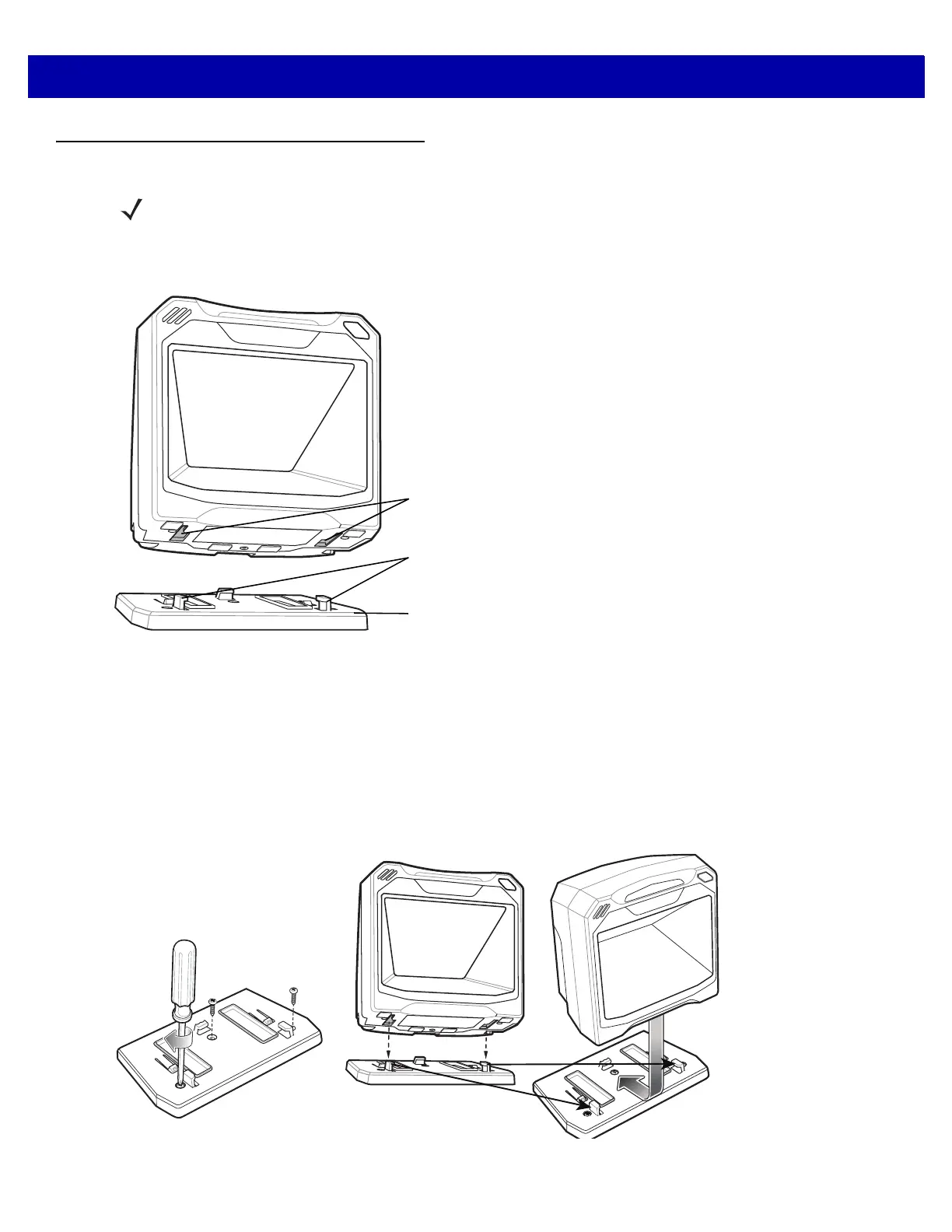
The DS7708 is designed to sit on top of a table, but optional mounting kits are available to mount the DS7708
to a table top or a wall. The mounting bracket slots in the bottom of the scanner accept the various mounting
brackets.
Figure 1-9
Mounting Overview
Mounting the Scanner to the Table Top
Mounting the Scanner to a Table Top with Double-sided Tape
The recommended method of installation is attaching the scanner to the table top using the double-sided tape
provided. Determine the location for installing the scanner; attach the scanner to the mounting bracket; peel off
the paper on the two strips of double-sided tape; position the bracket; and press down onto the table surface.
Mounting the Scanner to a Table Top with Screws
Figure 1-10
Table Top Mounting Diagram
NOTE The scanner should not be installed behind an additional protective window; this would create blind
decode zones in the imaging field of view.
Mounting Bracket Slots
Plastic Tabs
Mounting Bracket



 To Next Page