Connect the 4200A-SCS to the 7072
This section describes connections to the 7072.
To connect the 4200A-SCS and SMUs to the 7072:
Using four 4200-MTRX-X or 4200-TRX-X triaxial cables, make the following connections:
• 4200A-SCS GNDU FORCE to 7072 input terminal E
• 42x0 SMU channel 1 Force to 7072 input terminal A
• 42x0 SMU channel 2 Force to 7072 input terminal B
• 42x0 SMU channel 3 Force to 7072 input terminal C
To connect the 4210-CVU or 4215-CVU to the 7072:
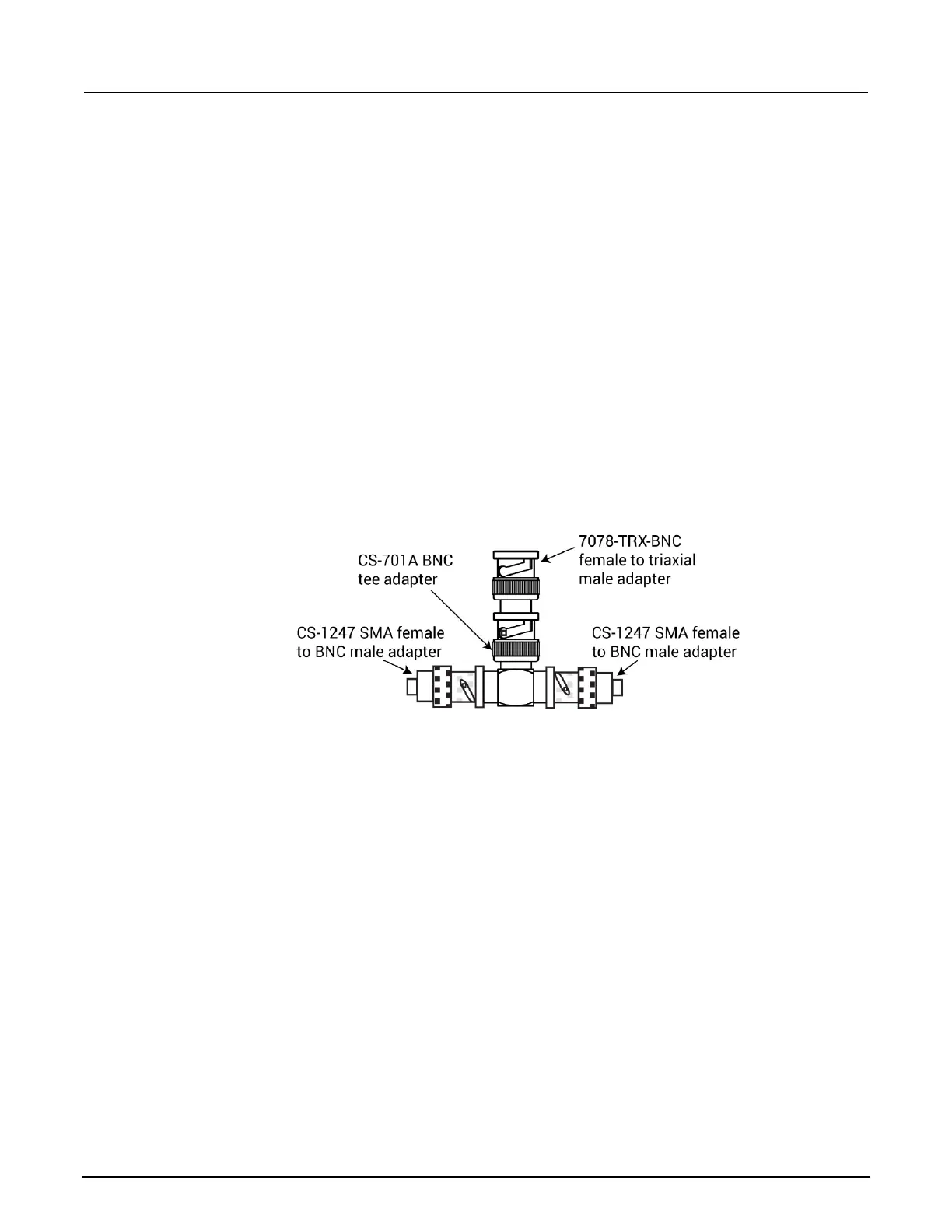
1. Using the parts in the following figure, assemble a tee adapter to connect the CVU to the 7072.
Figure 31: 4210-CVU to 7072 adapter tee assembly
2. Using four CA-447A SMA cables, make the following connections:
▪ CVU HCUR to adapter tee assembly 1
▪ CVU HPOT to adapter tee assembly 1
▪ CVU LPOT to adapter tee assembly 2
▪ CVU LCUR to adapter tee assembly 2
3. Connect adapter tee assembly 1 to input terminal G of the 7072.
4. Connect adapter tee assembly 2 to input terminal H of the 7072.
The connections are shown in the following figure.



 To Next Page
 Loading...