X35 Monitor Air Seeder Setup
6.25
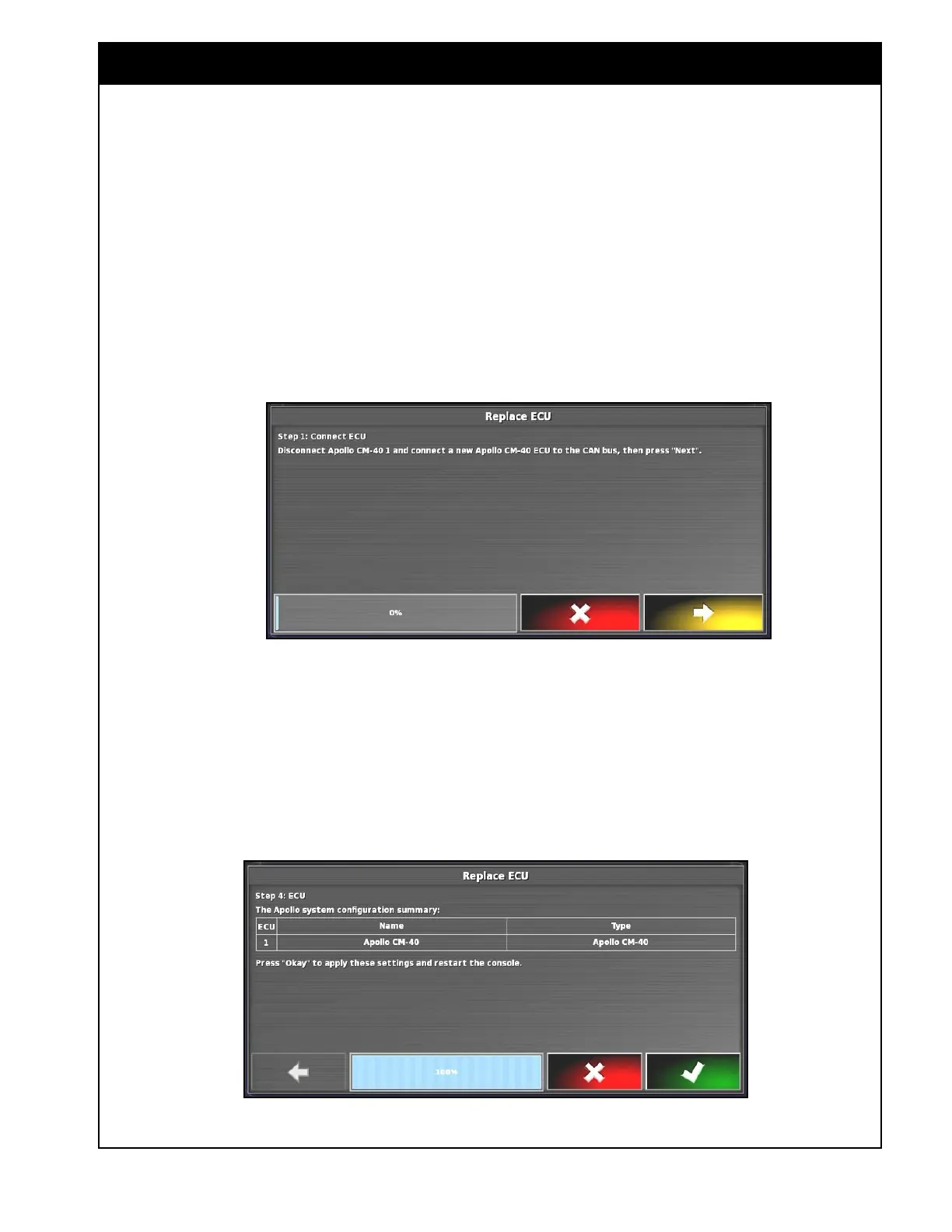
Figure 6.35 - Connect ECU
3. The X35 console will attempt to detect an
ECU.
4. Once an ECU is detected, a confirmation
message will be displayed. Select NEXT to
continue.
Figure 6.36 - Apollo System Configuration Summary
2. Select Replace to start the wizard.
a. Connect the ECU.
b. Follow instructions on the screen. Refer to
Figure 6.35.
Note
If detecting ECUs for the first time, it is not
necessary to disconnect the ECU and connect a
new one.
c. Once the ECU is connected, select NEXT.
Important
If detecting ECUs for the first time, make sure
that only the main ECU's COMMS connector is
plugged in, other ECUs must be disconnected.
Once an ECU has been detected, the COMMS
connector for that ECU can remain plugged in. If
replacing an ECU, all ECU's can stay connected.
If an ECU is not detected by the console, in the
ECU ISO Name column "please replace ECU" will
be displayed instead of the identification number.


 To Next Page