X35 Console Overview
2.13
2.6.1 Seeder Controller Mini-View
Window
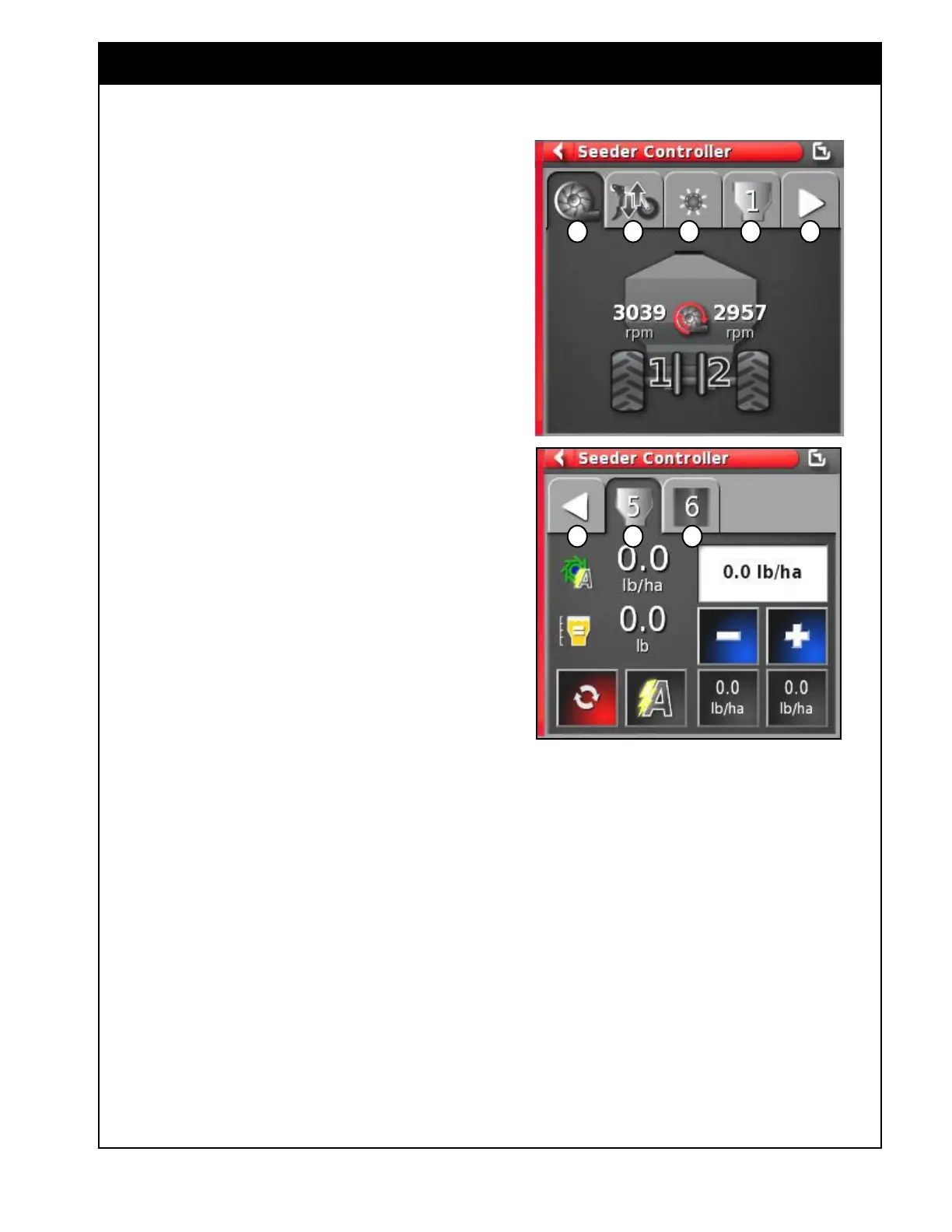
Refer to Figure 2.20.
Mini-view Seeder Control window has several tabs
at the top that display information for different air
seeder features. Only enabled features and tanks
will be displayed.
When there are more than five features available,
tab with arrow will appear to allow to move to the
next page.
A
Fan(s) - this tab will display the fan(s) speed
for enabled fan(s), for disabled fans it will
show "----" in place of a fan speed.
B Drill Control - displays parameters and
controls related to the operation of the drill
(opener lift/lower and pressure control).
C Blockage Monitoring - this tab displays the
status of the blockage monitoring system (if
present).
D Granular Tank - this tab will display
parameters and controls related to the operation
of a granular tank. The number in the icon
will indicate the tank on the air seeder. For
detailed information refer to Section 2.7.3 -
Tank Tab/Panel Explained.
E NH3/Liquid tank - this tab will display the
parameters and controls related to the operation
of an NH3/Liquid tank. The number in the
icon indicates number of the tank. For detail
information refer to Section 2.7.3 - Tank Tab/
Panel Explained.
F Next page - pressing this arrow tab will open
the next page to view more features.
G Previous page - pressing this arrow tab returns
you to the previous page.
Figure 2.20 - Seeder Controller - Navigation
a B C D F
G D E



 To Next Page