X35 ConsoleTrouble Shooting
12.4
12.3 OPERATION (CONTINUED)
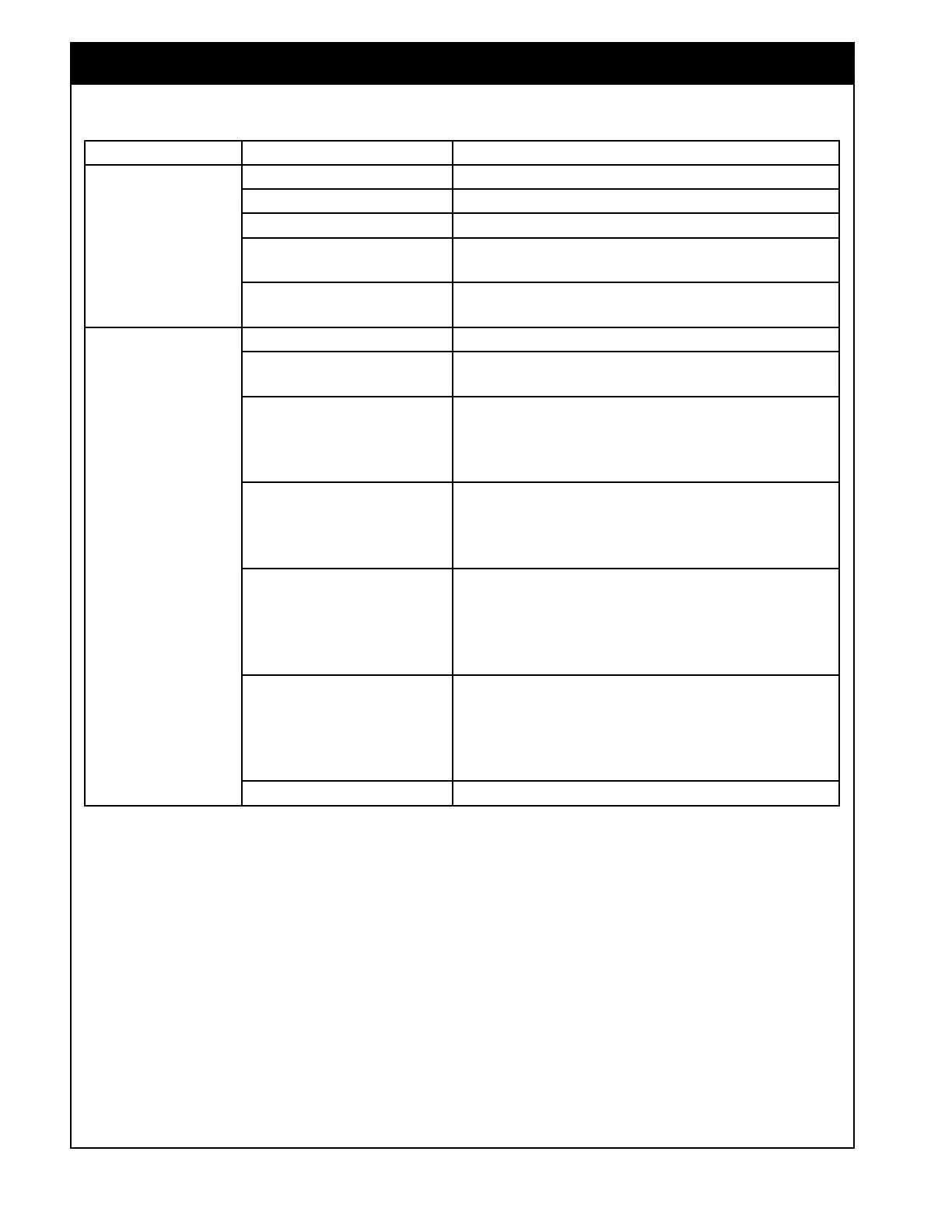
SYMPTOM PROBABLE CAUSE SOLUTION
Meters will not
start.
No fan speed or too low. Engage Fans and ensure proper speed is set.
No ground speed. Ensure speed is being picked up.
No set rate. Enter a requested rate.
No calibration factor.
Check Calibration factors under manual entry and
enter missing calibration factor or calibrate.
ASC is on but in covered
area or outside boundary.
Override ASC or move to area to be seeded.
Fluctuating meter
RPM
Varying ground speed. Ensure a consistent ground speed.
Misaligned or loose speed
sensor or sprocket.
Realign speed sensor or tighten set screws on
sprocket.
7000 A/S: Faulty
proportional valve (usually
if a problem on just one
meter).
Replace proportional valve.
7000 A/S: Faulty
compensator cartridge
(could show up on any of
the meters).
Replace compensator cartridge.
7000 A/S: Faulty metering
circuit priority valve (could
show up on any of the
meters and also in the fan
speed).
Replace priority valve.
7000 A/S: Inconsistent
hydraulic flow (could show
up on any of the meters
but usually worse on the
first meters in the circuit).
Adjust metering circuit back pressure, for procedure
refer to your 7000 Series Air Seed operator's
manual, Section 11.1.1.2 - Inconsistent Metering.
6000 A/S: Faulty actuator. Replace actuator.


 To Next Page