X35 Console Overview
2.19
2.6.4 Configuration Panel
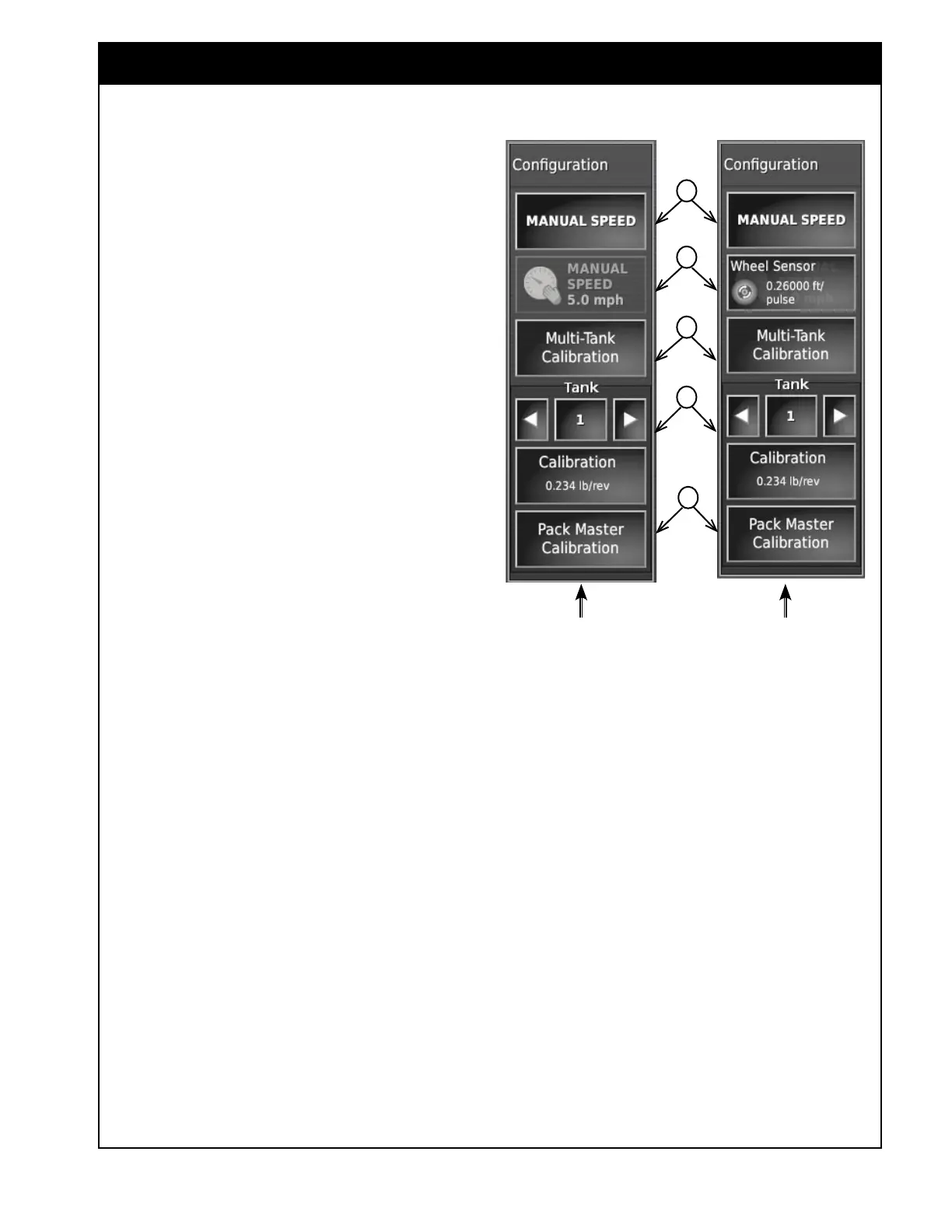
Refer to Figure 2.27.
A Manual Speed - allows the user to enable
or disable the manual speed control.
When enabled, the button will have green
background.
Important
The SET manual speed must be maintained to
achieve the rates that have been set.
Manual speed is also used to activate a
manual speed in the simulation mode and for
stationary calibration.
B This button can be used:
i. to enter value for the manual speed, if
Manual Speed is enabled (see item A
above), or if an alternative speed source
(Fallback Type) is set to use manual speed,
refer to Section 6.6.8 - Speed Source.
When selected it will bring up numeric key
pad to enter manual speed value.
ii. to perform a wheel sensor calibration,
if the Speed Source or alternative speed
source (Fallback Type) is set to use wheel
sensor for speed, refer to Section 6.6.8 -
Speed Source.
When selected it will bring up the wheel
sensor calibration wizard. For additional
information refer to
Section 8.7 - Wheel
Sensor Calibration.
C Multi-Tank Calibration - this opens up the
Calibration Method window, that is used to
access calibration functions, tank optimizer,
etc. For calibration procedures refer to Section
8 - General Operations.
D Single Tank Calibration - this can be used
to calibrate NH3 or Liquid tank, or a single
granular tank if recalibration is required.
i. The title bar displays the tank to be
calibrated. Selecting (touching) the title
bar will allow you to choose different
Figure 2.27 - Configuration Panel
tanks from the scroll list of available tanks
(disabled tanks will not be displayed in the
list).
ii. The calibration button underneath the
title bar will open up Calibration Method
window, that is used to access calibration
functions, tank optimizer, etc. For
calibration procedures refer to
Section 8
- General Operations.
Note
Product must be assigned to the tank that will
be calibrated. If no product is assigned, the
Calibration button will be disabled.
E Pack Master Calibration - select this button
to enter Pack Master calibration wizard if this
option is installed. Refer to Section 13.2.2
- Pack Master Feature.
a
B
C
D
Manual Speed
Activated
Speed Source Or Fallback Type Set
To Use Wheel Sensor For Speed
E



 To Next Page