X35 ConsoleOverview
2.16
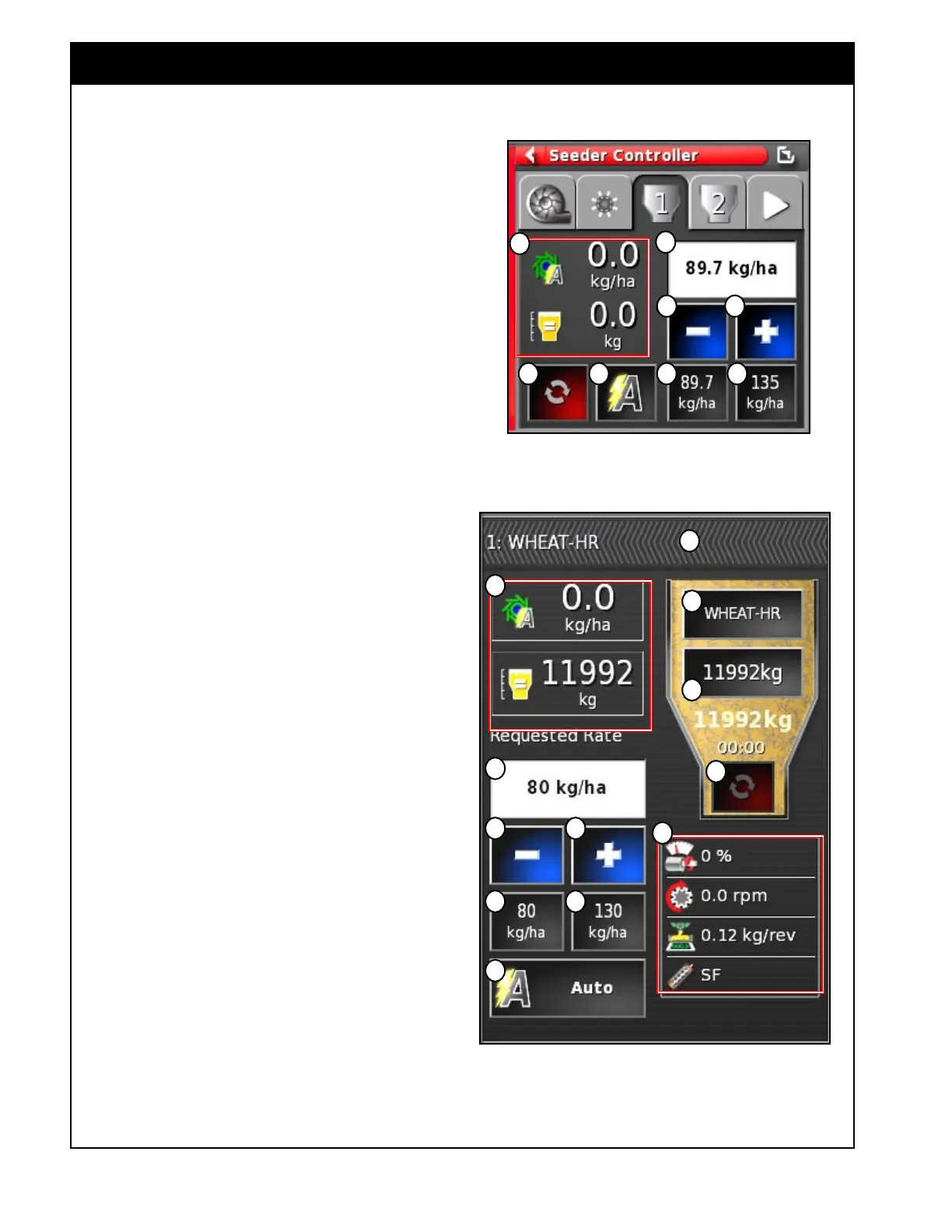
2.6.3 Tank Tab/Panel Explained
A Requested Application Rate - used to enter
and display the application rate. The control
system will use the calibration factor to adjust
the metering auger speed for the given product.
B Used to decrease requested application rate by
preset increment.
C Used to increase requested application rate by
preset increment.
Increase and Decrease functions (+/-) use the same
increment, that can be set in Product Setup (refer
to Section 7 - Product Setup) or when setting up
product details for the tank (refer to Section 8.1
- Selecting The Product).
D Requested Application Rate Preset 1 - this
is the user-defined default application rate.
Selecting this icon will immediately adjust the
application rate to that value.
E Requested Application Rate Preset 2 - this
is the user-defined default application rate.
Selecting this icon will immediately adjust the
application rate to that value.
Rate preset 1 and 2 can be set in Product Setup
(refer to
Section 7 - Product Setup) or when
setting up product details for the tank (refer to
Section 8.1 - Selecting The Product).
F Tank Metering On/Off toggle - this icon is
Green when the tank is On (metering auger
running), and Red when tank is Off (metering
auger stopped).
Figure 2.23 - Tank Panel - Mini-View
Figure 2.24 - Expanded Tank Panel - Full Screen
Mode
a
b
ed
c
gf
h
h
i
ed
g
f
a
b c
j
k
l



 To Next Page