X35 Monitor Air Seeder Setup
6.70
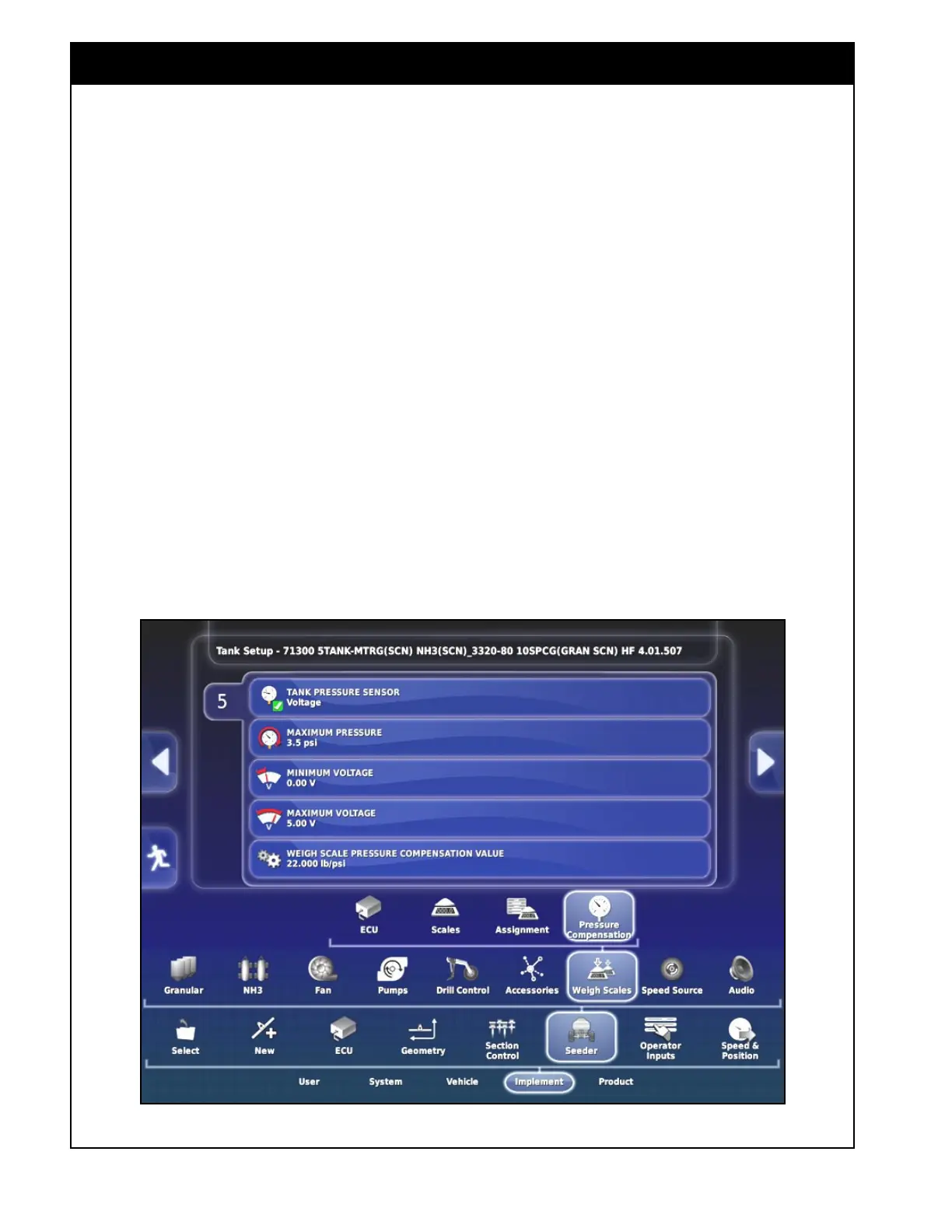
6.6.7.4 Pressure Compensation
There is a pressure sensor installed in the tanks
with dedicated load cells to measure the pressure
in the tank and correct for the weight that is taken
off of the scales due to pressurizing the tank.
1. For tanks that have the Weight Remaining
option set to Measured on the Assignment page
there will be a tab with the pressure sensor
settings.
a. Tank Pressure Sensor - set to Voltage for
the type of sensor that is used.
b. Maximum Pressure - maximum pressure
value for the pressure sensor used. Set to
3.5psi.
c. Minimum Voltage - minimum voltage value
for the pressure sensor used. Set to 0V.
d. Maximum Voltage - maximum voltage
value for the pressure sensor used. Set to
5V.
e. Weigh Scale Pressure Compensation Value
- this factor is applied to correct the
measured weight remaining for the tank as
pressure is detected in the tank. This value
can be adjusted until the measured weight
remaining displayed for the tank in the
Seeder Controller screen stays consistent
when the fans are turned on and the tank
is pressurized.
Refer to
Section 13.4 - Weigh System for
operational information on the weigh system.
Figure 6.89 - Weigh Scale ECU - Pressure Compensation



 To Next Page