X35 ConsoleOverview
2.20
2.6.5 Area Counters Panel
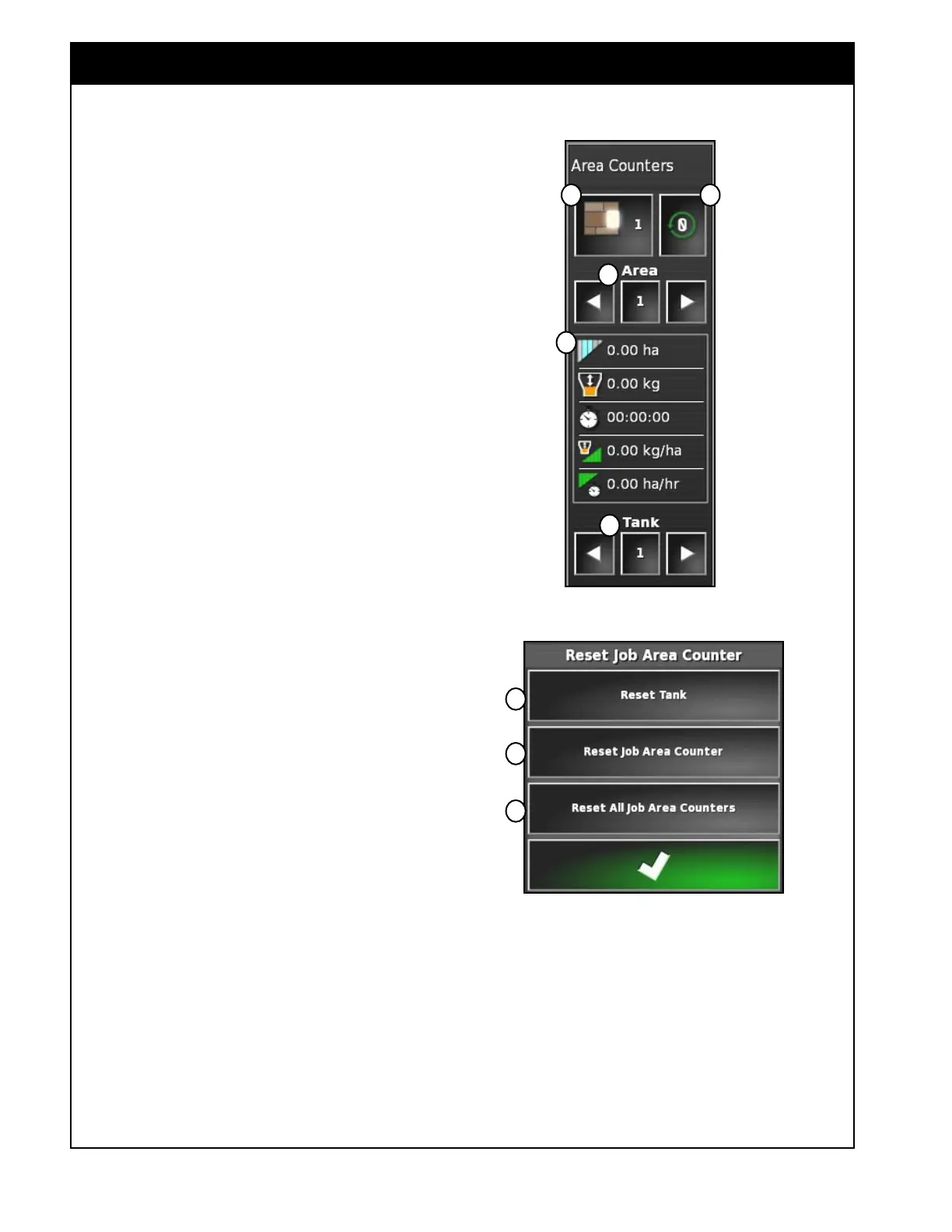
Refer to Figure 2.28.
The area counters section has a total of 10 possible
areas. For each tank and each area, the X35
console will record: the treated area, ASC savings,
product used, operating time, average rate and
productivity rate. These accumulate whenever the
master switch and the particular tank switch are on.
There can be 2 area counter panels displayed at the
same time if enabled in the settings, refer to Section
4.1.4 - Implement. A Job Area Counter to record
area within a job, and an Implement Area Counter
to keep a running total through multiple jobs.
A Allows you to set the active area counter
number, for which data will be accumulated.
When a new active area number is selected,
data accumulation for the previously selected
active area will stop.
B Allows you to select an area for viewing and
resetting data. Use the left and right arrows to
switch between areas.
C Selects a specific tank for viewing and
resetting data. Use the left and right arrows to
switch between tanks.
D Viewing area - will display the treated
area, ASC savings, product used, operating
time, average rate and productivity rate for a
selected area and tank (items B & C, Figure
2.28).
Selecting anywhere in the display area
will bring up a Customize Data menu, that
will allow you to select items for viewing.
Selected items will have white background.
i. Treated Area - displays the calculated area
each tank has applied product over based
on the width of the boom and the distance
travelled based on speed and time.
ii. ASC Savings - displays the calculated
percent savings in area of a sectional boom
compared to the area that would have been
applied if it were a full width boom.
Figure 2.28 - Area Counters Panel
A E
B
C
D
Figure 2.29 - Reset Job Area Counter
1
2
3
E Opens the reset area counter window, refer to
Figure 2.29.
1. Resets statistics for the selected tank in the
selected area
Figure 2.28 (items B & C,
Figure 2.28)
2. Resets the statistics for all tanks in the
selected area (items B,
Figure 2.28).
3. Resets statistics for all tanks in all areas.



 To Next Page