X35 ConsoleField / Job
9.16
9.3.3 Configure Job Regions
Allows you to set how categorized field boundary
regions are handled for the current job. A boundary
needs to be assigned as a categorized region in
order for this option to show up under the Job
menu, refer to Section 9.2.5.2 - Manipulating Field
Boundaries to categorize boundaries
Open Job Menu
and select Configure
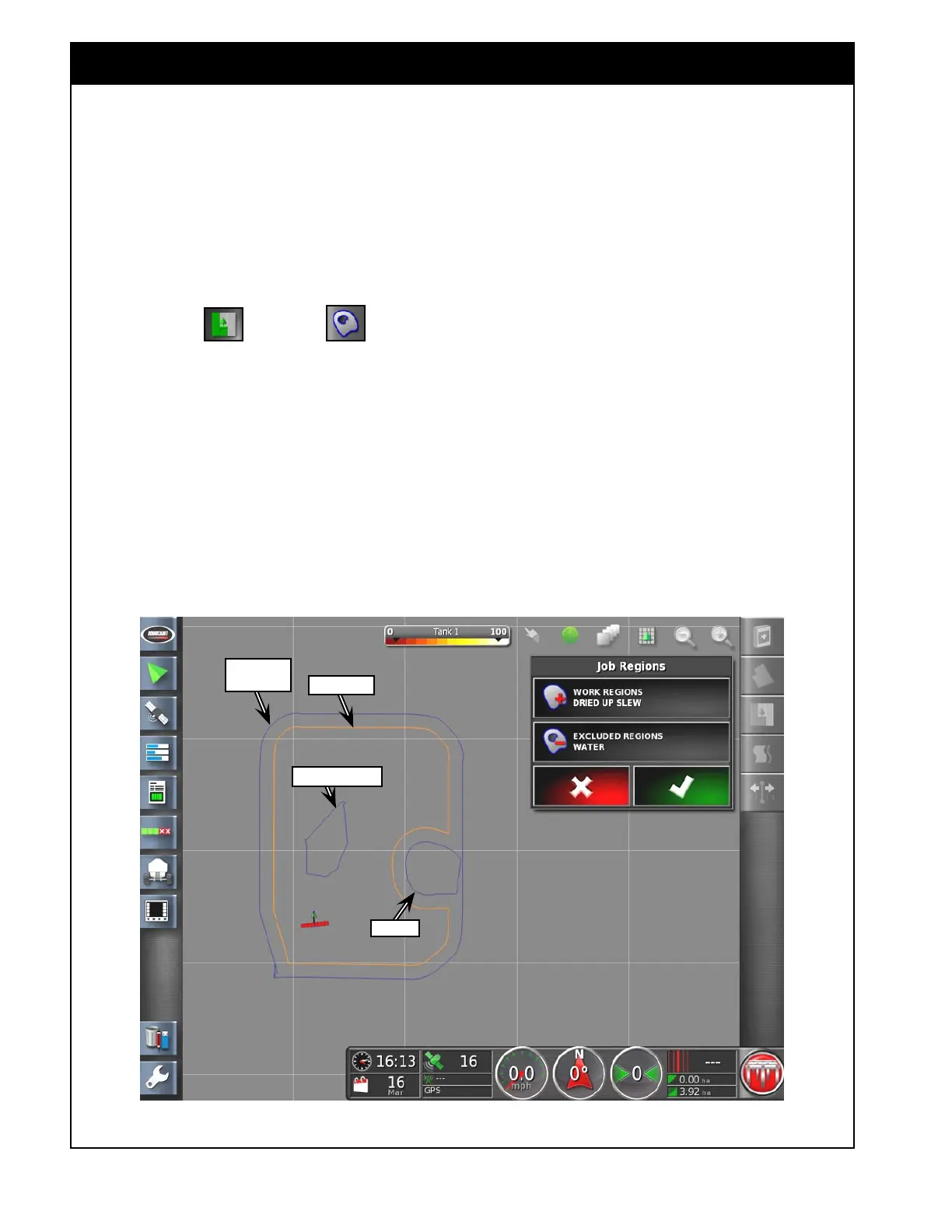
Job Regions. This will open Job Regions Menu,
refer to Figure 9.24.
1. Work Regions - pick groups of boundaries
you would like to apply as work regions for
the current job. Selected boundaries will be
highlighted. Product will be applied within
boundaries.
Figure 9.24 - Job Regions Menu
2. Excluded Regions - pick groups of boundaries
you would like to handle as excluded regions
for the current job. Selected boundaries will be
highlighted. Product will not be applied within
boundaries.
Note
Any categorized regions that are not selected in
this window will be treated as disabled regions
and ignored for the current job.
Water
Dried Up Slew
Headland
Field
Boundary



 To Next Page