X35 Console General Operations
8.7
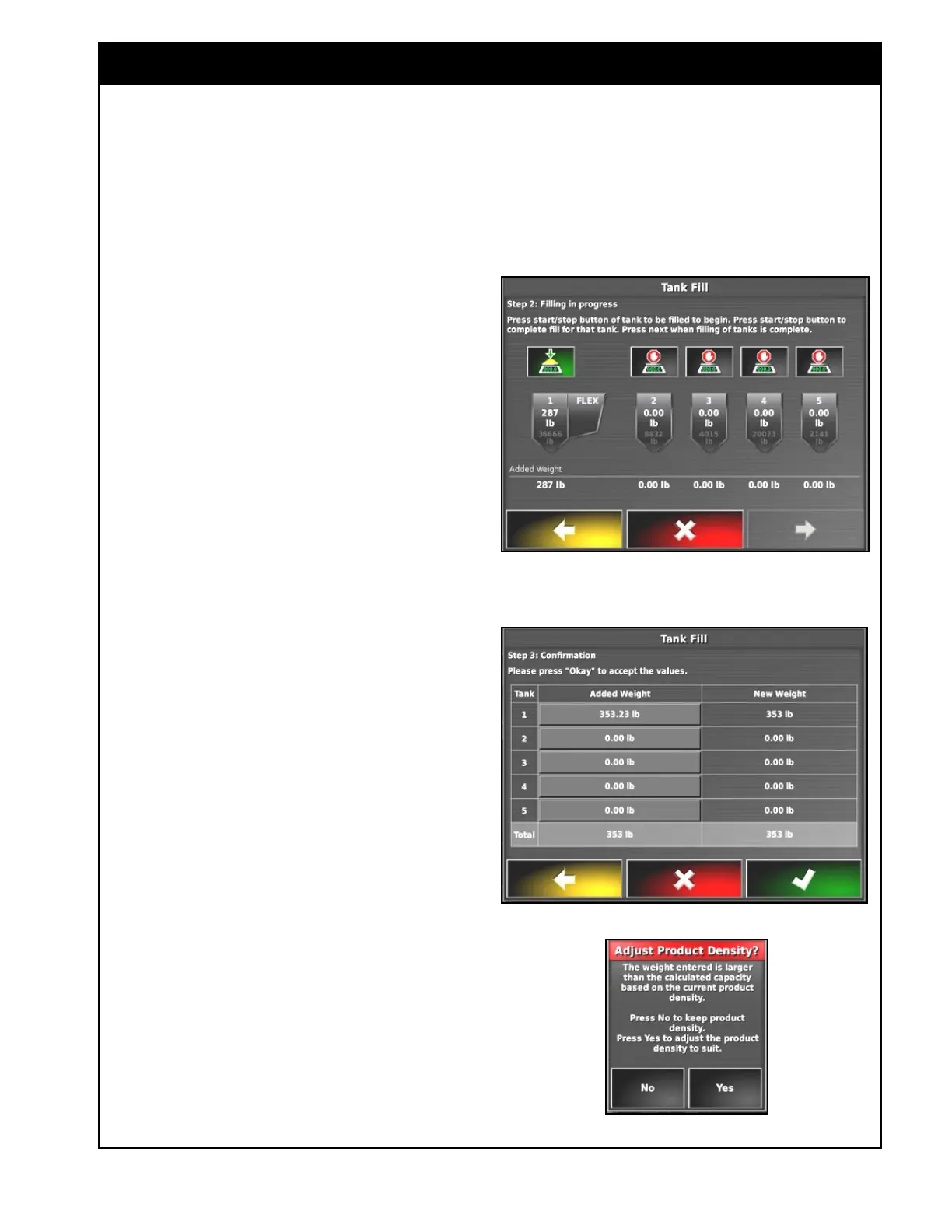
Step 3: Confirmation
a. The Added Weight can be manually
entered if adjustment is needed for
any of the tanks.
b. The New Weight column will show
the total weight that each tank will
be changed to.
c. Select the OK button to complete the
Tank Fill wizard and the weights will
be added to each tank.
d. Select the cancel button if you want
to leave the wizard without adding
the weights.
6. Adjust Product Density
If the total weight you are trying to change
any of the tanks to exceeds the theoretical
maximum weight capacity, you will get a
prompt to Adjust Product Density.
i. Select Yes if you want to adjust the
density of the product to increase
the maximum weight capacity of the
tank.
ii. Select No if you don’t want to
change the product density.
Important
The auger should be positioned on the ground
while tanks are activated in the Tank Fill wizard so
the weight of it doesn’t affect the volume added to
the tanks.



 To Next Page