X35 Monitor System Settings
4.3
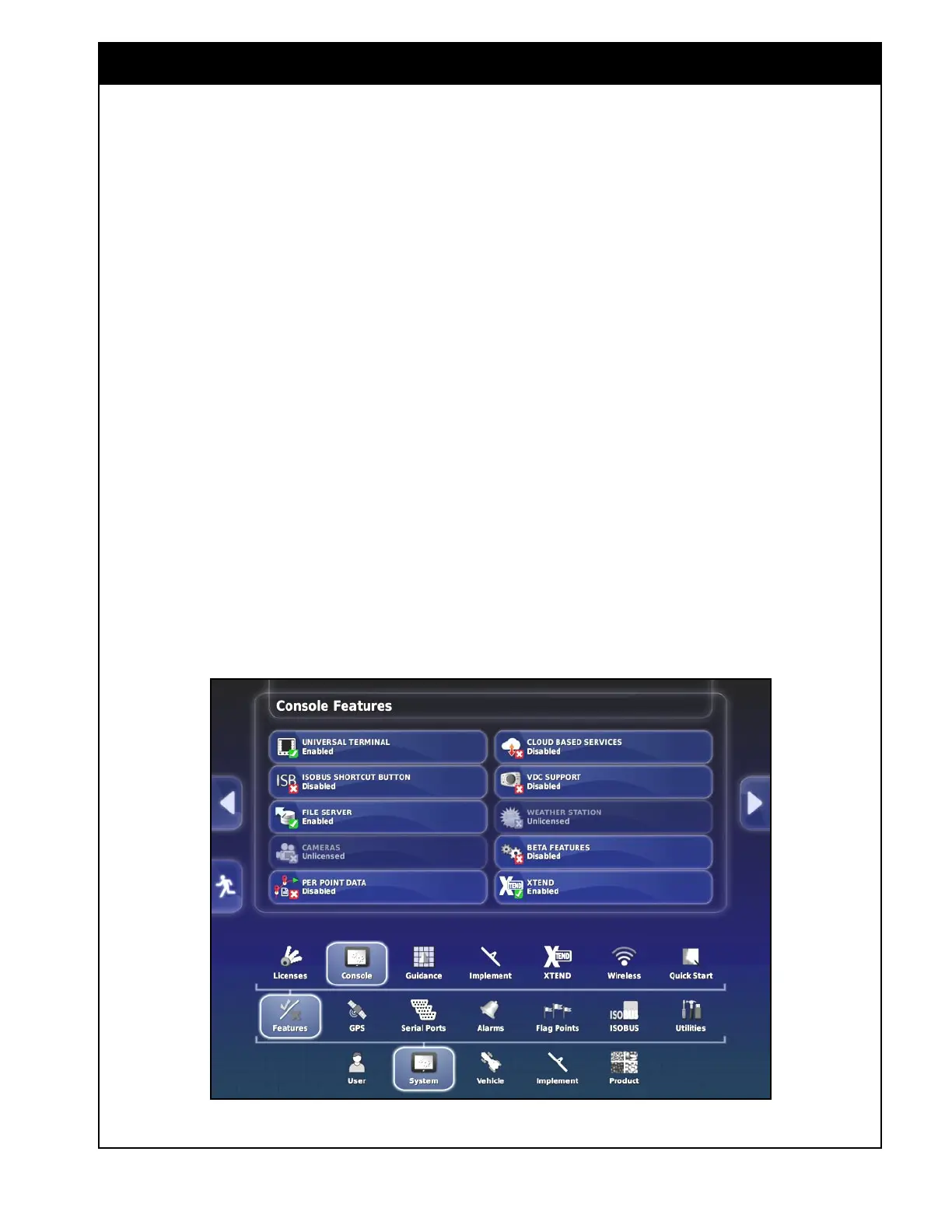
3. File Server - files for an ISOBUS ECU can be
stored on the file server. This setting enables
or disables the file server, if the ECU has file
server capability.
Important
The File Server setting needs to be enabled in
order to perform an update to the ECUs.
4. Cameras - enables or disables monitoring
by cameras, if digital cameras are connected.
Refer to the camera manual supplied with the
system installed on your seeding unit.
Note
At the current time this is not a Bourgault
supported feature.
5. Per-Point Data Logging - Enabling this will
record each GPS data point during a job along
with a number of other data fields. Bourgault
does not recommend using this unless
necessary to get certain information as it will
use up storage quickly.
Figure 4.2 - Console Features
6. Cloud Based Services - allows the user
to disable or select one of the two cloud
base services such AgJunction or Magnet.
AgJunction or Magnet customers can download
their prescription maps from the cloud servers
to the console and upload as-applied maps
from the console back to servers for future use.
7. VDC Support - enables or disables VDC
support. The console navigator is currently not
offered from Bourgault.
8. Weather Station - this is a locked weather
station feature.
9. Xtend - This allows the use of the Xtend
feature to remotely connect a smartphone
or tablet to the console to perform certain
functions outside of the tractor cab. Refer
to Section 13.5 - Xtend Feature to use this
feature.



 To Next Page