7 Troubleshooting intheField
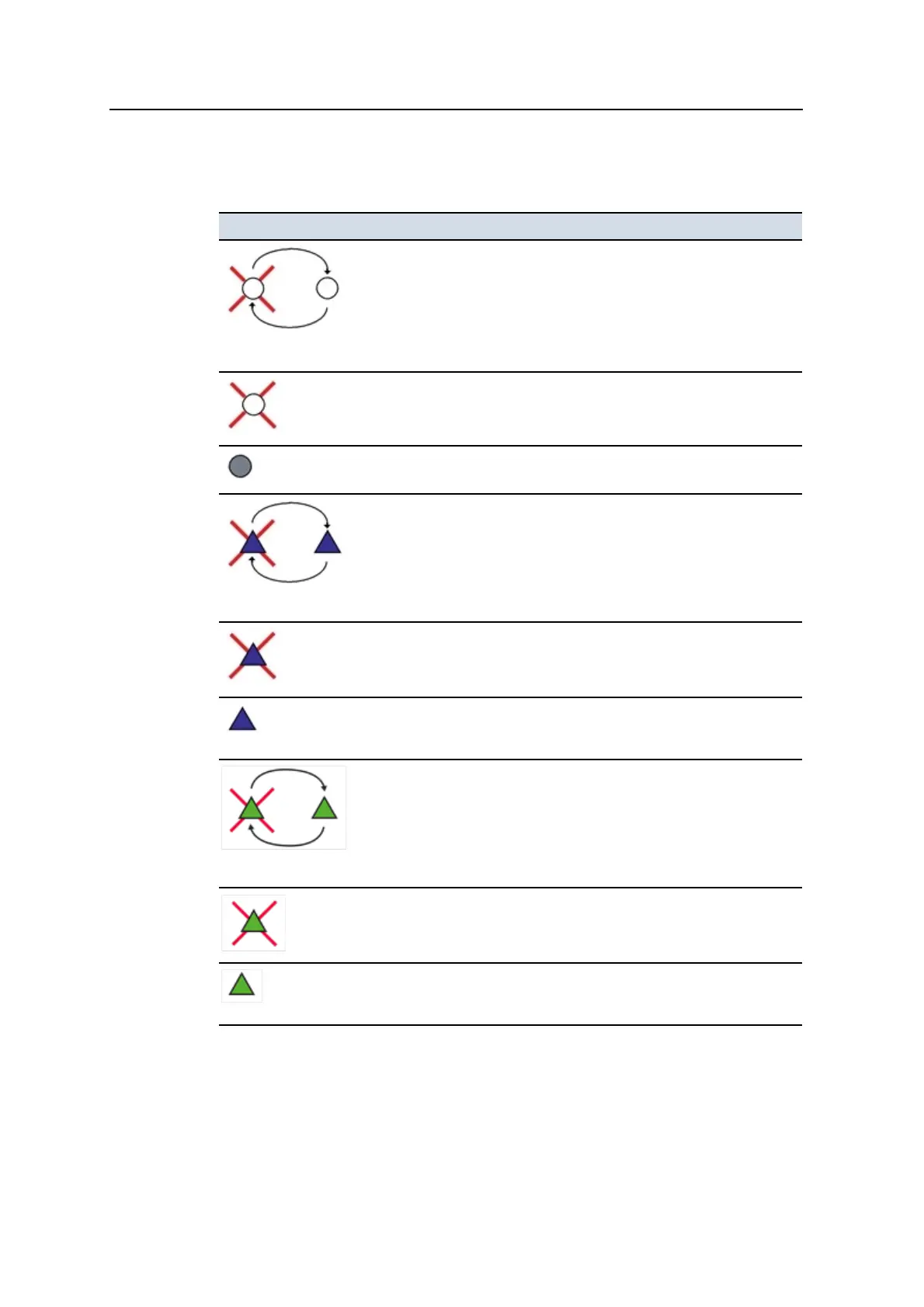
The following table describes the symbols that may appear in the Sky Plot dialog
satellite map:
This symbol ... Represents ...
3 seconds alternating
A GPS satellite that the system is tracking and using in the position
solution. The satellite’s identifier is displayed next to the satellite’s
symbol.
A GPS satellite that the system is tracking but not using in the position
solution. The satellite’s identifier is displayed next to the satellite’s
symbol.
A satellite that is currently below the elevation mask. The satellite’s
identifier is displayed next to the satellite’s symbol.
3 seconds alternating
A GLONASS satellite that the system is tracking and using in the position
solution. The satellite’s identifier is displayed, prefixed with an “R”, next to
the satellite’s symbol.
A GLONASS satellite that the system is tracking but not using in the
position solution. The satellite’s identifier is displayed, prefixed with an
“R”, next to the satellite’s symbol.
A GLONASS satellite that is currently below the elevation mask. The
satellite’s identifier is displayed, prefixed with an “R”, next to the
satellite’s symbol.
3 seconds alternating
A QZSS satellite that the system is tracking and using in the position
solution. The satellite’s identifier is displayed, prefixed with an “J”, next to
the satellite’s symbol.
A QZSS satellite that the system is tracking but not using in the position
solution. The satellite’s identifier is displayed, prefixed with an “J”, next to
the satellite’s symbol.
A QZSS satellite that is currently below the elevation mask. The
satellite’s identifier is displayed, prefixed with an “J”, next to the satellite’s
symbol.
164 GCS900 GradeControl System for Excavators Operator's Manual



 To Next Page