Using theControl Box and Lightbars 2
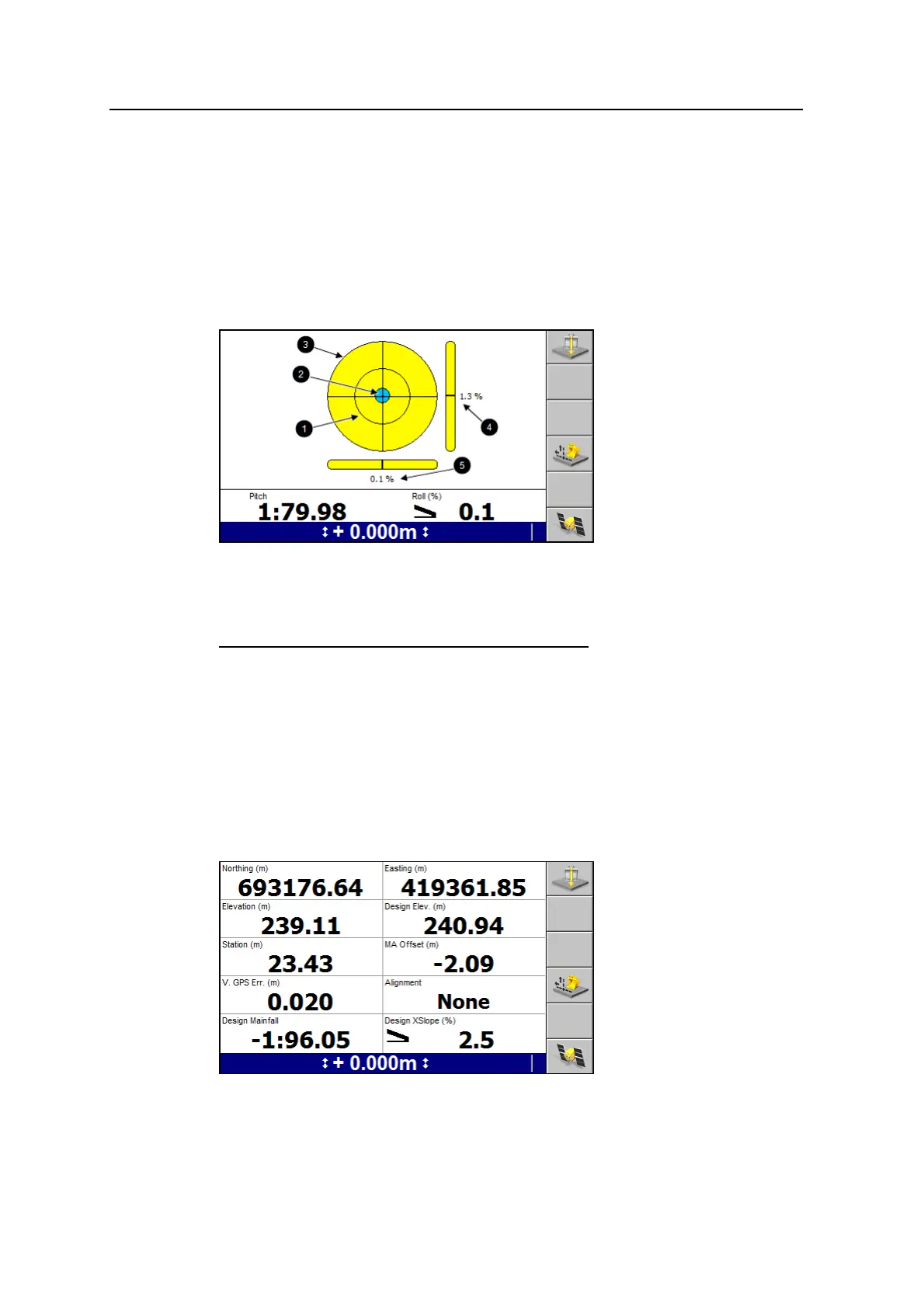
Level view displays a level bubble, horizontal and vertical level bars, and an angle
measurement. The level bubble provides a visual representation of the current pitch
and roll information coming from the pitch and roll sensor(s). The Pitch and Roll
text items appear in level view by default, and are the only text items available.
The outer ring represents 45°; the inner ring represents 22.5°.
The bubble, the horizontal and vertical level bars, and the text items all update as
the machine moves and the pitch and roll readings change.
1
Inner ring
2
Level bubble
3
Outer ring
4
Machine pitch
5
Machine roll
Figure 2.3 An example of a level view
The level bubble units are the same as the cross slope units set in the Units dialog.
When the pitch and/or roll sensor(s) are not connected, or when a value is not
available, N/A appears for that value and the bubble does not appear.
Text views
The site supervisor configures the text items that display in text view 1 and text
view 2. The following figure shows an example text view guidance screen.
GCS900 Grade Control System for Excavators Operator's Manual 39



 To Next Page