18
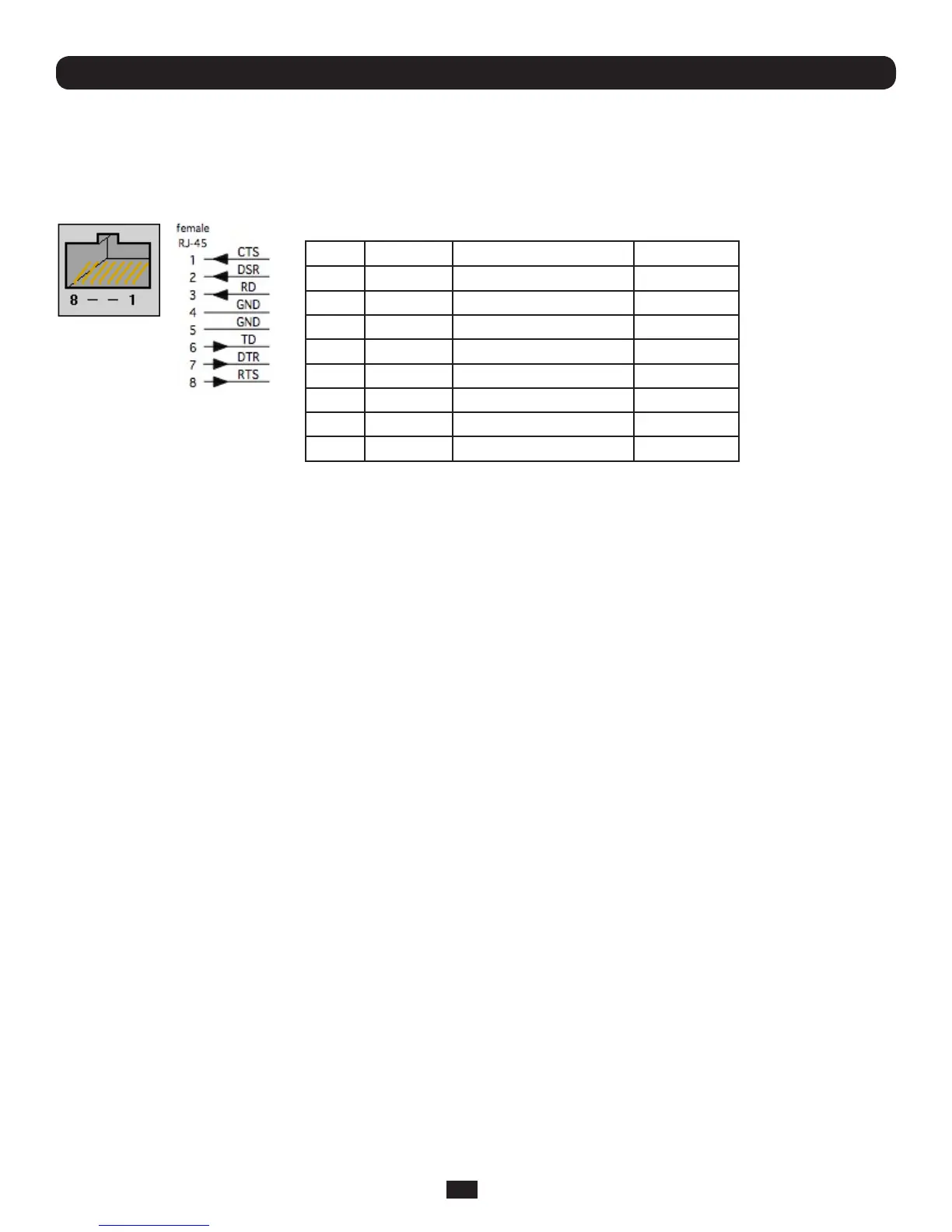
2.4 Serial Port Connection
TheRJ45serialportsarelocatedontherearoftheB092-016ConsoleServer,onthefrontoftheB096-048/016Console
ServerandB094-008ConsoleServer,andonthesidepaneloftheB095-004/003ConsoleServer.TheseConsoleServers
usetheRJ45pinoutusedbyCisco.UsestraightthroughRJ-45cablingtoconnecttoequipmentsuchasCisco,Juniper,SUN,
and more.
PIN SIGNAL DEFINITION DIRECTION
1 CTS Clear To Send Input
2 DSR DataSetReady Input
3 RXD ReceiveData Input
4 GND Signal Ground NA
5 GND Signal Ground NA
6 TXD TransmitData Output
7 DTR DataTerminalReady Output
8 RTS Request To Send Output
ConventionalCat5cablingwithRJ45jacksareusedforserialconnections.Beforeconnectingtheconsoleportofanexternal
devicetotheConsoleServerserialport,conrmthatthedevicesupportsstandardRS-232C(EIA-232).
TheConsoleServeralsohasaDB9LOCAL(Console/Modem)port.ThisDB-9connectorisontherearpaneloftheB092-016
ConsoleServer,andonthefrontpaneloftheB096-048/016ConsoleServerManagementSwitch.
2.5 USB Port Connection
TheB096-048/016ConsoleServerManagementSwitchhasoneUSB1.0portonthefrontpanelandtwoUSB2.0portson
therear.ExternalUSBdevicescanbepluggedintotheseUSBports.
Note: The B096-048/016 Console Server Management Switch ships with an internal 16GB USB memory which can be used
for extended log file storage
TheB094-008-2E-M-FConsoleServerhastwoUSB2.0portsonthefront.ExternalUSBdevicescanbepluggedintothese
USBports.
Note: The B094-008-2E-M-F Console Server ships with an internal 4GB USB memory which can be used for extended log file
storage
TherearefourUSB2.0portsontherearpaneloftheB092-016ConsoleServerandoneUSB2.0portlocatedundertheRJ45
10/100LANconnectorontheB095-004/003ConsoleServer.TheseportsareusedtoconnecttoUSBconsoles(ofmanaged
UPShardware)andtootherexternaldevices(suchasaUSBmemorystickorkeyboard).
ExternalUSBdevices(includingUSBhubs)canbepluggedintoanyConsoleServerUSBport.
2.6 Rackmount Console / KVM Connection (B092-016 only)
B092-016ConsoleServerwithPowerAlertcanbeconnecteddirectlytoarackmountconsole(suchasB021-000-17
orB021-019byTrippLite)toprovidedirectlocalmanagementrightattherack.Connecttherackmountconsole’sPS/2
Keyboard/MouseandVGAconnectorsdirectlytothePS/2andVGAconnectorsontheB092-016.Thedefaultvideoresolution
is1024x768.TheB092-016ConsoleServeralsosupportstheuseofaUSBkeyboard/mouse.
Alternately,theB092-016ConsoleServercanalsobeconnectedlocallytoaKVM(orKVMoIP)switchattherack.TheB092-
016ConsoleServerwithPowerAlertwillenableyouthentousethisKVMinfrastructuretorunPowerAlert,tomanageyour
power devices and to run the thin clients to manage other devices.
Note: Care should be taken in handling all Console Server products. There are no operator-serviceable components inside, so
do not remove cover. Refer any service to qualified personnel
Chapter 2: Installation



 To Next Page