70
Chapter 5: Firewall, Failover and Out-of-Band
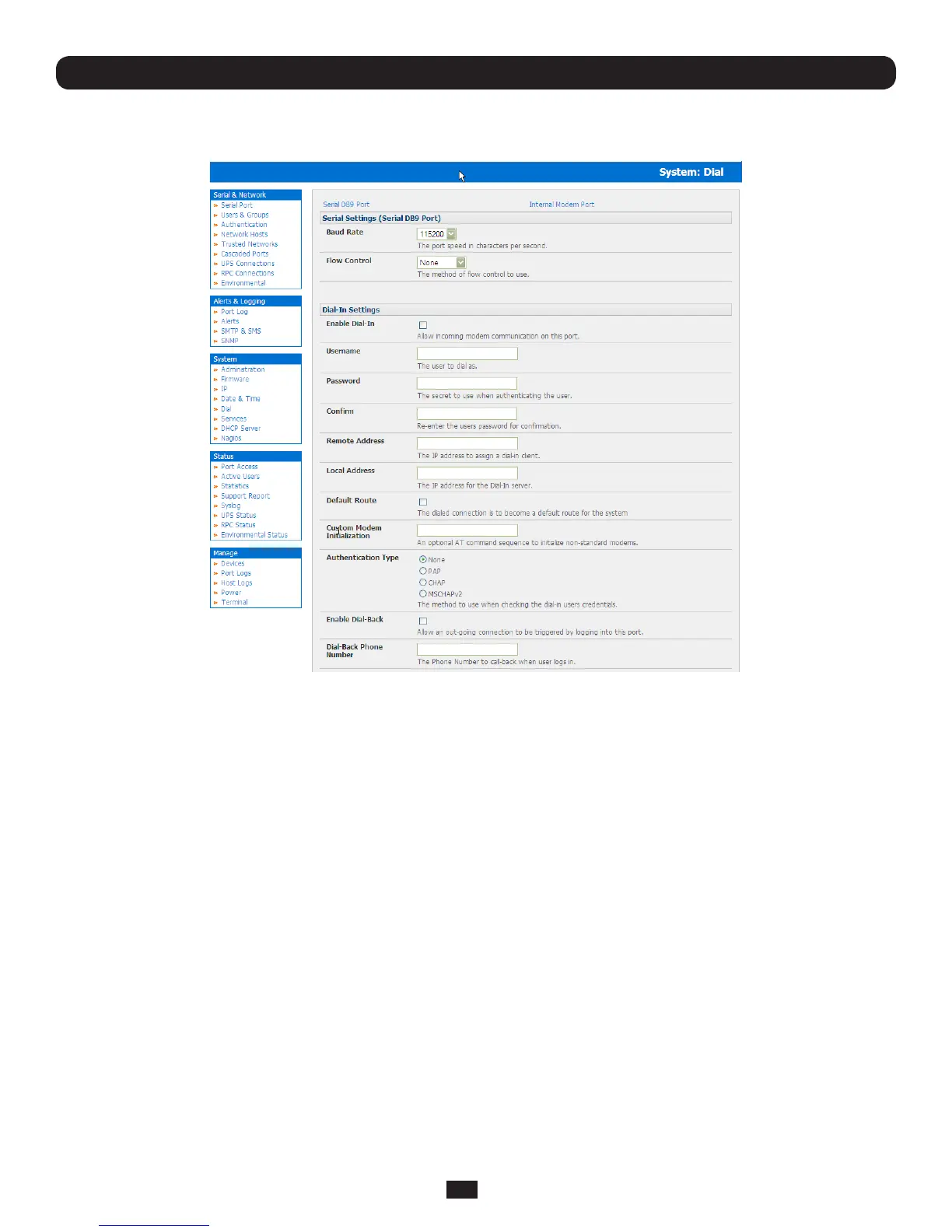
5.1.1 Configure dial-in PPP
Toenabledial-inPPPaccessontheConsoleServermodemport/internalmodem:
• SelecttheSystem: Dialmenuoptionandtheporttobecongured(Serial DB9 Port or Internal Modem Port)
Note: The Console Server’s console/modem serial port is set by default to 115200 baud, No parity, 8 data bits and 1 stop bit,
with software (Xon-Xoff) flow control enabled. You can modify the baud rate and flow control using the Management Console.
You can further configure the console/modem port settings by editing /etc/mgetty.config files as described in Chapter 14.
• SelecttheBaud Rate and Flow Control that will communicate with the modem
• ChecktheEnable Dial-In Access box
• EntertheUser name and Passwordtobeusedforthedial-inPPPlink
• IntheRemote Address eld,entertheIPaddresstobeassignedtothedial-inclient.Youcanselectanyaddressforthe
RemoteIPAddress.However,itandtheLocalIPAddressmustbothbeinthesamenetworkrange(e.g.200.100.1.12
and200.100.1.67)
• IntheLocal Addresseld,entertheIPaddressfortheDial-InPPPServer.ThisistheIPaddressthatwillbeusedbythe
remoteclienttoaccessConsoleServeroncethemodemconnectionisestablished.Again,youcanselectanyaddressfor
the Local IP Address but both must be in the same network range as the Remote IP Address
• TheDefault Route option enables the dialed PPP connection to become the default route for the Console Server
• TheCustom Modem InitializationoptionallowsacustomATstringmodeminitializationstringtobeentered(e.g.
AT&C1&D3&K3)
• Thenselectthe Authentication Typetobeappliedtothedial-inconnection.TheConsoleServerusesauthenticationto
challengeAdministratorswhodial-intotheConsoleServer.(Fordial-inaccess,theusernameandpasswordreceivedfrom
thedial-inclientareveriedagainstthelocalauthenticationdatabasestoredontheConsoleServer).TheAdministrator
must also have their client computer configured to use the selected authentication scheme. Select PAP CHAP
MSCHAPv2 or None and click Apply



 To Next Page