236
Chapter 16: Thin Client
TheB092-016hasaselectionofmanagementclients(Firefoxbrowser,SSH,Telnet,VNCviewer,ICA,RDP)embeddedaswell
astheTrippLitePowerAlertsoftware.Withthese,theB092-016providesracksidecontrolofcomputers,networking,telecom,
powerandothermanageddevicesviaserial,USBorIPovertheLAN.
This chapter provides instructions on configuring the thin clients and using them locally and remotely. The thin clients can be
controlledfromtheracksideusingadirectmonitor/keyboard/mouseconnectedtotheB092-016orremotelyusingaVNC
connectionfromtheremoteusertotheB092-016.
16.1 Local Client Service Connections
These client connections first need to be configured:
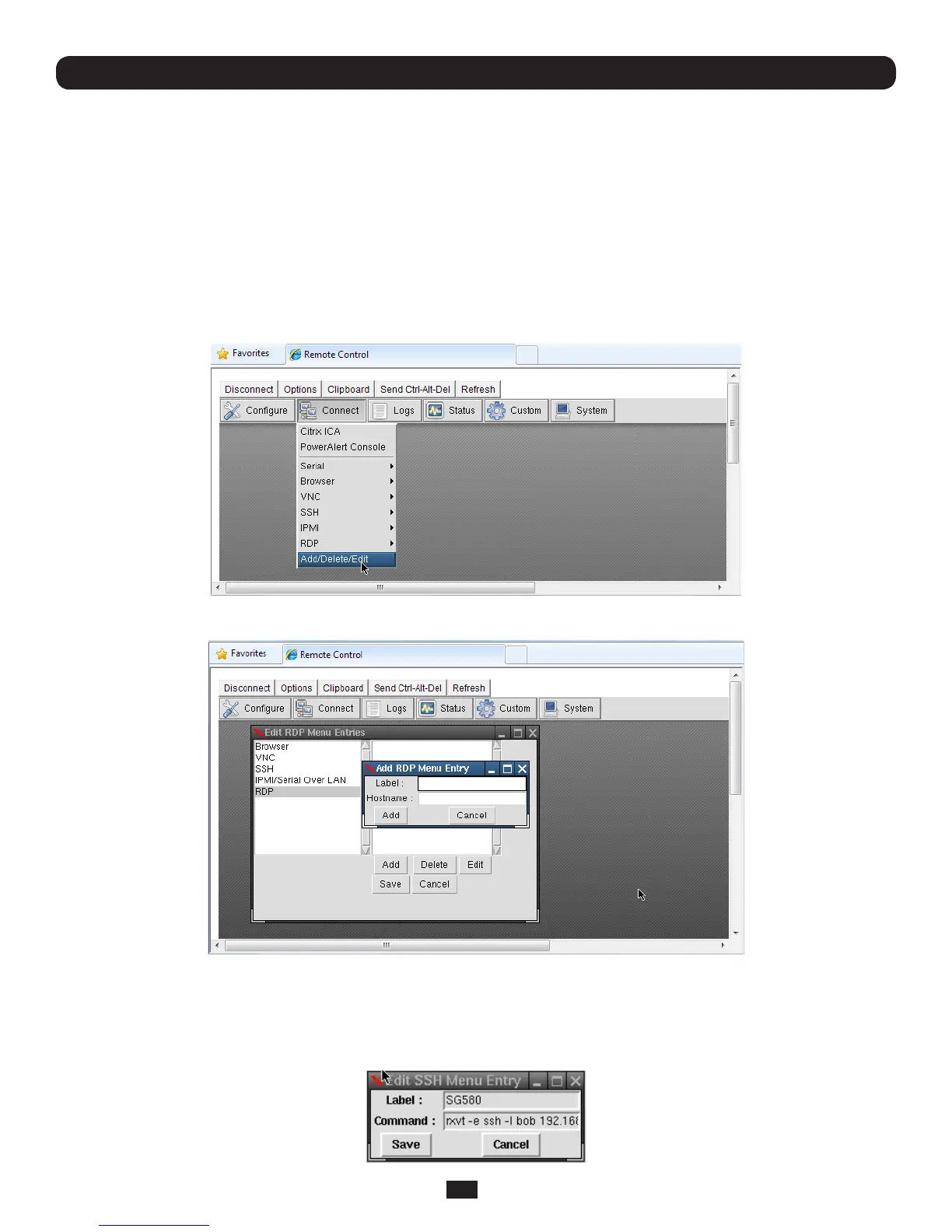
• SelectConnect: Add/Delete/Edit on the control panel
• ThenselectaConnectclient(suchasRDP)andclickAdd to configure the Host connection for that client service
• ForeachnewHostyouadd,youwillbeaskedtoenteraLabel(enteradescriptivename)andaHostname(entertheIP
Address or DNS NameofthenewnetworkconnectedHost)andpossiblyaUsername(enterthenameyouwilluseto
logintotheHost)
• OnceaHosthasbeenadded,youcanselectEdit and update the commands that will be executed in connecting the
service to the existing Host



 To Next Page