60
4.10.2 Configure as Server or Client
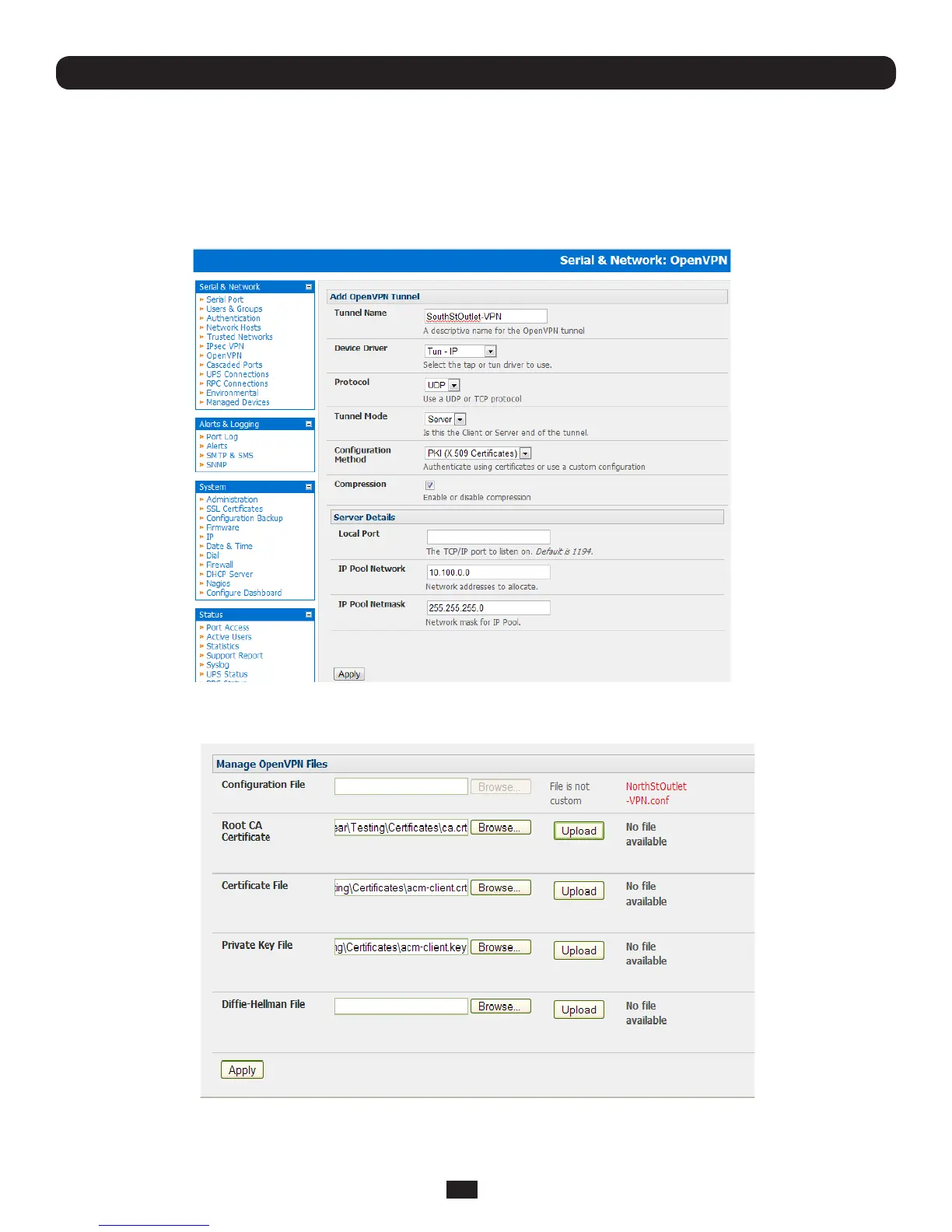
• CompletetheClient Details or Server Details depending on the Tunnel Mode selected.
o If Clienthasbeenselected,thePrimary Server Address willbetheaddressoftheOpenVPNServer.
o If Serverhasbeenselected,entertheIPPoolNetworkaddressandtheIPPoolNetworkmaskfortheIPPool.The
networkdenedbytheIPPoolNetworkaddress/maskis used to provide the addresses for connecting clients.
• ClickApply to save changes
Chapter 4: Serial Port, Device and User Configuration
• ToenterauthenticationcerticatesandlesEdittheOpenVPNtunnel.
• SelecttheManage OpenVPN Filestab.Uploadorbrowsetorelevantauthenticationcerticatesandles.
• Applytosavechanges.Savedleswillbedisplayedinredontheright-handsideoftheUploadbutton.



 To Next Page