98
Chapter 6: Secure SSH Tunneling & SDT Connector
6.8 Setting up SDT for Remote Desktop Access
Microsoft’sRemoteDesktopProtocol(RDP)enablesthesystemmanagersecurelytoaccessandmanageremoteWindows
computers:torecongureapplicationsanduserproles,upgradetheserver’soperatingsystem,rebootthemachine,etc.
SecureTunnelingusesSSHtunneling,sothisRDPtrafcissecurelytransferredthroughanauthenticatedandencrypted
tunnel.
SDTwithRDPalsoallowsremoteUserstoconnecttoWindowsXP,Vista,Windows2003computersandtoWindows2000
TerminalServers,andtohaveaccesstoalloftheapplications,les,andnetworkresources(withfullgraphicalinterfacejust
asthoughtheywereinfrontofthecomputerscreenitself).TosetupasecureRemoteDesktopconnection,youmustenable
RemoteDesktoponthetargetWindowscomputerthatistobeaccessedandconguretheRPDclientsoftwareontheclient
computer.
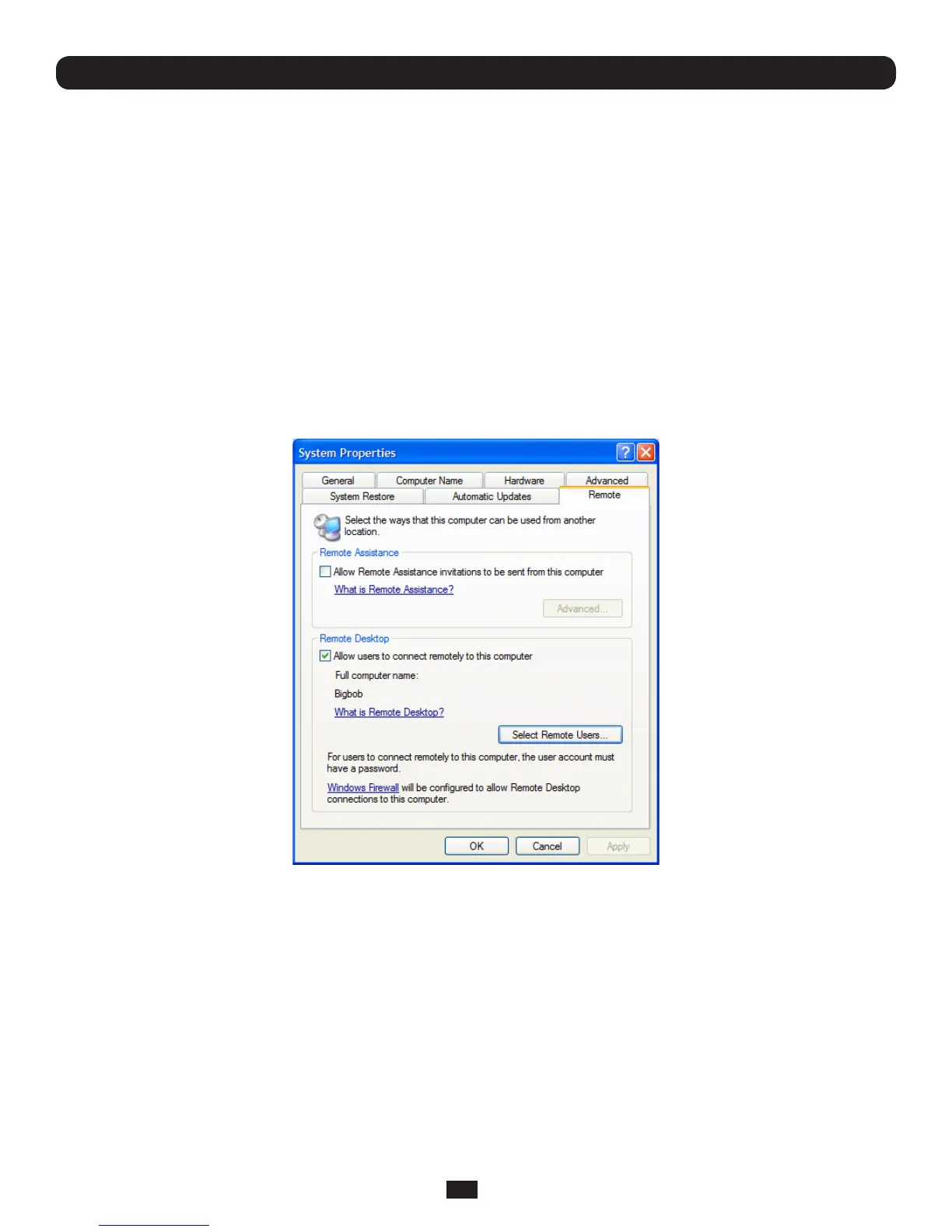
6.8.1 Enable Remote Desktop on the target Windows computer to be accessed
To enable Remote Desktop on the Windows computer being accessed:
• OpenSystem in the Control Panel and click the Remote tab
• Check Allow users to connect remotely to this computer
• ClickSelect Remote Users



 To Next Page