32
3.6.2 Configure the DHCP server
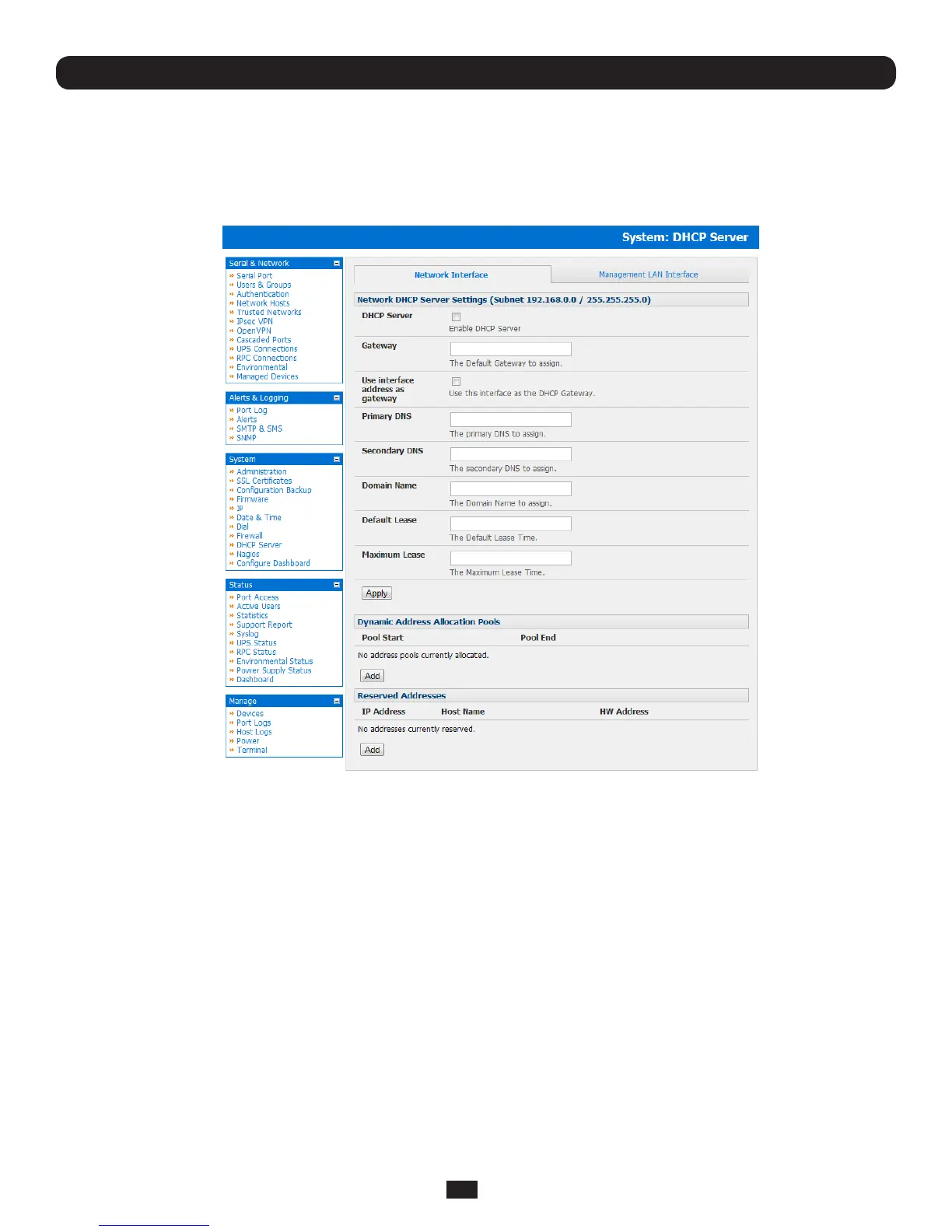
TheConsoleServersalsohostaDHCPserverwhichbydefaultisdisabled.TheDHCPserverenablestheautomatic
distributionofIPaddressestodevicesontheNetworkInterfaceortheManagementLAN.ToenabletheDHCPserver:
• OntheSystem: IP menu select the Management LAN Interface page and click the Disabled label in the DHCP Server
eld(orgototheSystem: DHCP Server menu and check Enable DHCP Server)
Chapter 3: Initial System Configuration
• EntertheGatewayaddressthatistobeissuedtotheDHCPclients.Ifthiseldisleftblank,theConsoleServer’sIP
address will be used
• EnterthePrimary DNS and Secondary DNSaddresstoissuetheDHCPclients.Againifthiseldisleftblank,Console
Server’sIPaddressisused,soleavethiseldblankforautomaticDNSserverassignment
• OptionallyenteraDomain NamesufxtoissueDHCPclients
• EntertheDefault Lease time and Maximum Lease time in seconds. The lease time is the time that a dynamically
assigned IP address is valid before the client must request it again
• ClickApply
TheDHCPserverwillsequentiallyissueIPaddressesfromaspeciedaddresspool(s):
• ClickAdd in the Dynamic Address Allocation Pools field
• EntertheDHCP Pool Start Address and End Address and click Apply



 To Next Page