88
6.2.5 Manually adding hosts to the SDT Connector gateway
Foreachgateway,youcanmanuallyspecifythenetworkconnectedhoststhatwillbeaccessedthroughthatConsoleServer;
andforeachhost,specifytheservicesthatwillusedincommunicatingwiththehost
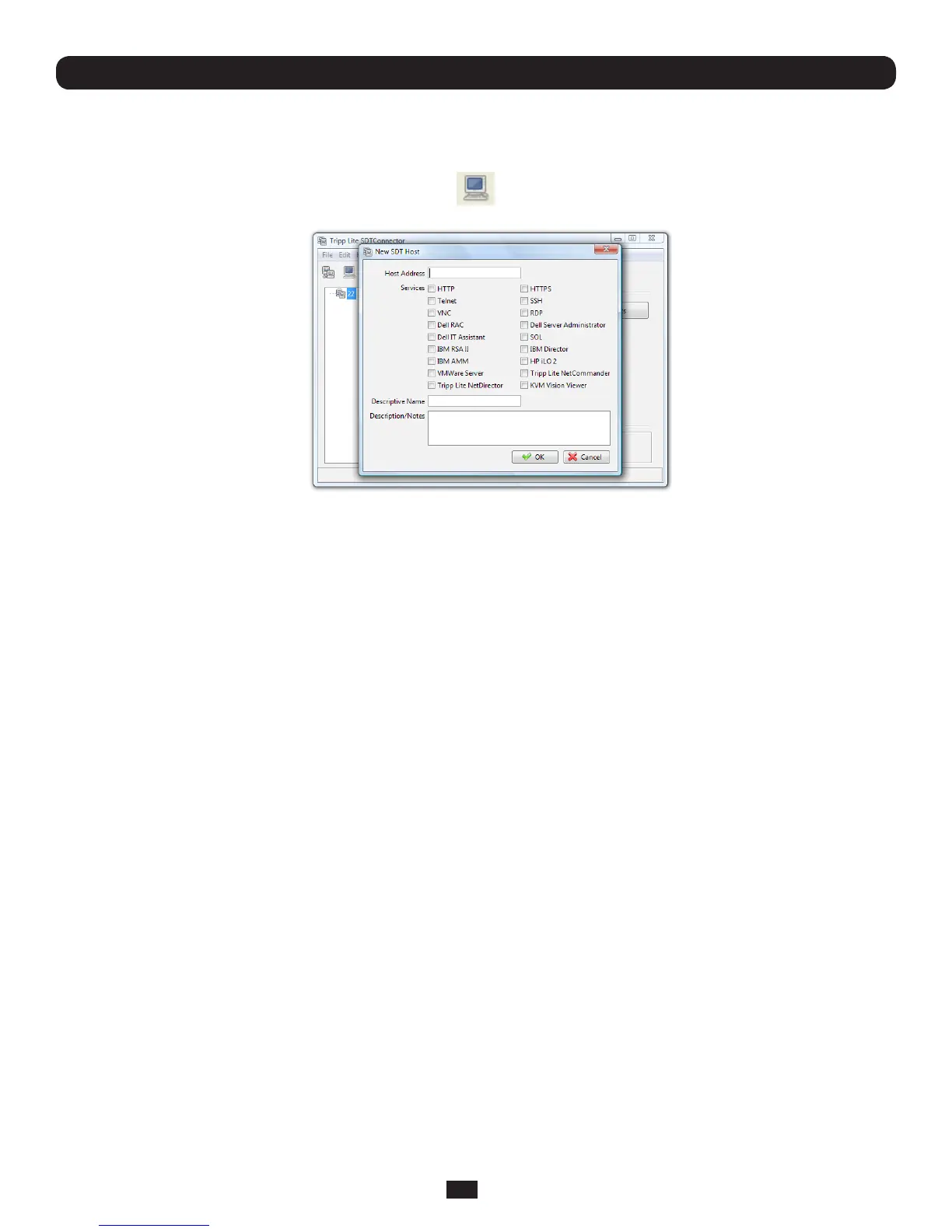
• SelectthenewlyaddedgatewayandclicktheHost icon to create a host that will be accessible via this gateway.
(AlternativelyselectFile: New Host)
Chapter 6: Secure SSH Tunneling & SDT Connector
• EntertheIPorDNSHost Addressofthehost(ifthisisaDNSaddress,itmustberesolvablebythegateway)
• SelectwhichServicesaretobeusedwhenaccessingthenewhost.Arangeofserviceoptionsarepre-conguredinthe
default SDT Connectorclient(RDP,VNC,HTTP,HTTPS,DellRAC,VMWareetc).Howeverifyouwishtoaddnewservicesto
therangethenproceedtothenextsection(Adding a new service)thenreturnhere
• Optionally,youcanenteraDescriptive NameforthehosttobedisplayedinsteadoftheIPorDNSaddress,aswellas
any Notes or a Descriptionofthishost(suchasitsoperatingsystem/release,oranythingspecialaboutitsconguration)
• ClickOK



 To Next Page