57
Chapter 4: Serial Port, Device and User Configuration
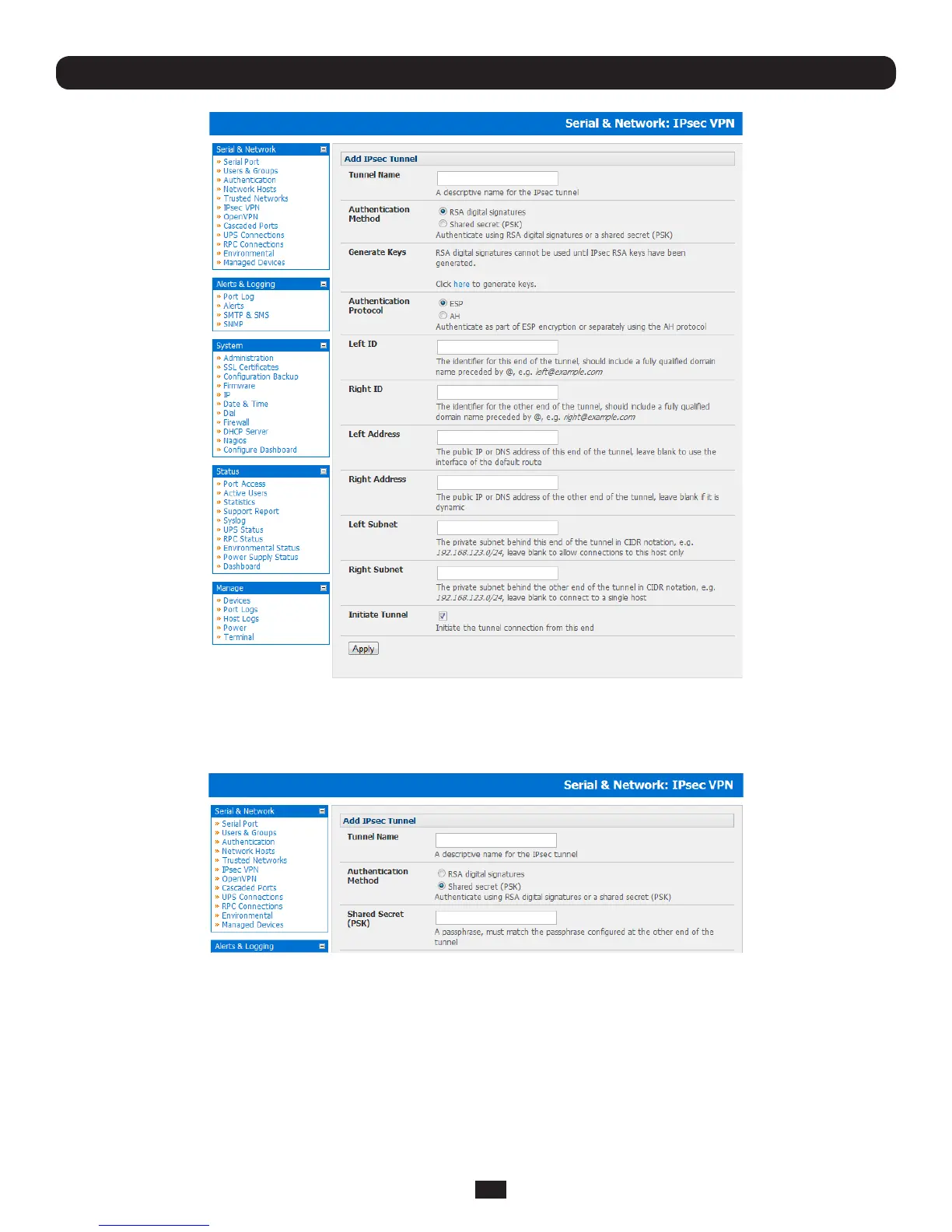
• SelecttheAuthentication Methodtobeused,eitherRSA digital signatures or a Shared secret (PSK)
o If you select RSA you will asked to click here to generate keys. This will generate an RSA public key for the
consoleserver(theLeft Public Key).Youwillneedtondoutthekeytobeusedontheremotegateway,thencut
and paste it into the Right Public Key
o If you select Shared secretyouwillneedtoenteraPre-sharedsecret(PSK).ThePSKmustmatchthePSK
configured at the other end of the tunnel
• InAuthentication Protocol select the authentication protocol to be used. Either authenticate as part of ESP
(EncapsulatingSecurityPayload)encryptionorseparatelyusingtheAH(AuthenticationHeader)protocol.
• EnteraLeft ID and Right ID. This is the identifier that the Local host/gateway and remote host/gateway use for IPsec
negotiationandauthentication.EachIDmustincludean‘@’andcanincludeafullyqualieddomainnameprecededby
‘@’(e.g.left@example.com)
• EnterthepublicIPorDNSaddressofthegatewaydeviceconnectingittotheInternetasthe Left Address. You can leave
this blank to use the interface of the default route



 To Next Page