64
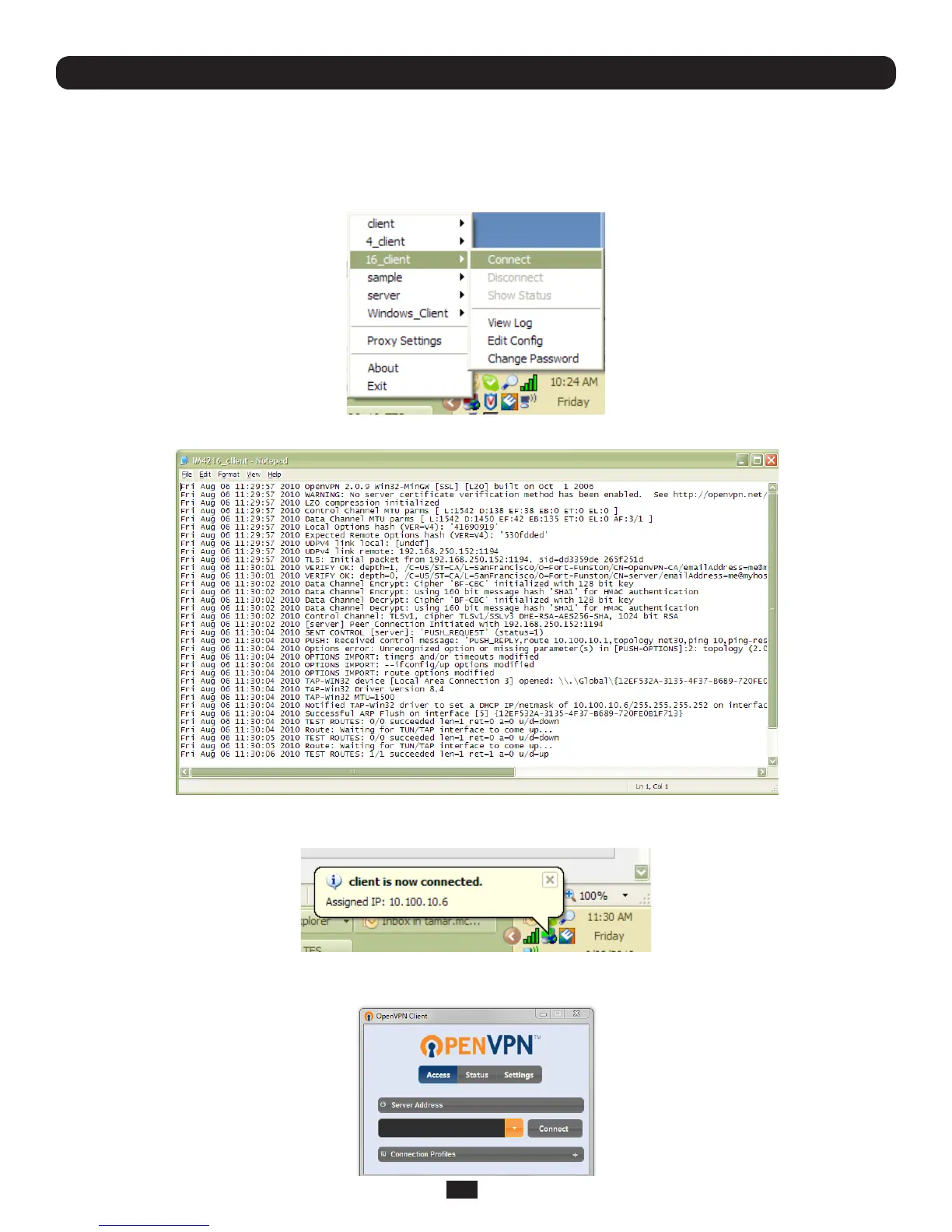
ToinitiatetheOpenVPNtunnelfollowingthecreationoftheclient/servercongurationles:
• RightclickontheOpenVPNiconintheNoticationArea
• Selectthenewlycreatedclientorserverconguration.Forexample,BL_client
• Click‘Connect’asshownbelow
• Theloglewillbedisplayedastheconnectionisestablished
Chapter 4: Serial Port, Device and User Configuration
• Onceestablished,theOpenVPNiconwilldisplayamessagenotifyingofthesuccessfulconnectionandassignedIP.This
information,aswellasthetimetheconnectionwasestablished,isavailableanytimebyscrollingovertheOpenVPNicon.
Note: An alternate OpenVPN Windows client can be downloaded from http://www.openvpn.net/index.php/openvpn-client/
downloads.html. Refer to http://www.openvpn.net/index.php/openvpn-client/howto-openvpn-client.html for help



 To Next Page