77
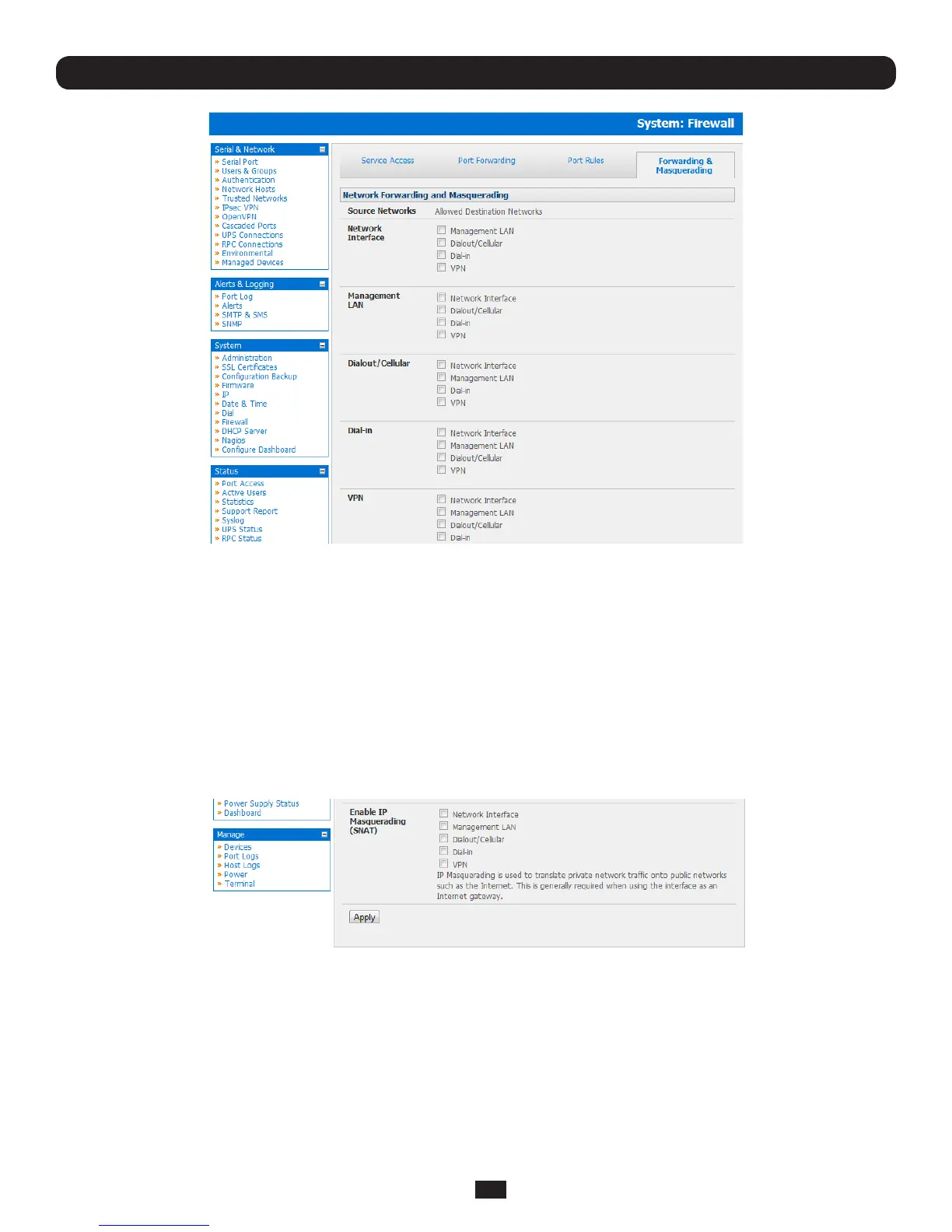
• FindtheSource Networktoberouted,andthenticktherelevantDestination Network to enable Forwarding
ForexampletocongureadualEthernetdevicesuchasaB096-048orB096-016ConsoleServerManagementSwitch:
• TheSource Network would the Network Interface and the Destination Network would be Management LAN
IPMasqueradingisgenerallyrequirediftheConsoleServerwillberoutingtotheInternet,oriftheexternalnetworkbeing
routed to does not have routing information about the internal network behind the Console Server.
IPMasqueradingperformsSourceNetworkAddressTranslation(SNAT)onoutgoingpackets,tomakethemappearlikethey've
comefromtheConsoleServer(ratherthandevicesontheinternalnetwork).Whenresponsepacketscomebackdeviceson
theexternalnetwork,theConsoleServerwilltranslatethepacketaddressbacktotheinternalIP,sothatitisroutedcorrectly.
This allows the Console Server to provide full outgoing connectivity for internal devices using a single IP Address on the
external network.
By default IP Masquerading is disabled for all networks. To enable masquerading:
• SelectForwarding & Masquerading panel on the System: Firewall menu
• CheckEnable IP Masquerading (SNAT) on the network interfaces where masquerading is be enabled
Generally this masquerading would be applied to any interface that is connecting with a public network such as the Internet.
Chapter 5: Firewall, Failover and Out-of-Band



 To Next Page