125
Auxiliary functions
• Safepos - Outputting the message: Actuator in safety position
• ERR.SP/CMD - Outputting the message: Sensor break for process set-point value/set-point position
Only available if the function in the SIG.ERR menu has been activated (SIG.ERR → SP/CMD input → Error on).
See Chapter “26.2.12. SIG.ERROR – Configuration of signal level fault detection”.
• ERR.PV - Outputting the message: Sensor break for process actual value (only for Type 8793)
Only available if the function in the SIG.ERR menu has been activated (SIG.ERR → PV Input → Error on).
See Chapter “26.2.12. SIG.ERROR – Configuration of signal level fault detection”.
• Remote - Output AUTOMATIC / MANUAL operating state
• Tune.Status - Output TUNE (process optimization)
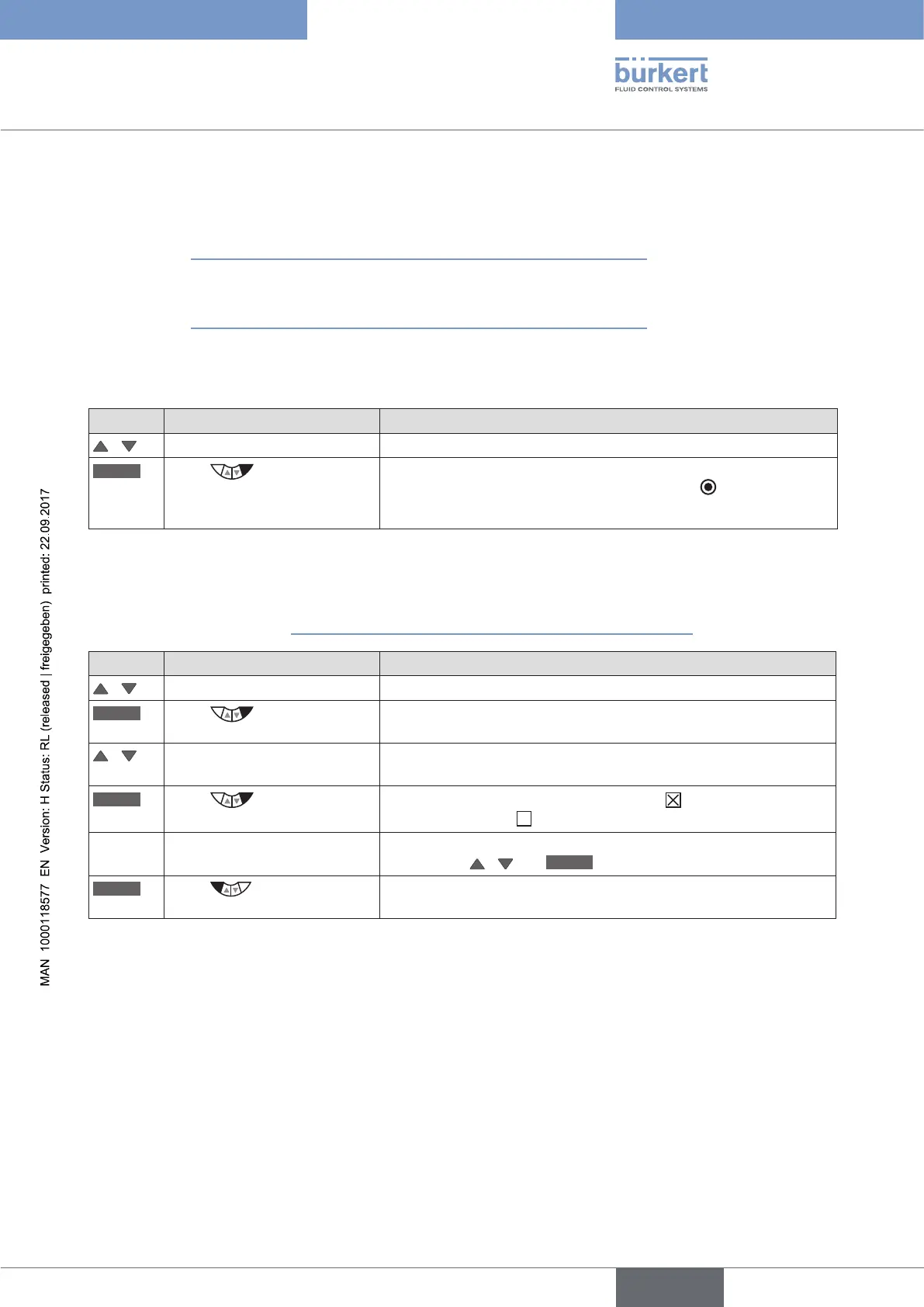
Key Action Description
/ Select submenu option (Safepos, ERR.SP/CMD, ERR.PV, Remote or Tune.Status).
SELEC
Press
Acknowledge submenu option as output function for the binary
output. The selection is marked by a filled circle
.
Then set the required switching status in the OUT.type submenu.
Table 61: OUT BIN1 / OUT BIN2; specifying Safepos, ERR.SP/CMD, ERR.PV, Remote or Tune.Status as output.
• DIAG.State-1/2 - Diagnosis output (option)
Outputting the message: Diagnosis message from selected status signal
For description see Chapter “26.2.22. DIAGNOSE – Menu for monitoring valves (option)”.
Key Action Description
/ Select DIAG.State-1/2
SELEC
Press
The status signals, which can be activated for outputting the
message, are displayed.
/ Select status signal Select the status signal which is to be assigned to the diagnosis
output.
SELEC
Press
Activate the selection by checking the box or deactivate it by
unchecking the box .
If required, activate further status signals for the diagnosis output by
pressing the
/ and
SELEC
keys.
EXIT
Press
Acknowledgment and simultaneous return to the OUT BIN 1/2 menu.
Then set the required switching status in the OUT.type submenu.
Table 62: OUT.type; inputting switching status for binary output and return to the process level.



 To Next Page