141
Auxiliary functions
26.2.21.2. CONTROL.sim – Simulation of the process and process valve
The settings to simulate the process and the process valve are made in the CONTROL.sim menu.
Settings
Type of simulation:
x.SIM
Simulation of the process valve.
p.SIM
Simulation of the process.
Parameterization of
the process:
SIM.Gain
Specify amplification factor.
SIM.Delay
Specify time constant in seconds.
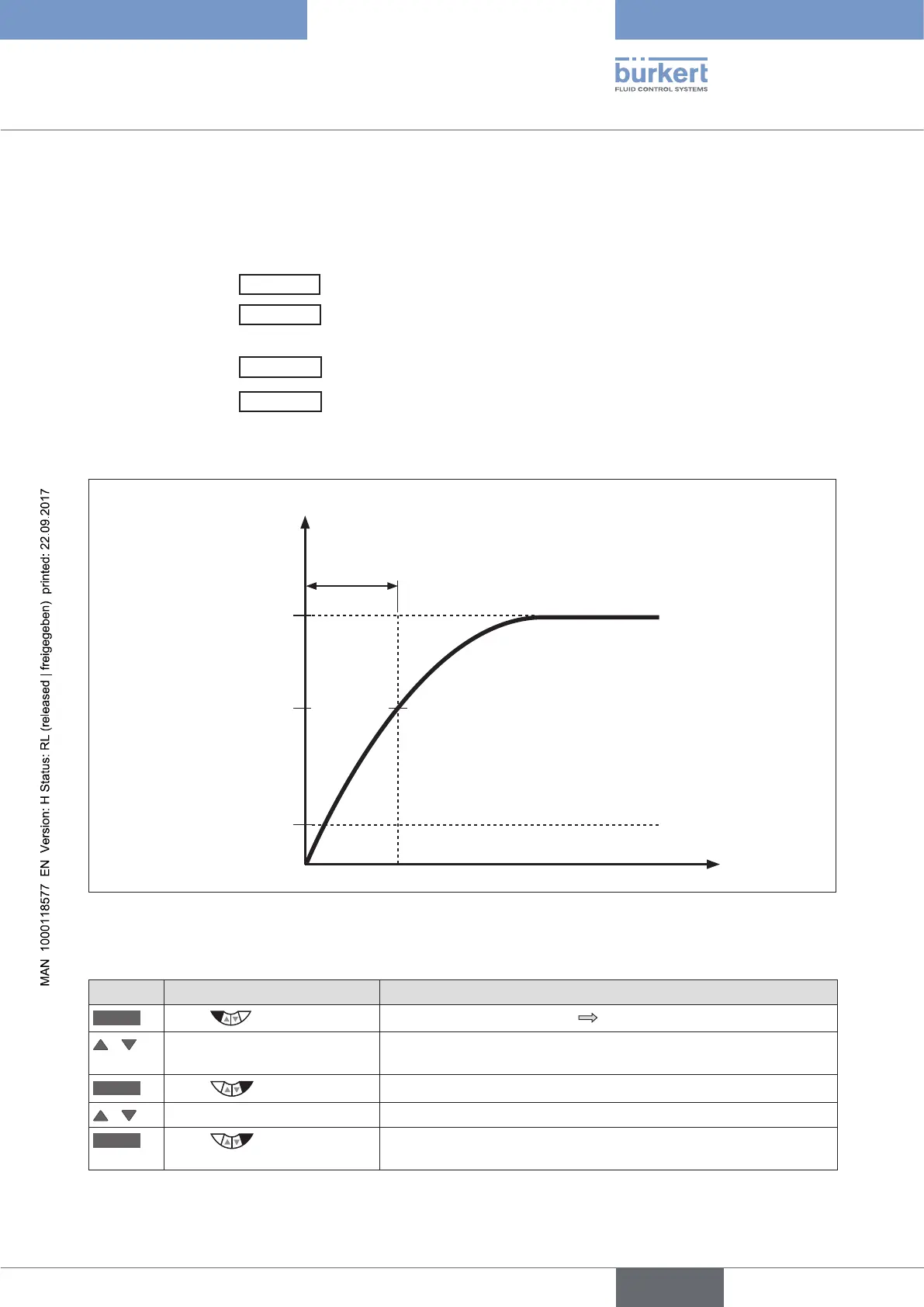
Example of a simulated process:
63 %
1
SIM.Gain
(Amplification factor [Kp])
t
SIM.Delay (Time constant [T] in s)
Effect of parameterization on the behavior of the PT1 element
Output of the simulated
process
Input of the simulated
process
y
u
5
Figure 82: Example of a simulated process. Behavior of the PT1 element
Activating and parameterizing simulation of the process and/or process valve:
Key Action Description
MENU
Press for approx. 3 s
Switching from process level setting level.
/ Select SIMULATION (To do this, the auxiliary function must be incorporated into the main
menu).
ENTER
Press
The submenu for setting the simulation is displayed.
/ Select CONTROL.sim
ENTER
Press
The submenu for activating and parameterizing the process and
process valve simulation is displayed.



 To Next Page