Handling rolls
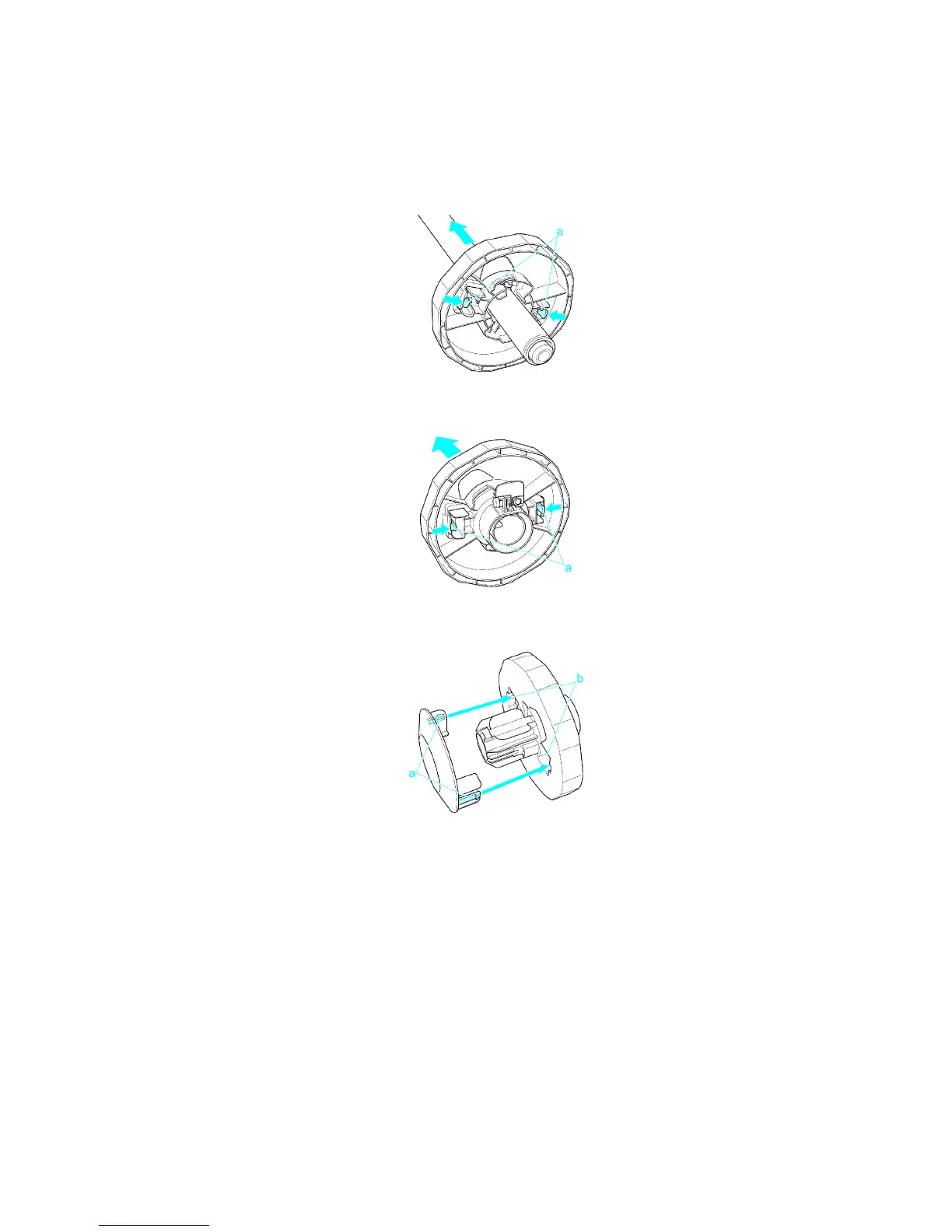
Installing the 2-Inch Paper Core Attachment
When loading a roll with a 2-inch paper core, remove the 3-Inch Paper Core Attachment from both the Roll
Holder and Holder Stopper and then attach the 2-Inch Paper Core Attachment on the Holder Stopper .
1. Push the tips (a) of 3-Inch Paper Core Attachment #1 in and remove the 3-Inch Paper Core
Attachment from the Roll Holder .
2. Push the tips (a) of 3-Inch Paper Core Attachment #2 in and remove the 3-Inch Paper Core
Attachment from the Holder Stopper .
3. Align the tips (a) of the 2-Inch Paper Core Attachment with the holes (b) of the Holder Stopper
and insert it rmly .
130 Handling Paper


 To Next Page
 Loading...











