CAPINTEC, INC. CAPTUS
®
600
FUSE SERVICING
CAUTION
For continued protection, replace only with
same type and rating of fuse(s)
Power Line Fuses
The power line fuses are located on the front side of the Isolation Transformer Unit directly
below the main power cord connector. The type and rating of these 2 fuses are listed on the
label that is located on the top of the Isolation Transformer Unit.
To change these fuses:
1. Turn off the 2 power switches that are located on the back of the Readout Unit and on
the right side of the Printer.
2. Unplug the power cord that is connected to the front of the Isolation Transformer Unit.
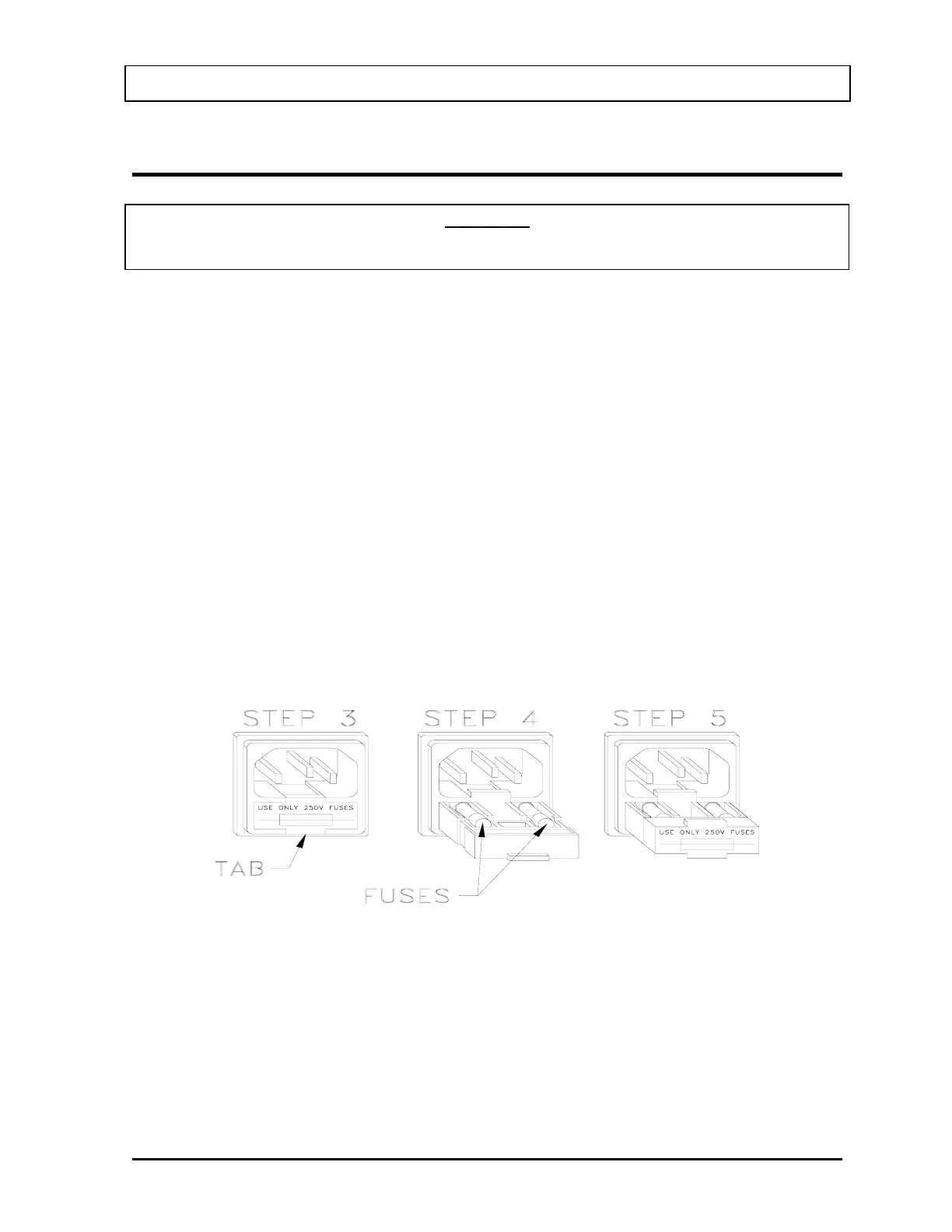
3. Use a small screwdriver to pry open the tab of the fuse drawer that is located directly
below the power cord connector. The drawer will drop down to expose the ends of the
2 fuses. (Refer to
Figure 20-3)
4. Remove the blown fuse(s) from the holder and replace it (them) with the fuses
specified on the top label.
5. Rotate the fuse drawer to the upright position and push the drawer back into the fuse
holder.
Figure 20-3
6. Reconnect the power cord to the Isolation Transformer Connector and turn on the 2
power switches (Readout Unit and Printer).
7. Verify the CAPTUS
®
600 System is functioning correctly by performing the Daily
Tests.
November 07 CLEANING AND MAINTENANCE 20-5



 To Next Page