CAPINTEC, INC. CAPTUS
®
600
Readout Unit Fuses
Two fuses are located in the power entry module next to the power cord connector on the
back panel of the Readout Unit. The type and rating of these fuses are listed on the label
located on the back panel of the Readout Unit.
To change these fuses:
1. Turn off the CAPTUS
®
600 power switch and unplug the line cord from the power
entry module.
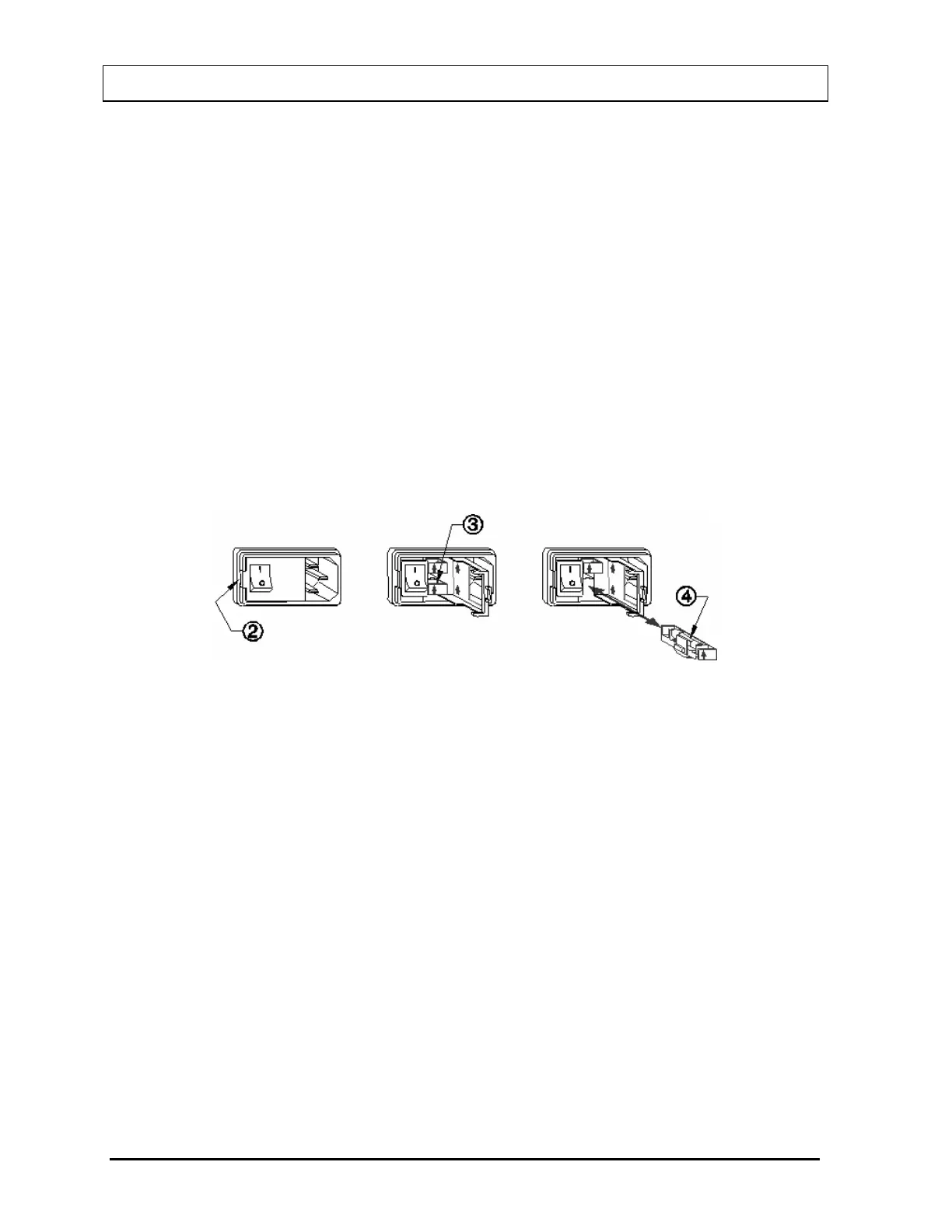
2. Insert the tip of a small flat bladed screwdriver into the notch of the power entry
module just to the left of the switch. Twist the screwdriver to open the fuse cover
door. (Refer to
Figure 20-4).
3. To remove the first of the two fuse carriers, insert the tip of the screwdriver behind the
arrow and pull it out. Repeat this process for the second fuse.
4. Remove the blown fuse(s) from the carrier and replace it (them) with the fuses
specified on the back label.
5. Re-insert the fuse carriers with the arrows pointing up (Refer to Figure 20-4).
Figure 20-4
6. Close the fuse cover door and snap it into place.
7. Replace the line cord and turn on the power switch for the CAPTUS
®
600.
8. Verify the CAPTUS
®
600 System is functioning correctly by performing the Daily
Tests.
Printer Fuse
The printer fuse is not accessible from the outside of the printer case and must be replaced
by a qualified service representative.
20-6 CLEANING AND MAINTENANCE November 07



 To Next Page