78
Enter Setup
1663 Barcode Scanner User Guide
Capital Lock Type & Setting
I n order t o send t he alphabet with correct case, the scanner needs to know the status of Caps Lock
on the keyboard. I ncorrect set tings m ay result in reversed case of the alphabet being transm itt ed.
Cap Lock Type Description
Norm al Norm al type
Capit al Lock When enabled, the keys of alphabetic characters will be int erpreted as
capit al let t ers. However, this does not affect the num ber or punctuat ion
keys.
Shift Lock When enabled, the keys of alphabetic characters will be int erpret ed as
capit al let t ers. I n addit ion, this affects the num ber or punct uation keys.
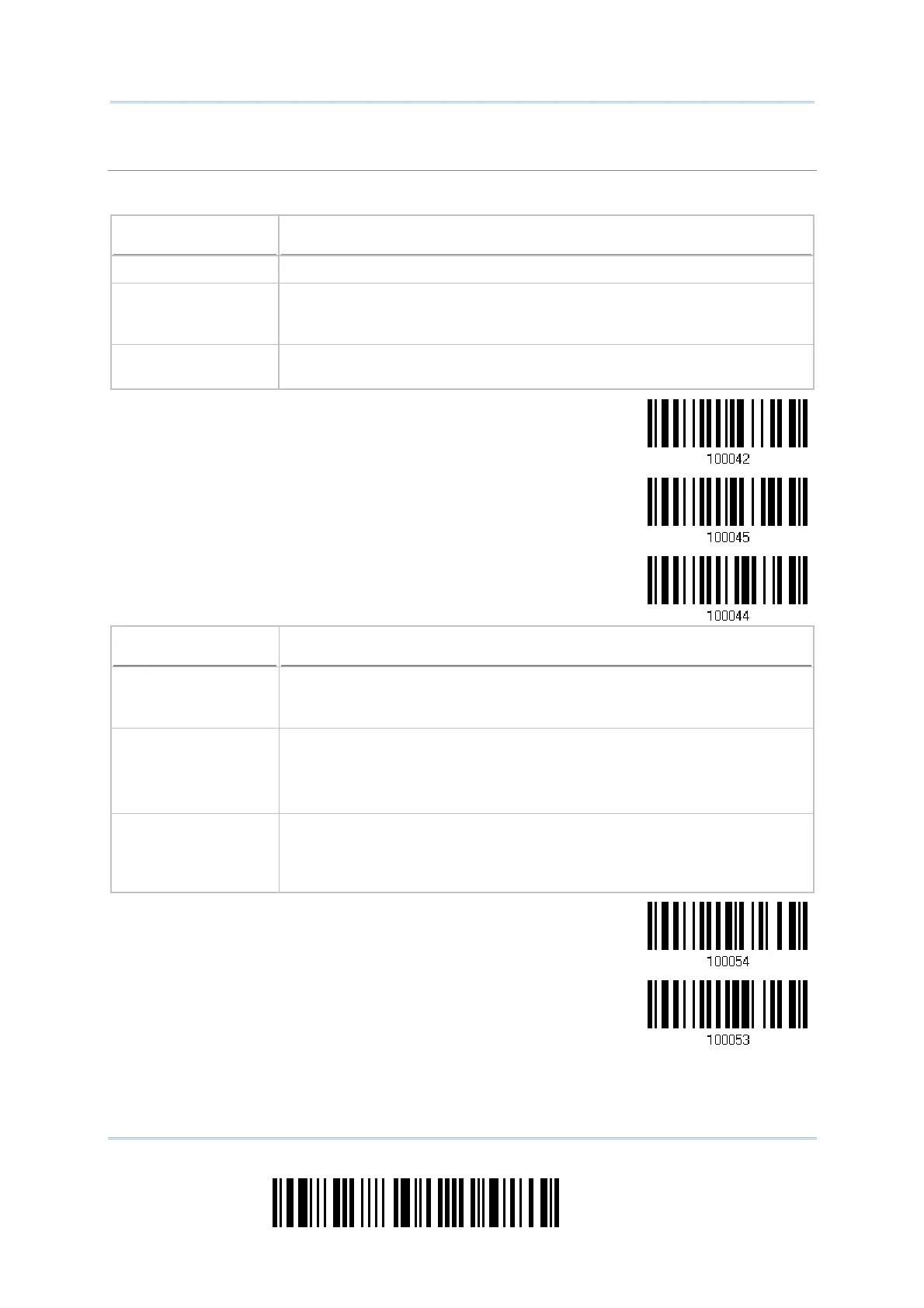
*Normal
Shift Lock
Capital Lock
Capital Lock State Description
Capit al Lock OFF Assum ing that t he st atus of Caps Lock on the keyboard is OFF,
transm itt ed charact ers are exact ly t he sam e as in the barcode ( when
"case- sensitive" is selected for Alphabet Transm ission) .
Capit al Lock ON Assum ing that t he st atus of Caps Lock on the keyboard is ON, t ransm it t ed
charact ers are exactly the sam e as in the barcode (when "case- sensit ive"
is selected for Alphabet Transm ission).
Refer to t he Capit al Lock Type above.
Auto Detect ion
(suggested use for
m ost applications)
The scanner will autom atically det ect the st at us of Caps Lock on the
keyboard before dat a is transm itt ed; transm itted charact ers are exact ly
the sam e as in t he barcode (when "case- sensit ive" is select ed for
Alphabet Transm ission).
Auto Detect
Capital Lock ON



 To Next Page