13
Update
Quick
Start
READ A SETUP BARCODE
CONFIGURE PARAMETERS
For m ost of the scanner paramet ers, only one read is required to set t hem t o new values.
The scanner will respond with t wo beeps (low-high tone) when each param et er is set
successfully. Refer t o
Create One- Scan Set up Barcodes.
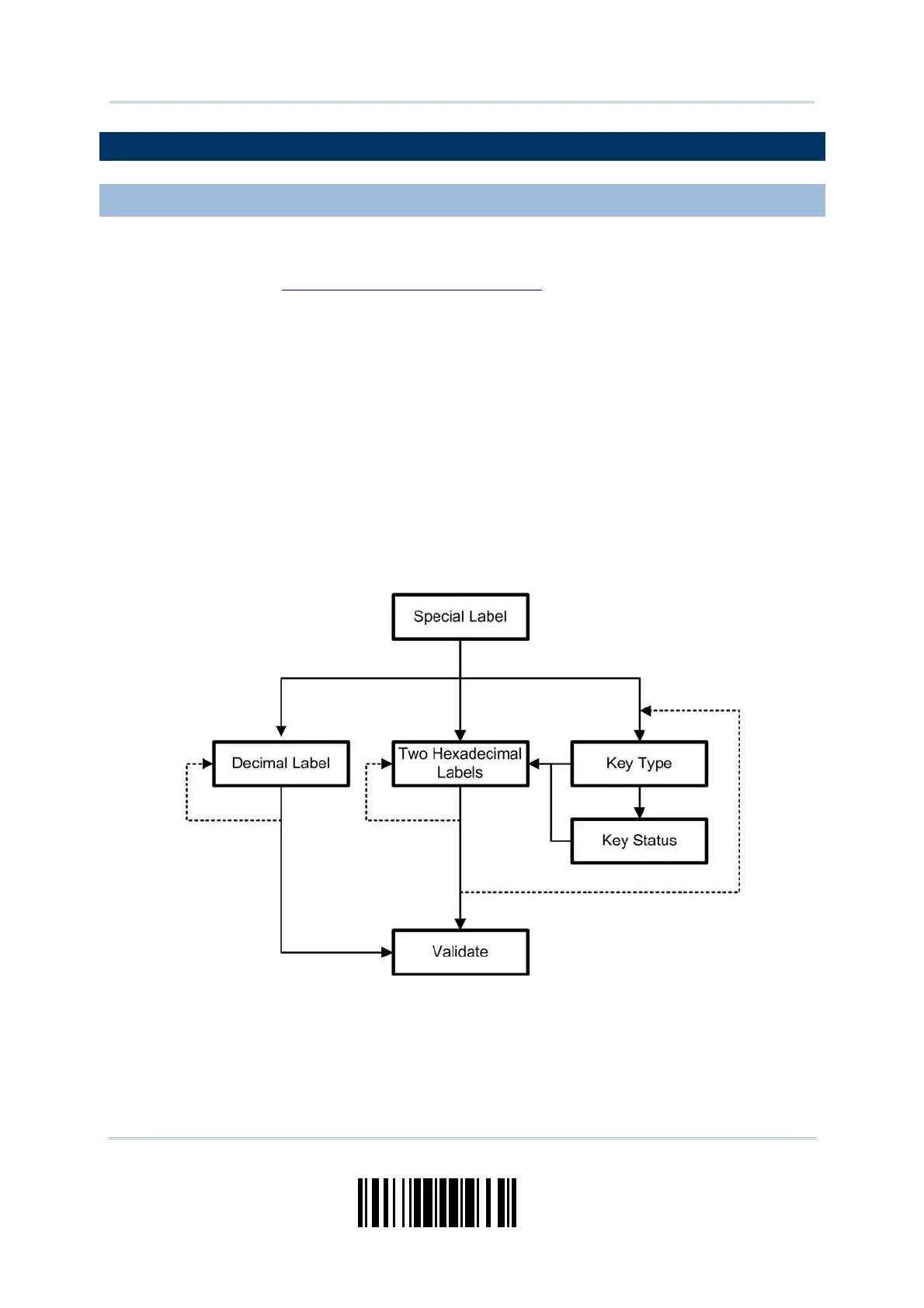
But for a number of special param et ers, m ult iple reads are required to com plet e the
sett ing. I n this case, t he scanner will respond wit h a short beep t o indicate it needs to
read m ore setup barcodes. These special param et ers m ay require reading one or m ore
setup barcodes, such as:
Num eric barcodes, say, for keyboard type, int er- character delay, lengt h qualificat ion
Hexadecim al barcodes, say, for character strings as prefix, suffix, et c.
When “ Bluet ooth
®
HID” or “USB HID” is configured for interface, Key Type and Key
St atus will t hen becom e applicable. Decide whether to change key st atus when
“ Norm al Key” is selected for Key Type.
To com plete t he configurat ion of t hese special param eters, it requires reading the
“ Validate” barcode, and the scanner will respond wit h t wo beeps ( low- high tone) to
indicat e the input values are validated.



 To Next Page