©2024 Comba Telecom. All Rights Reserved.
568 Gibraltar Drive, Milpitas, CA 95035 | +1 408 526 0180
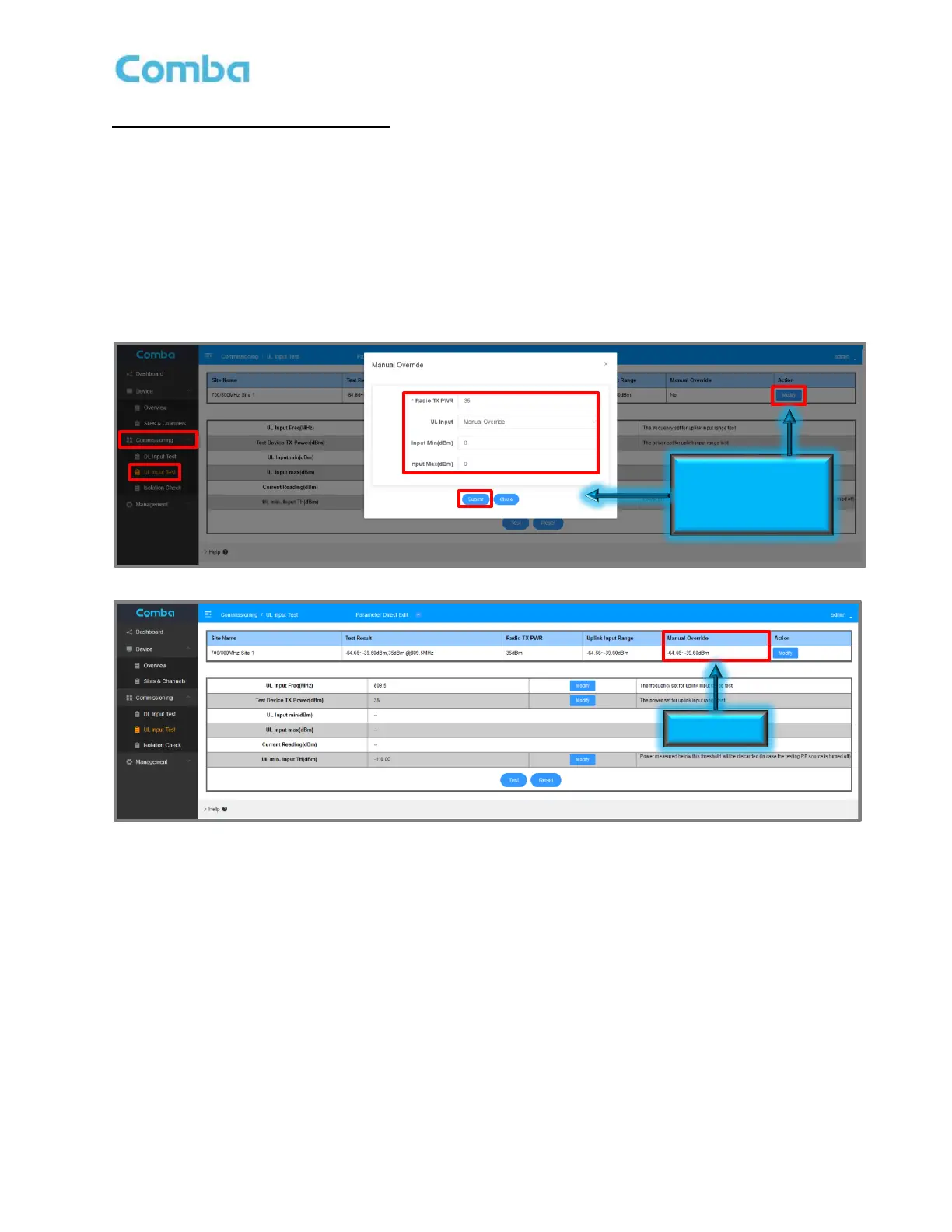
UL Input Test (Manual Measurement):
• Navigate to <Commissioning – UL Input Test>
• Select the “Site” that you want to commission
• Click <Modify> in the Site “Action” column. A pop-up window will appear. Select <Manual
Override>. Enter the actual <Radio TX PWR> in dBm of the radios that will be used for the
jurisdiction. This information must be filled in for each donor site so the system can apply an offset
(between the actual radios and device used during the test) to calculate the uplink input range from
the actual radios.
• Enter the Manual Measurements for <Input Min (dBm)> and <Input MAX (dBm)> and click <Submit>.
Results will display in the <Manual Override> section of the top window.
Figure 121: V3 BDA/MU Commissioning Tools – UL Input Test Manual Override



 To Next Page