©2024 Comba Telecom. All Rights Reserved.
568 Gibraltar Drive, Milpitas, CA 95035 | +1 408 526 0180
Setting Input ATT, Output ATT, Gain Limit, and Main RF Switches
The Input ATT, Output ATT, Gain Limit, and RF Switches can be configured from the <Device – Sites &
Channels> page. Input ATT and Output ATT can also be configured in the <Device – Overview – BDA
Overview> page. Gain Limit can also be configured in the <Device – Overview – Advanced Settings> page.
The parameters are available in several places for convenience. However, the easiest way to configure
these parameters are from the <Device – Sites & Channels> page as they can all be modified quickly from
the same window while monitoring RF levels in the channel filter sections.
To modify these RF parameters:
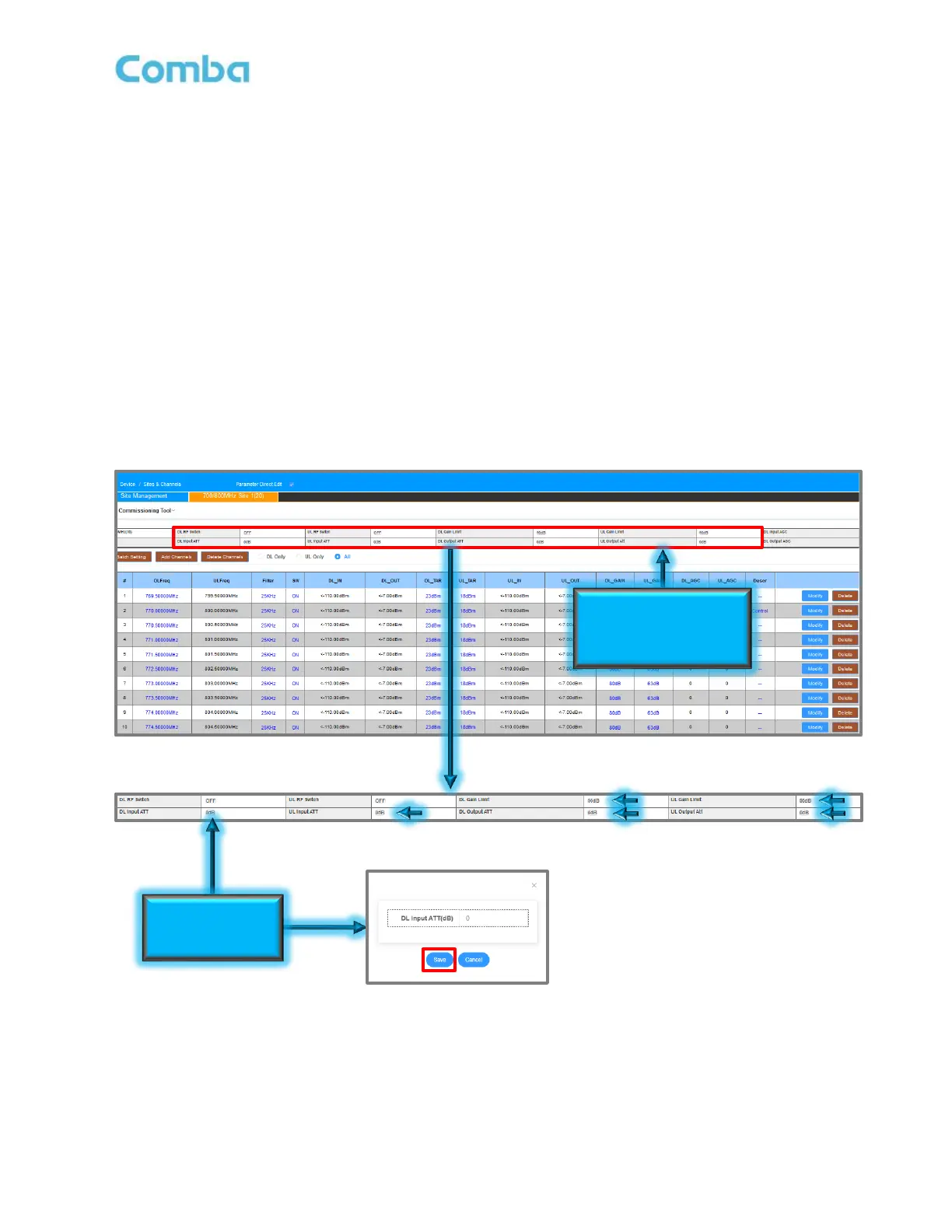
• Navigate to <Device – Sites & Channels>. There is narrow window above each channel filter section
where these parameters can be controlled. The user can set the DL Input ATT, UL Input ATT, DL
Output ATT, UL Output ATT, DL Gain Limit, UL Gain Limit, and Turn ON/OFF the Main DL/UL RF
Switches.,
• Click on the parameter text for a parameter to modify it. Click <Save>.
See Figure 141 for more details.
Figure 141: Commissioning BDA – Setting Input ATT, Output ATT, Gain Limit and Main RF Switches



 To Next Page