©2024 Comba Telecom. All Rights Reserved.
568 Gibraltar Drive, Milpitas, CA 95035 | +1 408 526 0180
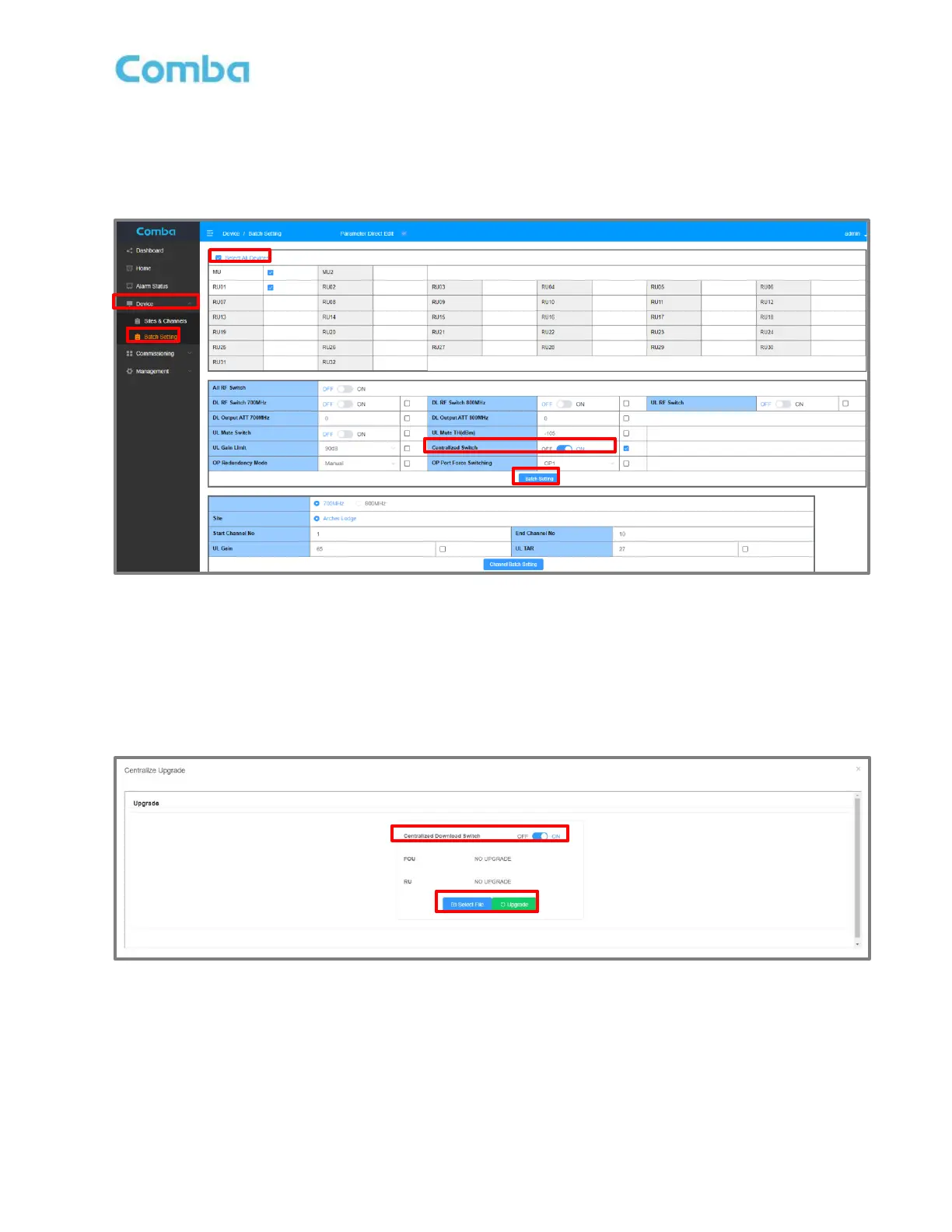
4. In the BDA/MU main menu, go to Device -> Batch Setting, turn ON <Centralized Switch>. Make sure
to select the devices that need to be upgraded at the top table, and the <Centralized Switch> is
checked. Then click on the <Batch Setting> button. There is a pop-up that indicates the operation is
successful.
Figure 166: Batch Setting RU Centralized Download Switch
FOU and RU Centralized Upgrade
1. In the <Dashboard> Page, click <Centralize Upgrade> button. Both the FOU and RU can be
upgraded here. You can only upgrade FOUs or RUs but not at the same.
Figure 167: V3 BDA/MU Dashboard Centralized Upgrade Pop-up Window



 To Next Page