©2024 Comba Telecom. All Rights Reserved.
568 Gibraltar Drive, Milpitas, CA 95035 | +1 408 526 0180
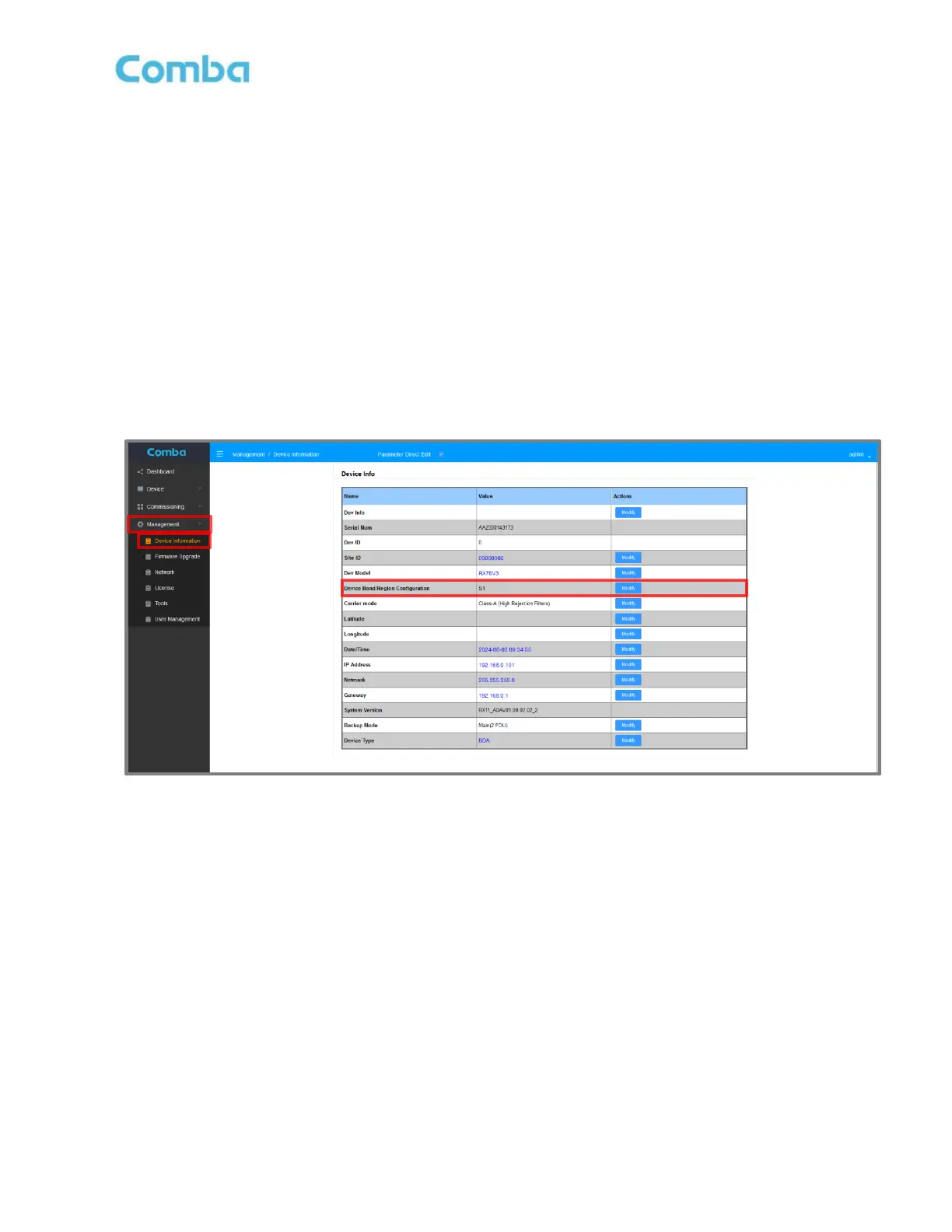
• Login to the device web GUI and change the <Device Band/Region Configuration> according to the
new filter type that was installed. Navigate to <Management – Device Information – Device
Band/Region Configuration – Modify> to change the Cavity Filter/Triplexer type.
Note: Due to RF calibration differences in Cavity Filters (S0/S1/S2/S3/S4/S5), Changing the Device
Band/Region Configuration will delete the current device configuration and reset back to the default
settings. If the device has already been commissioned and is currently in service, it is highly
recommended to save/export the Site Configuration from the <Channels & Sites> page and Database
(DB) configuration files from the <Tools> page, before making this change. After making the change,
the device will reset, and the user can reload the device configuration files to assist with faster
reprogramming of the device. Parameters such as RF Switches, DL/UL Gain Limit, Oscillation
Protection, NetProtect UL PA Muting, DL/UL Target Power, and others will still require
reprogramming.
Figure 196: V3 BDA/MU/RU Changing Device Band/Region Configuration after Filter Replacement



 To Next Page