©2024 Comba Telecom. All Rights Reserved.
568 Gibraltar Drive, Milpitas, CA 95035 | +1 408 526 0180
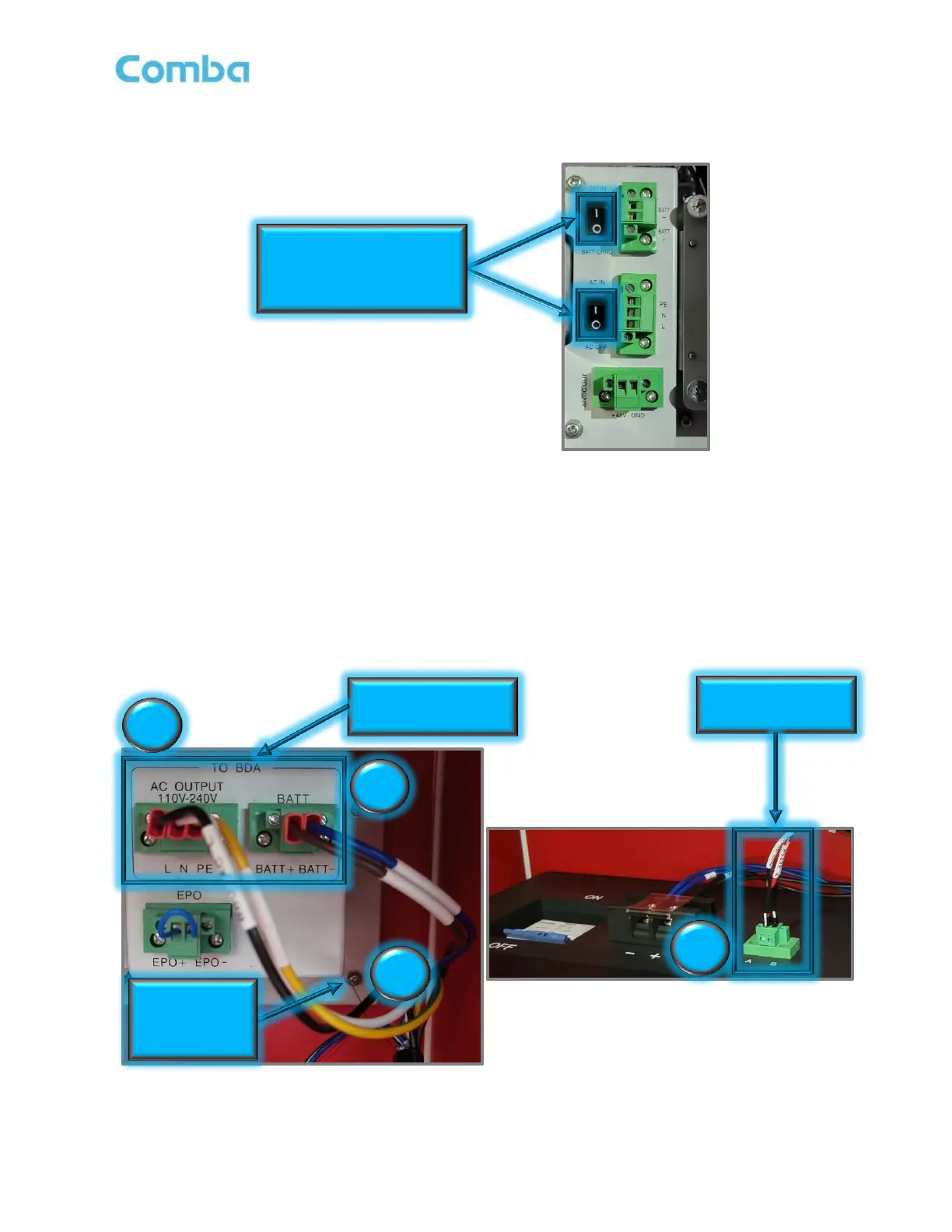
• Switch both AC IN/AC OFF (POWER) and DC IN/BATT CHRG (BATTERY) to OFF (O) in the
BDA/MU/RU as shown in Figure 35 below.
Figure 35: BDA/MU/RU AC and DC Switch OFF
• Connect the connectorized end of the Hybrid cable to the BBU as shown in Figure 36 below.
1. Connect AC Phoenix connector from Hybrid cable to the AC Output of the BBU.
2. Connect BATT Phoenix connector from Hybrid cable to BATT of the BBU.
3. Connect Copper RS485 Shielding Wire to Plate Screw for GND.
4. Connect RS485 Battery Comms Phoenix connector from Hybrid cable to A&B of the BBU.
5. Secure all Phoenix connectors by tightening screws using a small flathead screwdriver.
Figure 36: Hybrid Cable Connection in BBU
Before making wire connections,
Turn AC OFF and DC Switch to
“BATT CHRG” position (“O”)
Connect AC and BATT
Connect RS485 Battery



 To Next Page