©2024 Comba Telecom. All Rights Reserved.
568 Gibraltar Drive, Milpitas, CA 95035 | +1 408 526 0180
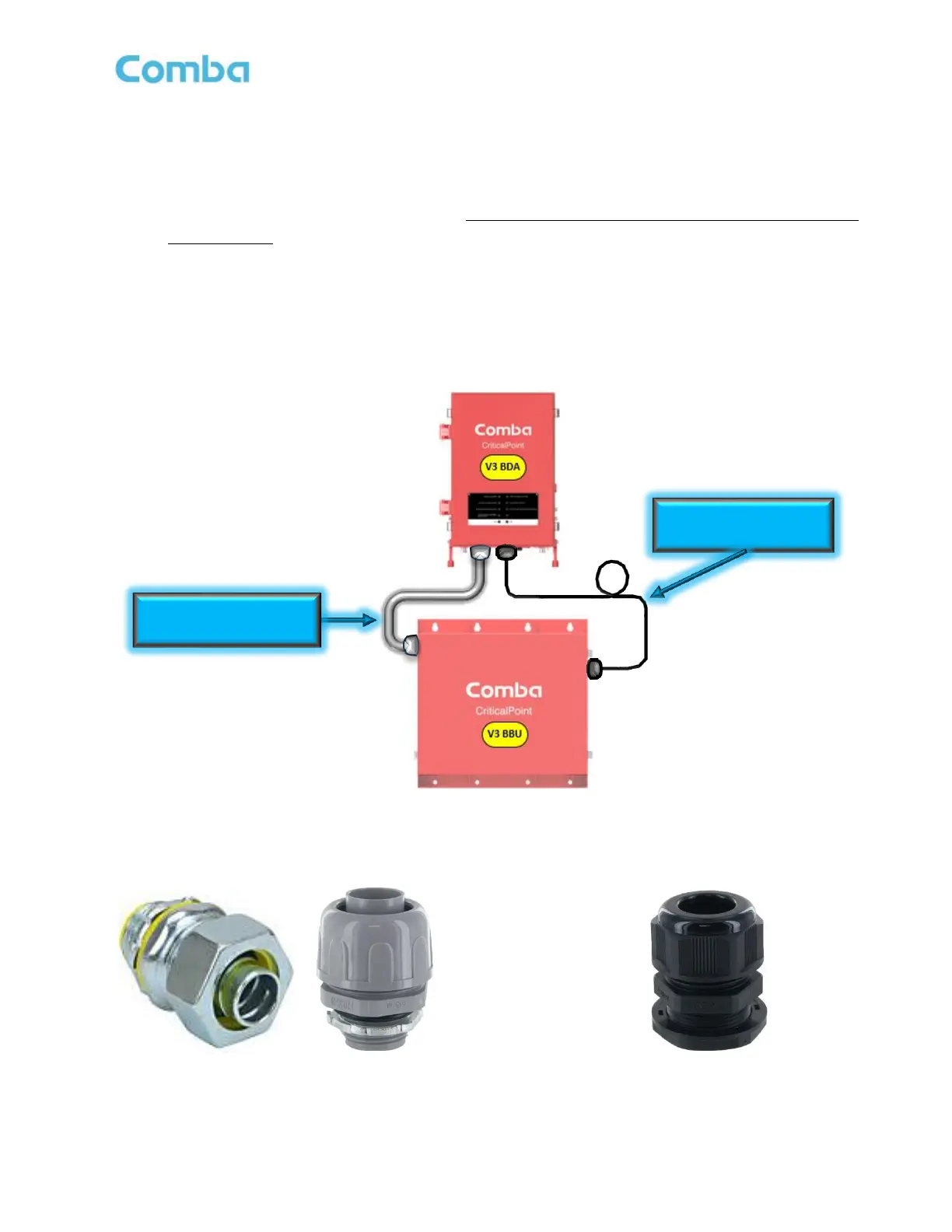
• Run the Hybrid cable through a knockout on the BBU to a knockout on the BDA/MU/RU then into the
BDA/MU/RU for connection. It is recommended to use the 3/4” knockouts for ease of installation.
The cable can run through a conduit between the BBU and BDA/MU/RU as shown in Figure 37. If
using conduit, liquid tight conduit connectors, as shown in Figure 38, must be installed to maintain
the UL50E Type 4 rating for waterproofing. These connectors are not included and must be provided
by the installer.
• Alternatively, the Hybrid Cable can be free-wired between the BDA/MU/RU and BBU knockouts. If
you are free wiring the Hybrid Cable, you must do so using the provided 3/4” liquid tight cable glands
to maintain the UL50E Type 4 rating for waterproofing. These cable glands are included and are
shown below in Figure 39.
Note: Always follow your local code requirements.
Figure 37: V3 BBU to V3 BDA/MU/RU Hybrid Cable Installation Example
Figure 38: Liquid Tight Conduit Connector Figure 39: Liquid Tight Cable Gland



 To Next Page