Chapter 4 Parameters
4-53
into Pr. 00-07. The password consists of min. 2 digits and max. 5 digits.
How to make the password valid again after decoding by Pr.00-07:
Method 1: Re-input original password into Pr.00-08 (Or you can enter a new password if you
want to use a changed or new one).
Method 2: After rebooting, password function will be recovered.
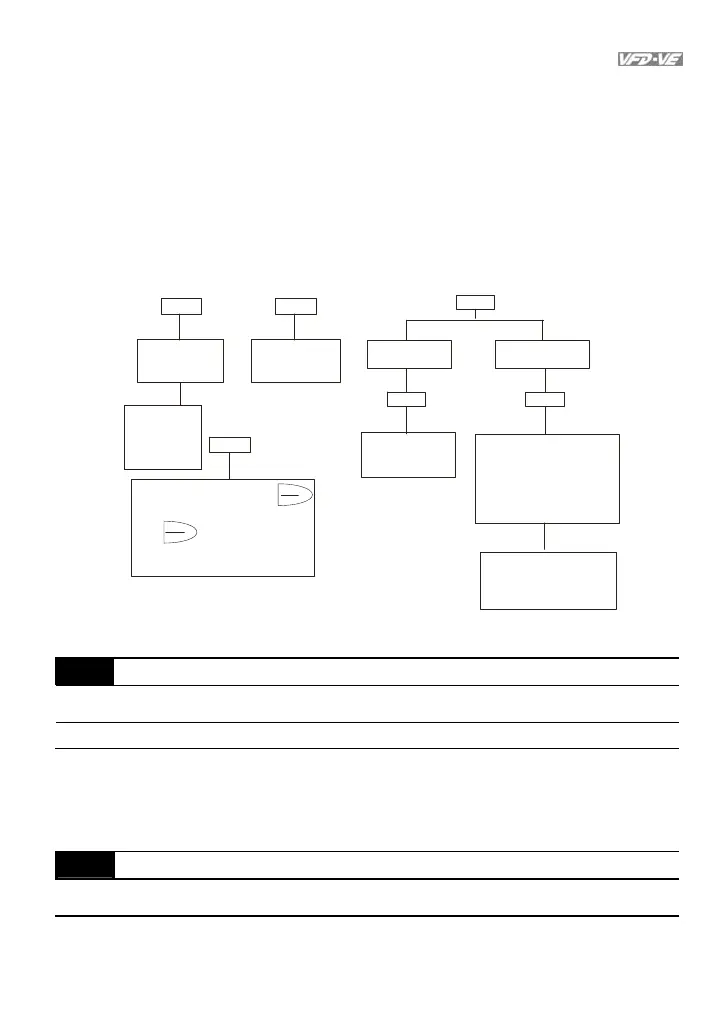
Password Decode Flow Chart
00-0800-08
00-07
PROG
DATA
Password Setting D ecoding Flow C har t
Forgetting
Passwrod
After entering 9999, pr ess
and repeat it again (enter 9999,
press
3 chances to enter the correct
password.
1st time displays "01" if
password is incorrect.
2nd time displays "02", if
password is incorrect.
3rd time displays "P code"
(blinking)
If the password was entered
incorrectly after three tries,
the keypad will be locked.
Turn the power OFF/ON to
re-enter the password.
In co rre ct Pa ssw o rd
END
00-07
00-07
Displays 00 when
entering correct
password into
Pr.0 0 -0 7 .
C o rre ct Passwo rd
END
00-08
Displays 00 when
entering correct
password into
Pr.00-07.
Displays 01 when
entering correct
password into
Pr.00-08.
to decode. The
PROG
DATA
parameter setting will be set to
factory setting.
All par ameters
will display 0
and cannot be
modified.
00-09
Energy Saving Gain
Unit: 1
Control
mode
FOCPG
Factory setting: 100%
Settings
10~1000 %
When Pr.00-19 is set to1, this parameter can be used for energy saving. The setting
should be decreased when the energy saving is not well. When the motor is vibrated,
the setting should be increased.
00-10
Control Method
Control
mode
VF VFPG SVC FOCPG TQCPG
Factory setting: 0
Settings 0 V/f control
1 V/f + Encoder (VFPG)



 To Next Page