Chapter 4 Parameters
4-102
Group 5 Motor Parameters
05-00 Motor Auto Tuning
Control
mode
SVC
Factory setting: 0
Settings 0 No function
1 Rolling test
2 Static Test
3 Reserved
Starting auto tuning by pressing RUN key and it will write the measure value into Pr.05-
05 to Pr.05-09 for motor 1 and Pr.05-17 to Pr.05-21 for motor 2.
The steps to AUTO-Tuning are: (when setting to 1)
1. Make sure that all the parameters are set to factory settings and the motor wiring is
correct.
2. Make sure the motor has no-load before executing auto-tuning and the shaft is not
connected to any belt or gear motor. It is recommended to set to 2 or 3 if the motor can’t
separate from the load.
3. Motor 1: fill in Pr.01-02, Pr.01-01, Pr.05-01, Pr.05-02, Pr.05-03 and Pr.05-04 with correct
values. Refer to motor capacity to set accel./decel. time.
Motor 2: fill in Pr.01-36, Pr.01-35, Pr.05-13, Pr.05-14, Pr.05-15 and Pr.05-16 with correct
values. Refer to motor capacity to set accel./decel. time.
4. When Pr.05-00 is set to 1, the AC motor drive will execute auto-tuning immediately after
receiving a “RUN” command. (NOTE: the motor will run!)
5. After executing, please check if there are values filled in Pr.05-05 to Pr.05-09 for motor 1
and Pr.05-17 to Pr.05-21 for motor 2.
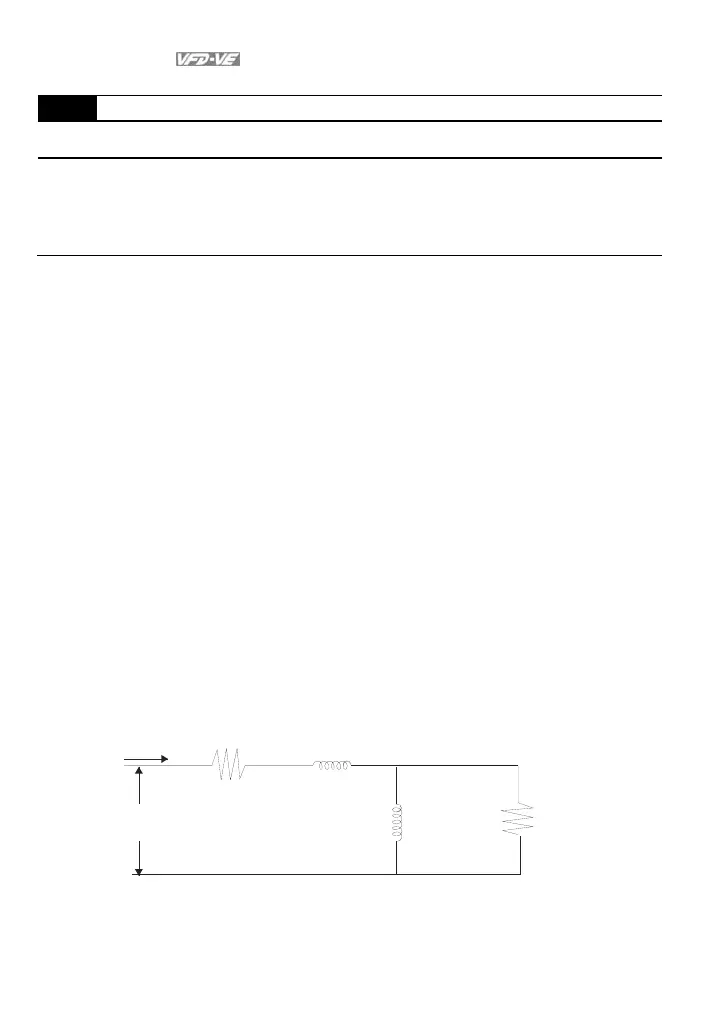
6. Mechanical equivalent circuit
V
S
I
R
Rr
Lx
Lm
Pr.05-06
Pr.05-18
Pr.0 5- 09
Pr.0 5- 21
Pr.05-08
Pr.05-20
Pr.05-07
Pr.05-19
Mecha ni cal eq ui val en t cir cui t for VE serie s
If Pr.05-00 is set to 2, it needs to input Pr.05-05 for motor 1/Pr.05-17 for motor 2.



 To Next Page