Chapter 3 Digital Keypad Operation and Start Up
3-4 Revision Apr. 2016, 07VE, SW V2.05
U
F
H
U
F
H
U
F
H
U
F
H
U
F
H
U
F
H
U
F
H
U
F
H
U
F
H
U
F
H
U
F
H
U
F
H
U
F
H
U
F
H
U
F
H
U
F
H
U
F
H
U
F
H
U
F
H
U
F
H
U
F
H
U
F
H
U
F
H
U
F
H
U
F
H
U
F
H
U
F
H
U
F
H
U
F
H
U
F
H
U
F
H
U
F
H
U
F
H
U
F
H
U
F
H
U
F
H
U
F
H
U
F
H
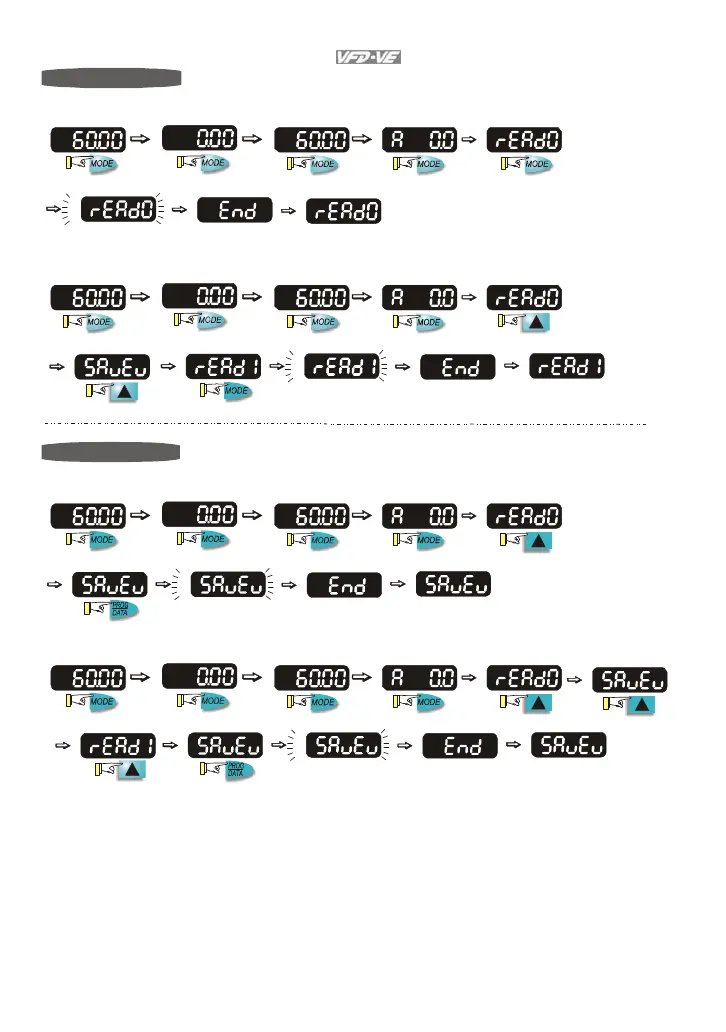
To copy parameters 1
Copy parameters from the AC Motor Drive to the KPV-CE01
about 2-3 seconds
start blinking
It will display "End" to indicate that
the first parameter is saved, then
return to "rEAd0".
about 2-3 seconds
start blinking
It will display "End" to indicate that
the second parameter is saved, then
return to "rEAd1".
To copy parameters 2
Copy parameters from to the KPV-CE01 the AC Motor Drive
about 2-3 seconds
about 2-3 seconds
start blinking
start blinking
It will display "End" to indicate that
the first parameter is saved, then
return to "SAvEv".
It will display "End" to indicate that
the second parameter is saved, then
return to "SAvEv".



 To Next Page