Chapter 6 Fault Code Information and Maintenance
6-5
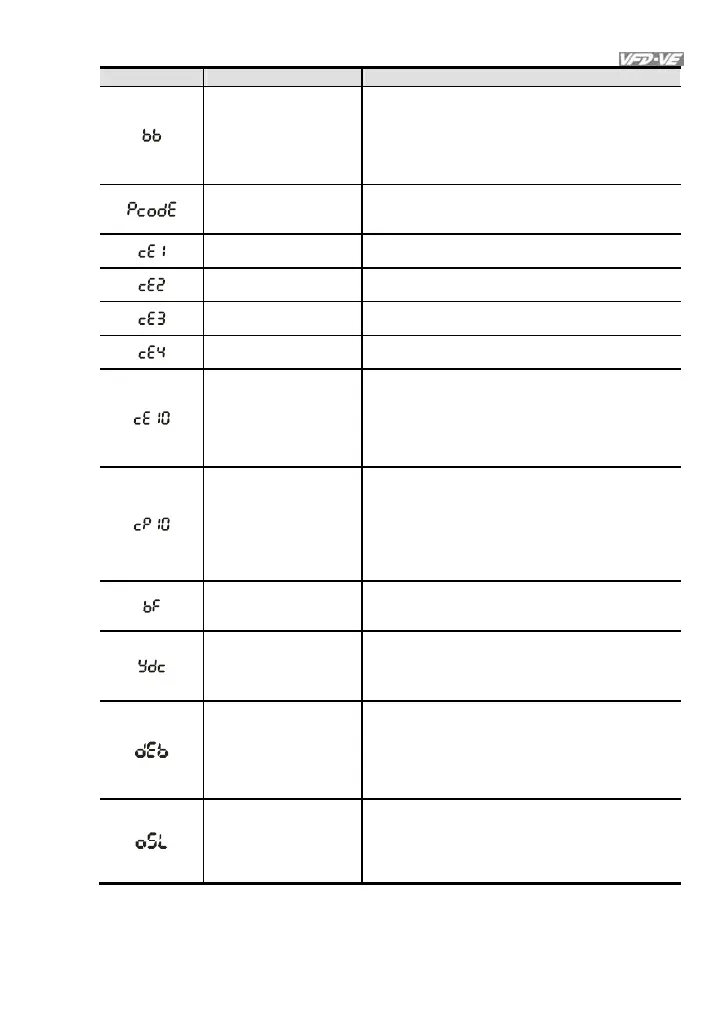
Fault Name Fault Descriptions Corrective Actions
External Base Block
1. When the external input terminal (B.B) is
active, the AC motor drive output will be
turned off.
2. Deactivate the external input terminal
(B.B) to operate the AC motor drive
again.
Password is locked.
Keypad will be locked. Turn the power ON
after power OFF to re-enter the correct
password. See Pr.00-07 and 00-08.
Illegal function code
Check if the function code is correct (function
code must be 03, 06, 10, 63)
Illegal data address
(00H to 254H)
Check if the communication address is correct
Illegal data value
Check if the data value exceeds max./min.
value
Data is written to
read-only address
Check if the communication address is correct
Communication
time-out
COM1: exceeds
Pr.09-03 setting,
COM2: exceeds
Pr.09-07 setting
Check if the wiring for the communication is
correct
Keypad (KPV-CE01)
communication
time-out
COM1: exceeds
Pr.09-03 setting,
COM2: exceeds
Pr.09-07 setting
1. Check if the wiring for the
communication is correct
2. Check if there is any wrong with the
keypad
Brake resistor fault
If the fault code is still displayed on the keypad
after pressing “RESET” key, please return to
the factory.
Y-connection/
Δ
-
connection switch
error
1. Check the wiring of the Y-connection/
Δ
-
connection
2. Check the parameters settings
When Pr.07-13 is not
set to 0 and
momentary power off
or power cut, it will
display dEb during
accel./decel. stop.
1. Set Pr.07-13 to 0
2. Check if input power is stable
It will be displayed
when slip exceeds
Pr.05-26 setting and
time exceeds Pr.05-
27 setting.
1. Check if motor parameter is correct (please
decrease the load if overload
2. Check the settings of Pr.05-26 and Pr.05-
27



 To Next Page