Show Control 429
Example:
{MIDI Tx Source ID} [2][5] [Enter]
MIDI - MTC
{MIDI Time Code Rx}
As above, but for MIDI Time Code instead of SMPTE. Defaults to “Enabled."
Contacts
{Analog Inputs}
This is a master setting for receiving analog inputs from a Net3 I/O Gateway or the built-in I/O
port (when available). When disabled, it will no longer trigger any analog input actions on any
event lists. Default is “Enabled”.
{Relay Outputs}
This is a master setting for triggering external relays from a Net3 I/O Gateway or the built-in I/O
port (when available). When disabled, will no longer affect any external relays normally
triggered from the desk via cues, submasters, or macros. The default is “Enabled”.
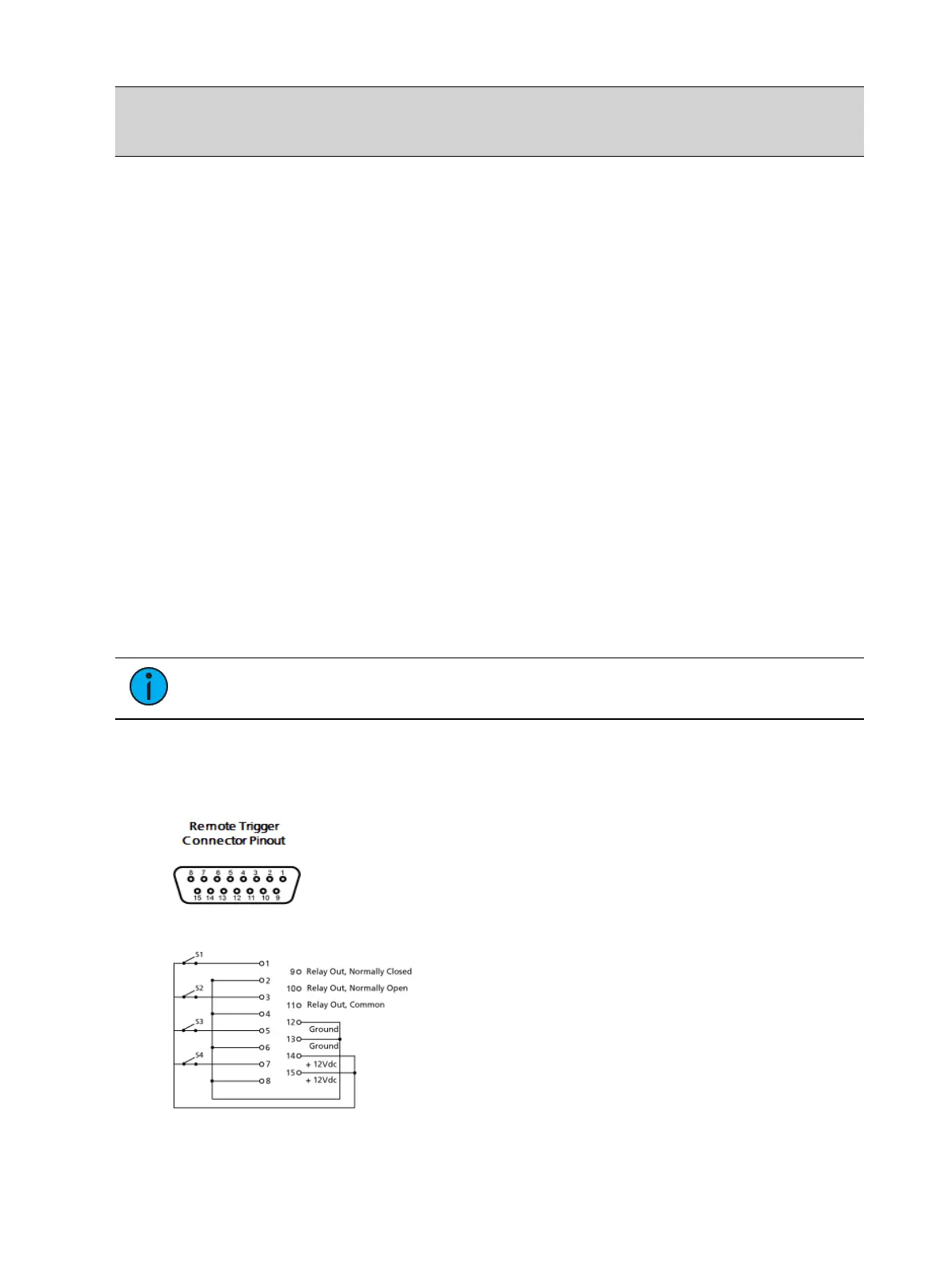
Contact Closure (remote trigger connector)
Allows you to set the Group and Address In values for the remote trigger input on the back of
your console. The contact closure only reports on/off even though it is considered an analog
input.
Note: The contact closures require DC voltage, which is supplied by the console on
pins 14 and 15. See the diagram below.
Relay Out
Allows you to assign the Relay Out Source ID and the Relay Out Address.



 To Next Page