146 Eos Family v2.9.0 Operations Manual
If the slider is set to 0, the color coding for the direct selects is removed, and a yellow outline
will display around valid palettes based on your fixture selection.
PDF Settings
This screen allows you to select the orientation and paper type for PDF files.
Recall Device Settings
When multiple devices are in a system, this option allows you to select a device to recall their
settings.
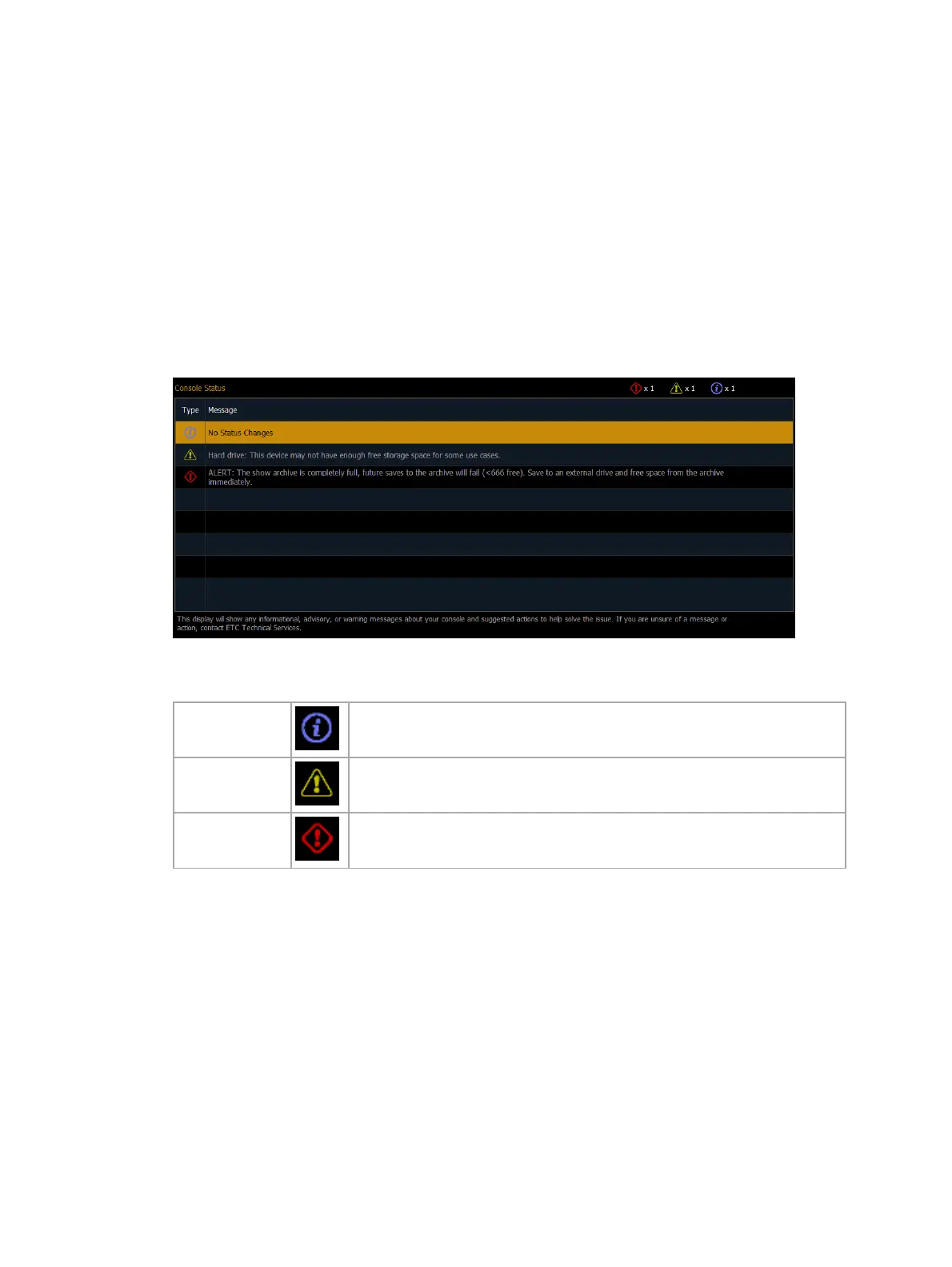
Console Status Display
The Console Status Display (CSD) shows informational, advisory, or warning messages about
your console. The CSD can be opened via Browser > Setup, or through About > Console Status.
The Type column displays the category of the message:
Informational Instructional data that does not impact console functionality.
Advisory Console operation can continue, but with caution.
Warning Urgent issues that require immediate attention.
The Message column displays the message details, and any applicable suggested actions to help
resolve the issue. The counter in the top-right displays the total quantity of each type of
message.
Possible Status Messages
Hard Drives
ALERT / Hard Drive / Show Archive
This device does not have enough available hard drive space to operate safely.
Minimum %2 free space recommended.
The show archive is completely full, future saves to the archive will fail.
Save to an external drive and free space from the archive as soon as possible.



 To Next Page