Pub. 42004-550C
Elemec3 Console Manual—Version 3 Page 99 of 109
P:\Standard IOMs - Current Release\42004 Instr. Manuals\42004-550C.docx
07/21
Load Test Offsets
The load test offsets define the pass/fail measurement range when the amplifier tests the loudspeaker(s).
The amplifier determines the speaker load is healthy when it measures a speaker load value that is within
the measurement range.
Load Offset +—defines the amount of offset to add to the calibrated speaker load value to provide an
upper bound of the impedance range the amplifier uses to test the station’s speaker(s).
Load Offset −—defines the amount of offset to subtract from the calibrated speaker load value to
provide a lower bound of the impedance range the amplifier uses to test the station’s speaker(s).
VLC Settings
VLC (volume level control) enables broadcasting audio at different volume levels than the volume level
configured for an event. The E3 controller broadcasts the current VLC level. The VLC level is IDLE
when no event is occurring. This is the lowest VLC level possible. Create VLC levels on the VLC
LEVELS tab of the SP2 CONFIGURATION ASSETS utility (see the VLC Levels section). Assign VLC
levels to events (see the Event Builder section) to configure the VLC priority level for the event. Assign
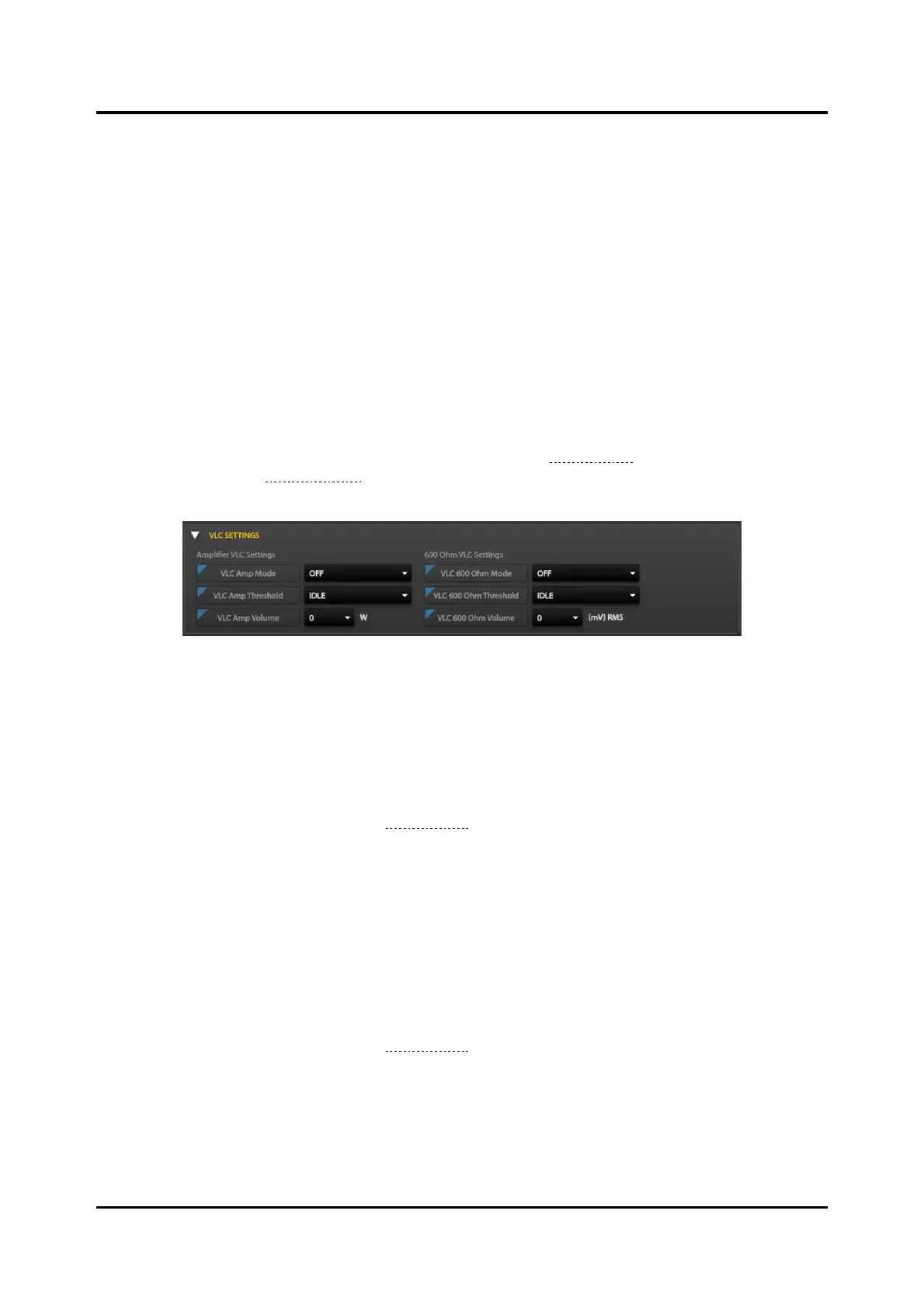
the VLC levels to SP2 stations on the VLC Settings Pane
Figure 114. VLC Settings Pane
Amplifier VLC Settings
VLC Amp Mode—OFF/LOWER THAN/GREATER THAN/EQUAL operator used to compare the SP2
station’s VLC amplifier threshold to the event’s VLC threshold to control VLC while the event targets an
SP2 amplifier for the output.
VLC Amp Threshold—Select a threshold level created on the VLC LEVELS tab in the SP2
CONFIGURATION ASSETS utility (see the VLC Levels section) or select VLC SETTINGS to open the VLC
LEVELS tab of the SP2 CONFIGURATION ASSETS screen.
VLC Amp Volume—amplifier volume level set by VLC.
valid values: 0.008, 0.016, 0.032, 0.063, 0.125, 0.25, 0.5, 1, 2, 4, 9, 14, 18, 24, 30, 0 (watts)
600 Ohm VLC Settings
VLC 600 Ohm Mode—OFF/LOWER THAN/GREATER THAN/EQUAL setting controls VLC while an event
targets 600-Ohm audio output.
VLC 600 Ohm Threshold—Select a threshold level from the list of VLC LEVELS tab in the SP2
CONFIGURATION ASSETS utility (see the VLC Levels section) or select VLC SETTINGS to open the VLC
LEVELS tab of the SP2 CONFIGURATION ASSETS screen.
VLC 600 Ohm Volume—600-ohm volume level set by VLC
valid values: 100, 200, 300, 500, 700, 775, 900, 1000, 0 (mV
RMS
)



 To Next Page