Pub. 42004-550C
Elemec3 Console Manual—Version 3 Page 82 of 109
P:\Standard IOMs - Current Release\42004 Instr. Manuals\42004-550C.docx
07/21
Group Mix Setup Button—See the Global Audio Mix Setup section.
Scheduled Events
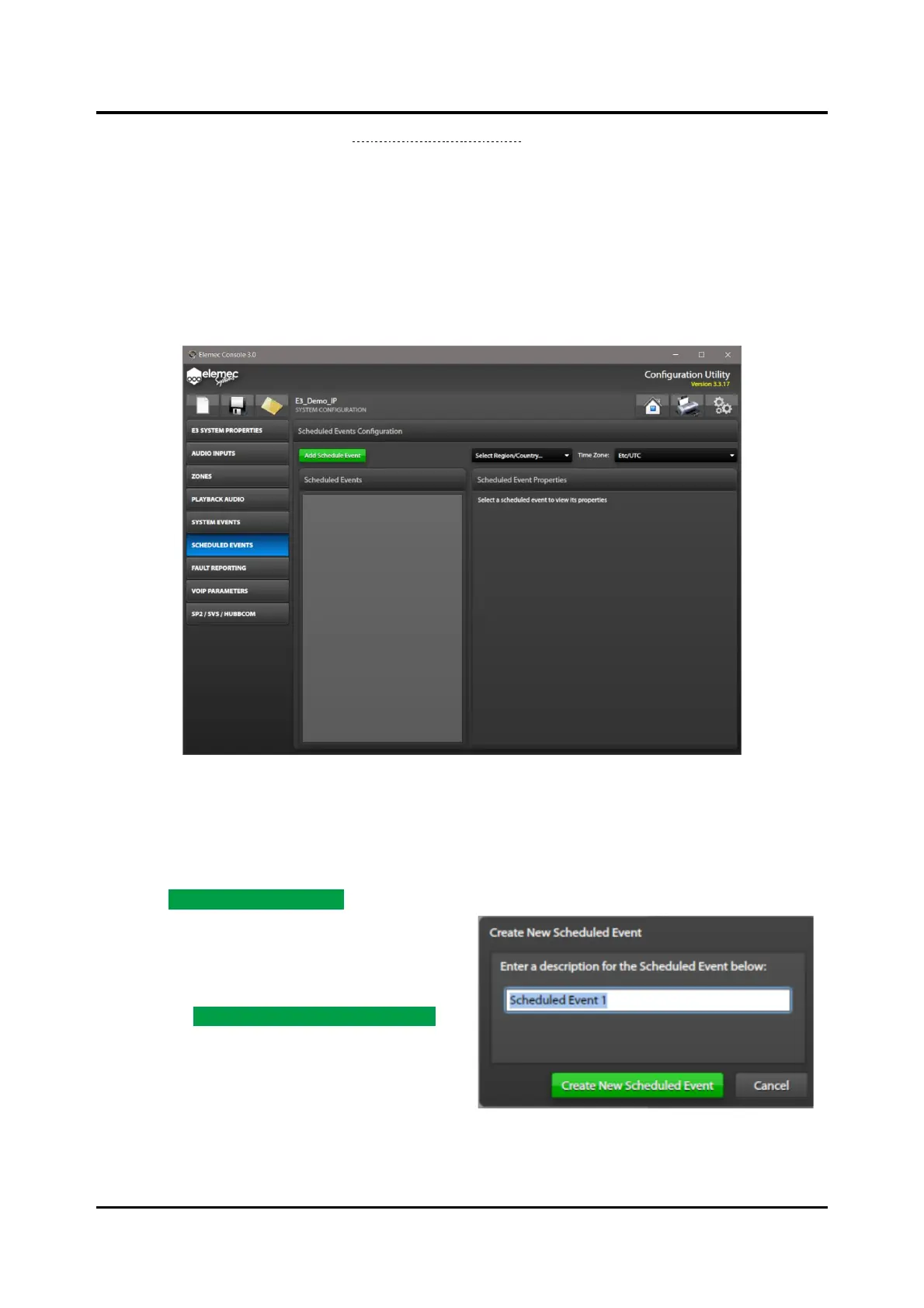
Create scheduled events to schedule recurring events in an E3 system. The SCHEDULED EVENTS screen
lists the E3 system’s scheduled events and displays the properties of the currently selected scheduled
event.
NOTE: The E3 controller requires NTP (Network Time Protocol) service access to implement scheduled
events.
Figure 91. Scheduled Events
Select Region/Country…—Select the region or country for the E3 system installation to narrow the
TIME ZONE selection list.
Time Zone:—Click the drop-down list and select the time zone for the E3 system installation.
1. Click ADD SCHEDULED EVENT to create a new
scheduled event.
The CREATE NEW SCHEDULED EVENT dialog
box opens:
2. Enter a description for the new scheduled event
and click CREATE NEW SCHEDULED EVENT.
The SCHEDULED EVENT BUILDER window
opens:



 To Next Page