Pub. 42004-550C
Elemec3 Console Manual—Version 3 Page 68 of 109
P:\Standard IOMs - Current Release\42004 Instr. Manuals\42004-550C.docx
07/21
Zone Builder
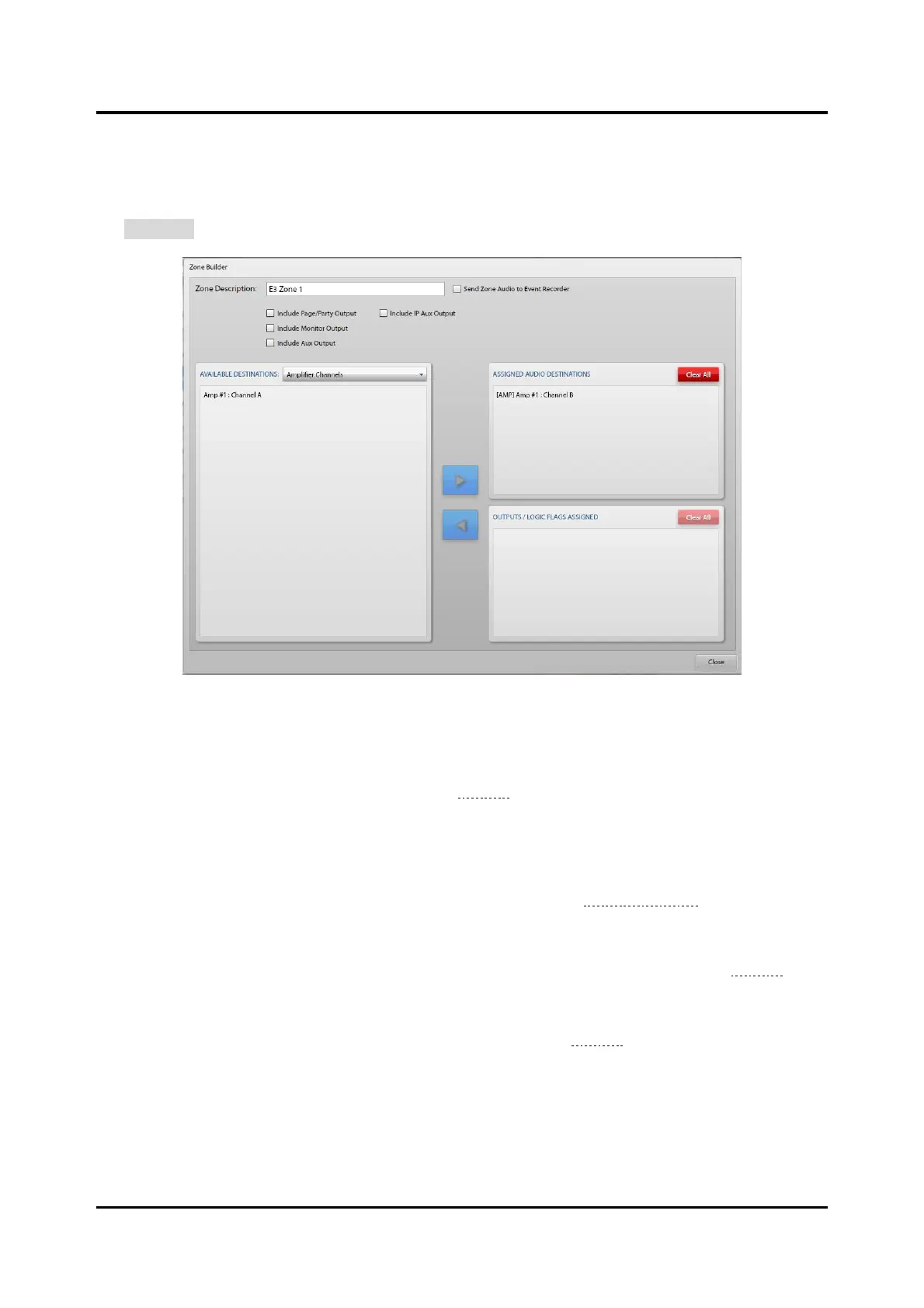
Use the ZONE BUILDER screen to configure zones in an Elemec3 system. The ZONE BUILDER screen
opens when creating a new zone or when selecting an existing zone from the ZONE LIST on the ZONES
screen. Make zone changes by highlighting the zone in the AVAILABLE DESTINATIONS pane and clicking
the EDIT ZONE button.
Figure 75. Zone Builder
Zone Description—unique descriptive name of the zone.
Send Zone Audio to Event Recorder—records all audio for this zone in the event recorder. Enable this
option on the SYSTEM PROPERTIES screen (see the Globals section) to enable the option here.
Beneath the ZONE DESCRIPTION field are four selectable audio outputs. Select the audio outputs to
include in the zone. The available audio outputs are:
• Include Page/Party Output—includes Page/Party output. Enable the Page/Party audio source under
the SOURCES ENABLED section of the AUDIO INPUTS tab (see the Sources Enabled section) to enable
this option.
• Include Monitor Output—includes the monitor output and the IP monitor out, if configured.
Enabling insert two on the GLOBALS pane on the SYSTEM PROPERTIES screen (see the Globals
section) disables this option.
• Include Aux Output—sends all audio for this zone to the auxiliary output. Enabling insert one on
the GLOBALS pane on the SYSTEM PROPERTIES screen (see the Globals section) disables this option.
• Include IP Aux Output—sends audio for this zone to the IP auxiliary output.



 To Next Page