Pub. 42004-550C
Elemec3 Console Manual—Version 3 Page 88 of 109
P:\Standard IOMs - Current Release\42004 Instr. Manuals\42004-550C.docx
07/21
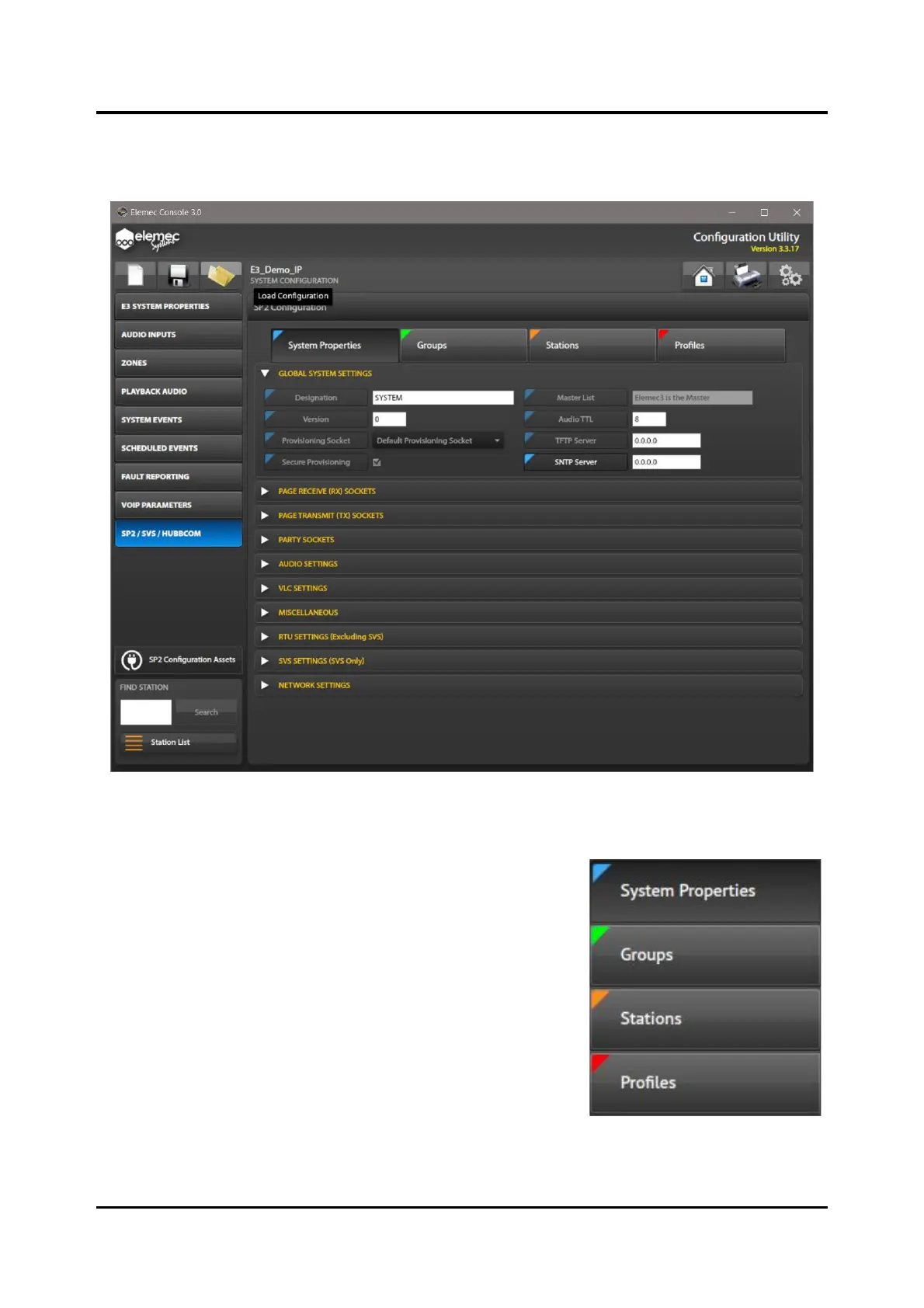
Click the SP2/SVS/HUBCOM tab on the left side of the E3 Console to access the SP2 CONFIGURATION.
The SP2 CONFIGURATION opens with SYSTEM PROPERTIES selected and the GLOBAL SYSTEM
SETTINGS parameter group expanded.
Figure 100. SP2 Configuration
Configuration Parameter Field Flags
The E3 Console SP2 CONFIGURATION uses colored flags on each
parameter field label that indicate the configuration location for
that setting in the SP2 configuration. The flags display as colored
triangular overlays on the upper left corner of each parameter field
label and match the color of the location in the configuration
where it was set. The flag colors are:
• blue for parameters configured on the SYSTEM PROPERTIES
screen
• green for parameters configured on the GROUPS screen
• orange for parameters configured on the STATIONS screen
• red for parameters configured on the PROFILES screen
The flags are visible on every SP2 parameter field in the console
and appear exactly as displayed on the screen label buttons across
the top of the SP2 CONFIGURATION screen.



 To Next Page