Pub. 42004-550C
Elemec3 Console Manual—Version 3 Page 100 of 109
P:\Standard IOMs - Current Release\42004 Instr. Manuals\42004-550C.docx
07/21
Miscellaneous Pane
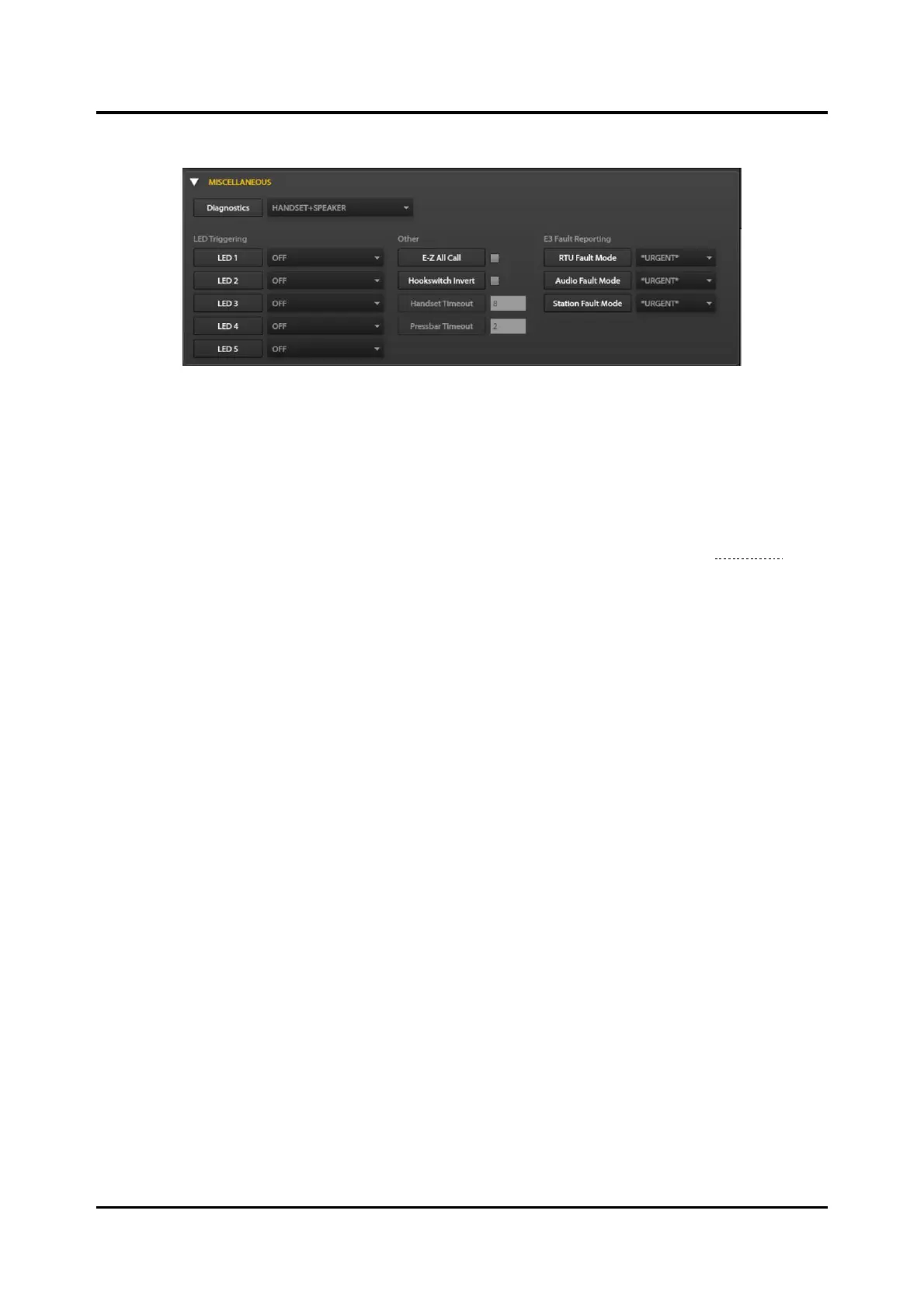
Figure 115. Miscellaneous Parameters Pane
Diagnostics—determines what the station tests each time the diagnostic self- test runs. Set this to
HANDSET+HEADSET+SPEAKER to execute all diagnostics, any combination of the three, or OFF.
Valid settings: OFF, HANDSET, HANDSET + HEADSET, SPEAKER, HANDSET + SPEAKER,
HEADSET + SPEAKER, HANDSET + HEADSET + SPEAKER.
LED Triggering Parameters
LED1–LED5—Configure each LED to turn on during various station conditions (see the I/O States
section).
Other
E-Z All Call—only valid on handset stations equipped with an ALL CALL paging pushbutton. This
parameter determines whether an operator must press the handset pressbar when making a page to the
PAGETX_B_SOCK multicast socket. Valid values are:
• TRUE—Only press the ALL CALL button after lifting the handset to start paging to the
PAGETX_B_SOCK multicast address. Do not press the handset pressbar to initiate the page.
Pressing the handset pressbar without holding the ALL CALL button initiates a page on
PAGETX_A_SOCK.
• FALSE—The operator must always press the handset pressbar to make a page; including the use
of the ALL CALL button.
NOTE: Do not set this parameter to TRUE on stations that do not have an ALL CALL button.
Hookswitch Invert—This parameter enables the inversion of the current physical state of the hook-
switch represented by the ON-HOOK and OFF_HOOK variables. Valid settings are:
• TRUE—ON-HOOK and OFF-HOOK values are reversed.
• FALSE—ON-HOOK and OFF-HOOK values are represent the actual current state of the
handset.
Handset Timeout—limits the period that a station is off hook (in minutes with a default of eight
minutes). A setting of zero disables the hookswitch timeout.
Pressbar Timeout—limits the period that a page can continue (in minutes with a default timeout of two
minutes). A setting of zero disables the pressbar timeout.
E3 Fault Reporting
RTU Fault Mode—specifies the reporting level the system uses to report RTU-related faults.



 To Next Page