Pub. 42004-550C
Elemec3 Console Manual—Version 3 Page 75 of 109
P:\Standard IOMs - Current Release\42004 Instr. Manuals\42004-550C.docx
07/21
Event Builder
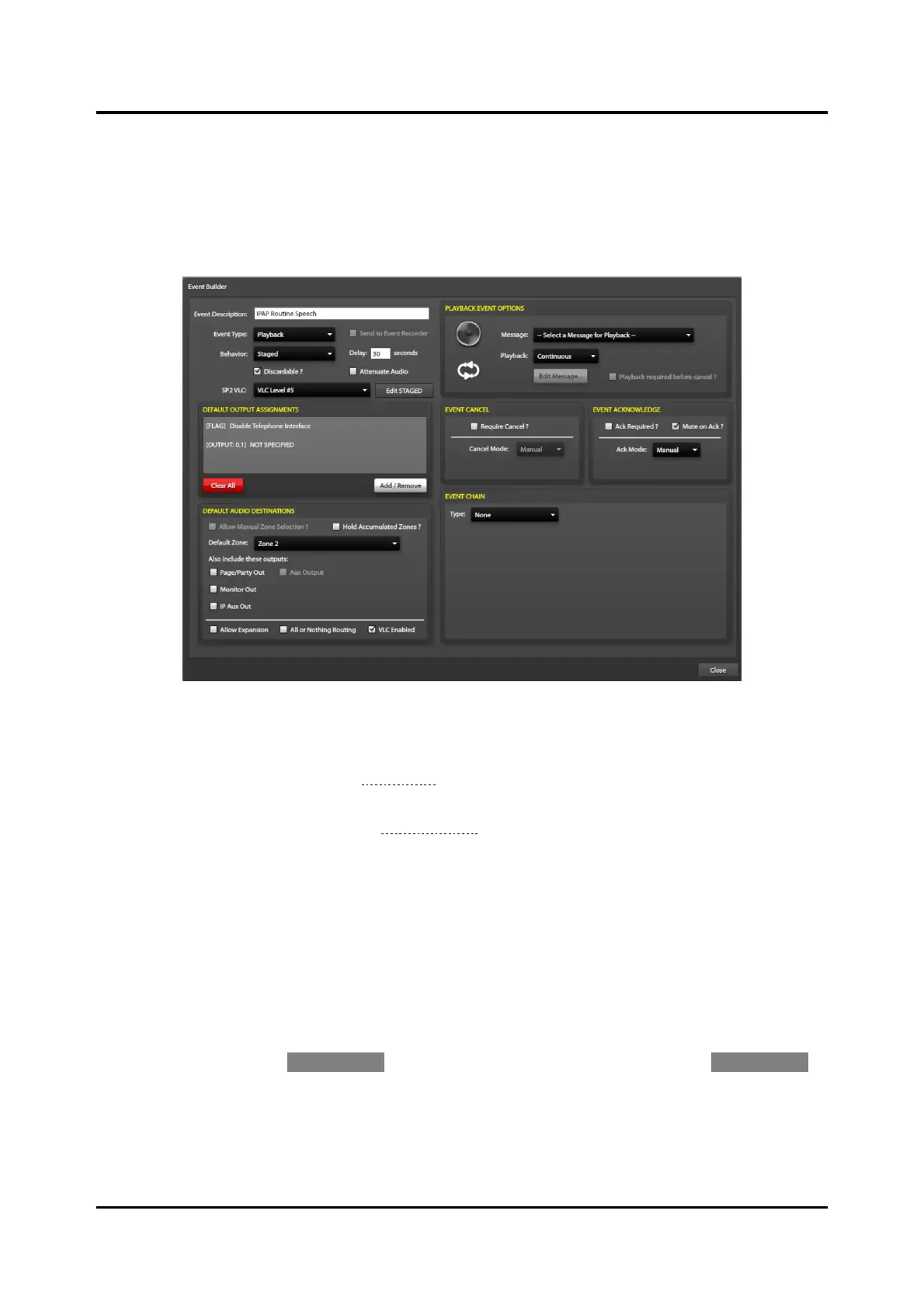
The event builder screen contains a parent section displaying the event’s root properties and six additional
panes to configure the event’s DEFAULT OUTPUT ASSIGNMENTS, DEFAULT AUDIO DESTINATIONS,
PLAYBACK EVENT OPTIONS, EVENT CANCEL, EVENT ACKNOWLEDGE, and EVENT CHAIN properties.
Building an event involves assembling all these components into a single action for execution by the
system.
Figure 83. Event Builder
Event Description—user-defined unique description.
Event Type—type of event. (See the Add Event section above.)
The EVENT OPTIONS pane, in the upper right corner of the EVENT BUILDER screen, is dependent
upon the event type selected (see the Event Options section).
Behavior (Playback and External events only)—event behavior for playback and external audio events.
• Normal—attempts to play the specified message immediately upon initiation.
• Delayed—attempts to play the specified message after an initial delay period. (Selecting this option
adds the following field to the event builder properties:)
Delay—delay period (seconds) that the system will wait before executing the event.
• Staged—attempts to play the specified message immediately using the DEFAULT OUTPUT
ASSIGNMENTS and DEFAULT AUDIO DESTINATIONS. After the configured delay, the staged portion
of the event activates using the STAGED OUTPUT ASSIGNMENTS and STAGED AUDIO DESTINATIONS
pane accessible via the EDIT STAGED button. Selecting the STAGED option adds the EDIT STAGED
button and the DELAY field to the screen.
Delay—delay period (seconds) that the system will wait before initiating the staged execution of
the event.



 To Next Page