Pub. 42004-550C
Elemec3 Console Manual—Version 3 Page 106 of 109
P:\Standard IOMs - Current Release\42004 Instr. Manuals\42004-550C.docx
07/21
Find Station/Search—facilitates finding stations in the configuration that the active filter is hiding (see
the Search Button section).
Filter by Parameter—display the stations with the selected parameter configured in the [G.SS] section
of the configuration by selecting a parameter from the dropdown list. All station parameters configurable
at the station level are selectable from the list.
Reset All Filters—removes all applied filters in the pane to display all stations with identifiers in the E3
configuration.
Filter by Profile—has four selectable options; IGNORE PROFILE, ANY PROFILE, NO PROFILE, or
PROFILE 1–9. The RED BUTTON is the currently selected option (see the Profiles Screen section).
• Ignore Profile—is the default option that displays all stations regardless of profile assignment.
• Any Profile—option displays all stations that have any profile assigned.
• No Profile—lists only those stations that do not have a profile assigned.
• Profile 1..9—finds and lists the stations that apply the selected profile.
Filter by Group—locates all stations in the configuration with their group selector switch set to the
selected group number, 0–F.
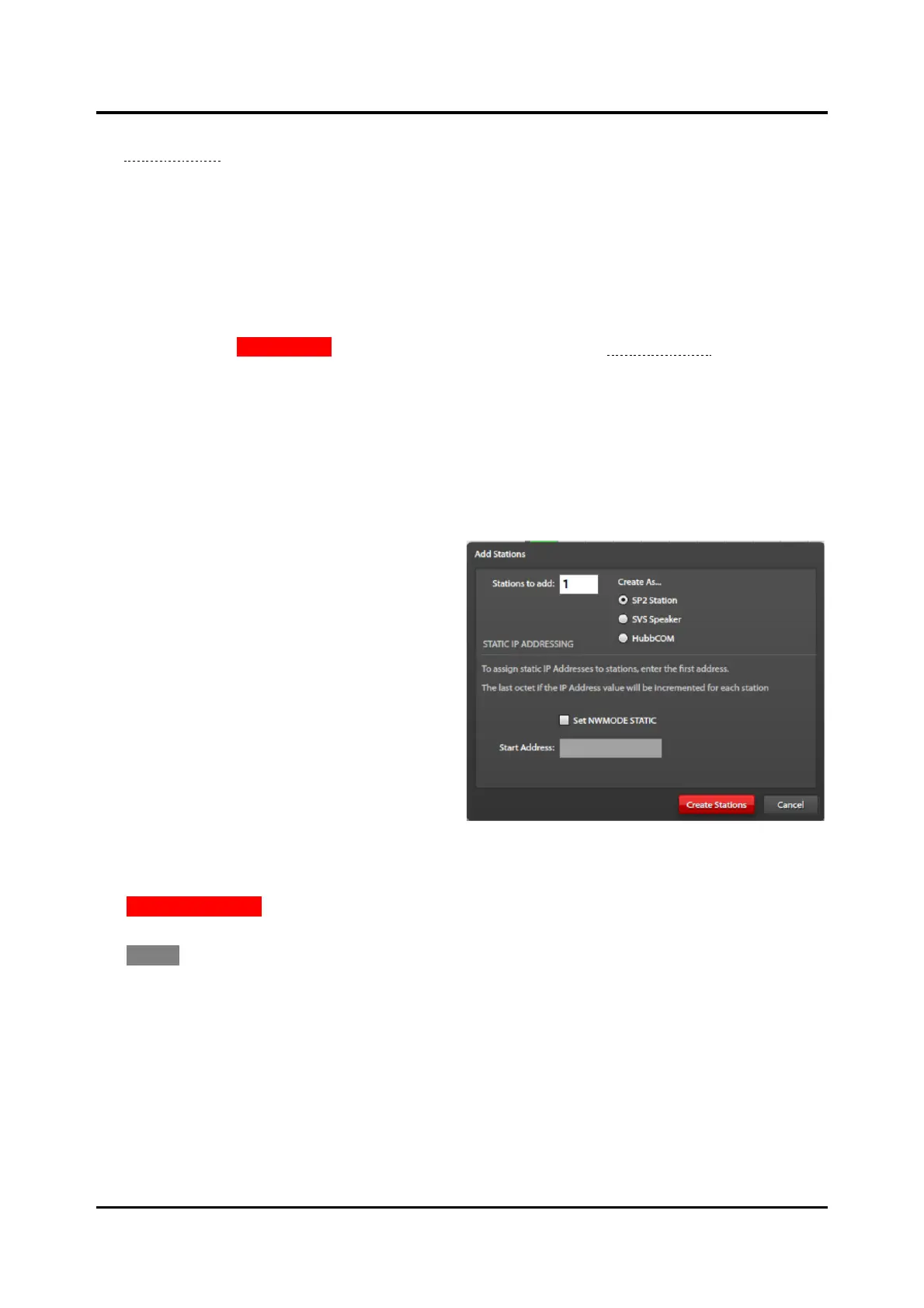
Add Stations to Group—opens the dialog box
at the right to add stations to the configuration in
the group selected above.
STATIONS TO ADD:—the number of stations,
1–250, to add to the configuration where
their group selector switch is set to the group
number selected in the filter.
CREATE AS…—selects the type of station;
SP2 STATION, SVS SPEAKER, or
HUBBCOM.
SET NWMODE STATIC—sets the station’s
NW-MODE parameter to static. Configure
static IP addresses for all stations in the
configuration.
Start Address—the class C IP address of the first station. The console automatically configures the
remaining stations with incremental IP addresses.
CREATE STATIONS—creates the number of stations in the STATIONS TO ADD: field. Selection of
SET NWMODE STATIC requires entry of a valid class C address IP address.
CANCEL—closes the dialog box without creating any stations in the configuration.
Filter—displays the applied filters. Ex. GROUP1, IGNORING PROFILES.
Use Hostnames—lists the SP2 stations by their host names instead of by their station IDs. Valid SP2
station hostnames are up to 28 characters long. Select this option to show fewer stations on screen.
Stations—number of stations currently displayed in the pane inside the MANAGE STATIONS screen. The
number of creatable stations in the group also displays when applying a group filter.
Close—closes the MANAGE STATIONS screen.



 To Next Page